Brooks Automation
278580 Revision A 19
LF80C ZeniD RFID Reader 5 Product Specifications
Product Manual 5.4 Description of the Components
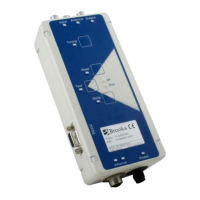
Input LED
The Input LED indicates that the external sensor
was initiated, or that an external potential-free
contact was actuated.
Output LED
If the external output is set, the LED is on; if
not, the LED does not light up.
Link and Traffic LED
Link LED: LED is on → Link OK.
Traffic LED: LED is flashing → Rx or Tx activity
Test LED
The test mode is used to check the most
important reader features (reading or writing),
which are operated by pressing the
corresponding button in test mode.
To switch the reader to test mode, press the Test
mode button and keep it pressed for at least five
seconds. The Test LED flashes when the reader
is in test mode.
Press the Test mode button again to leave test
mode.
Component Description


 To Next Page