IV - 4
1.1 Lower Rear Cover
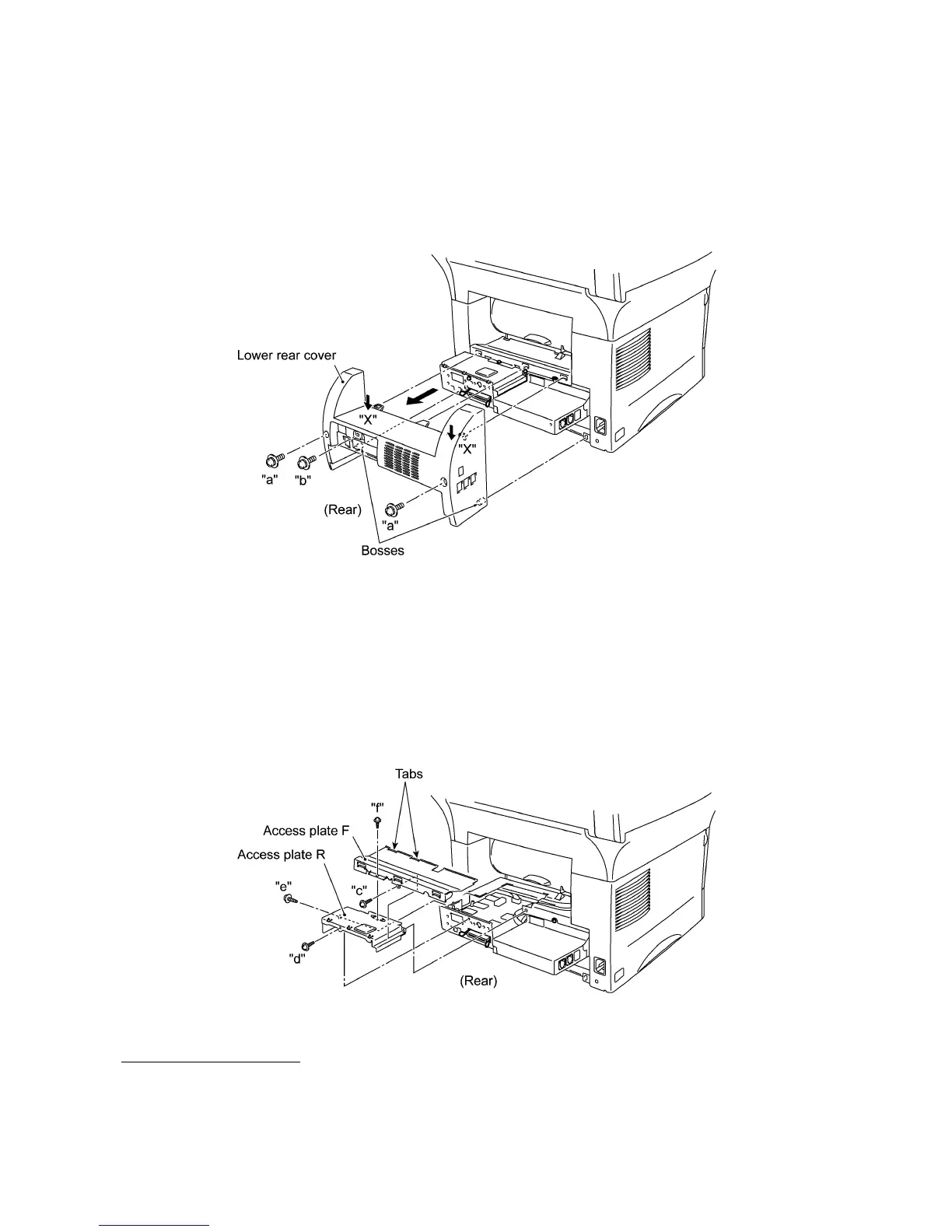
(1) Remove the three screws (two "a" and one "b") from the lower rear cover. Screw "b" is
provided on those models available with a 2nd paper cassette (as an option).
(2) Lightly pressing sections "X," pull out the lower rear cover.
1.2 Access Plates R and F
(1) Remove screw "c" that secures access plates R and F together to the main chassis.
(2) Remove screws "d" and "e" from access plate R.
(3) Take out access plates R and F together.
(4) Remove screw "f" to separate those access plates.
n
nn
n Reassembling Notes
• When reinstalling access plate F, fit the two tabs provided on the front end underneath the
center edge of the main chassis.
"a" and "b": Screw, pan (washer) M4x10DB
"c" to "f": Taptite, cup S M3x6
(Tightening torque: 0.5 N•m)



 To Next Page