IV - 10
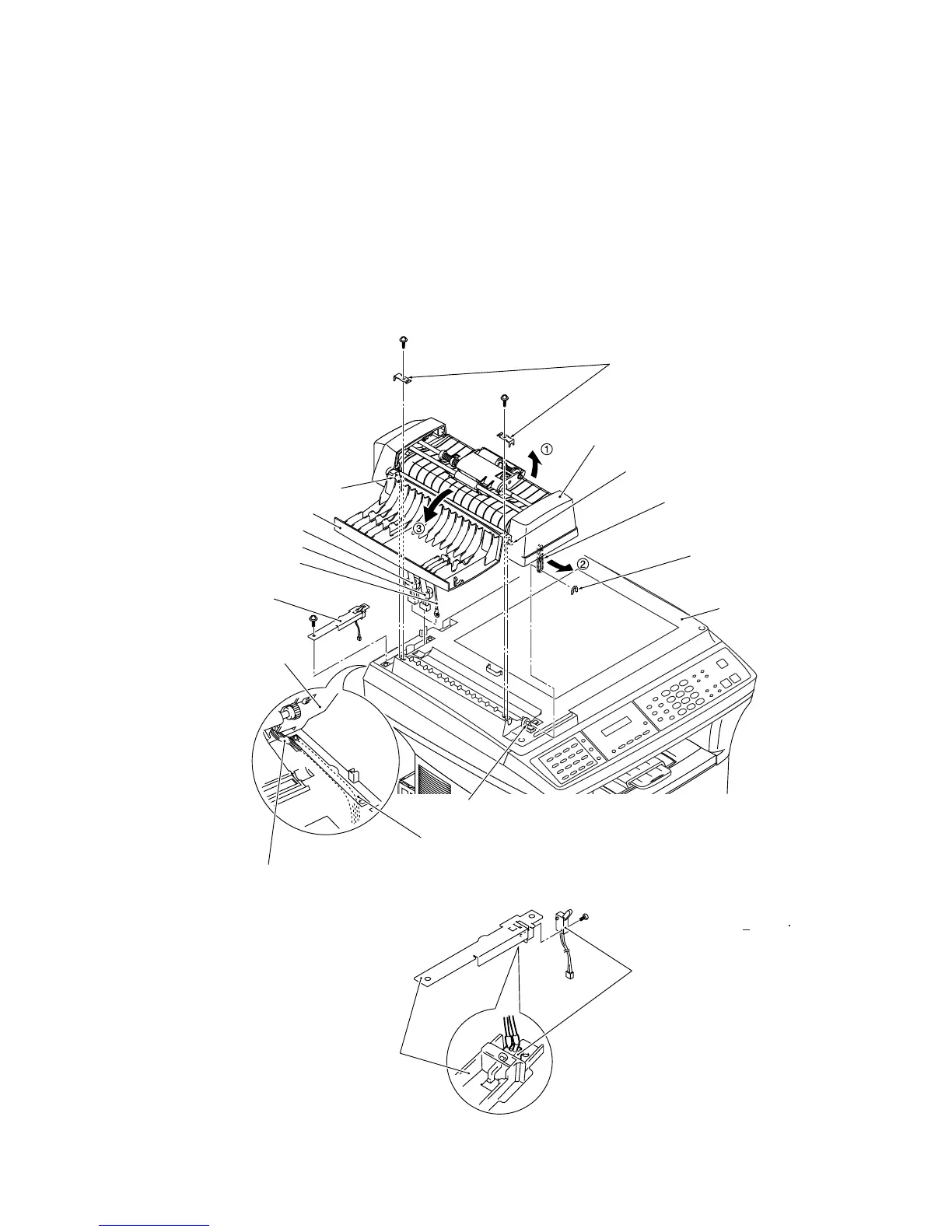
(4) Turn the ADF unit in the direction of arrow
Q, remove the plastic retaining ring, and release the
arm (arrow
R) from the boss provided on the scanner top cover. Turn the ADF unit back into
place.
(5) Open the ADF cover (arrow
S) and remove two screws "c."
(6) Lift up the ADF unit while pulling out the ADF motor harness, document sensor harness, and
grounding wire. The ADF supports also come off.
(7) Remove screw "d" and take off the harness support together with the document tray open
sensor.
Remove the screw from the document tray open sensor.
"c"
ADF cover
ADF motor harness
Document sensor harness
ADF grounding wire
Harness support
"d"
ADF unit
ADF motor harness,
document sensor harness,
and grounding wire
Harness support
Boss
Scanner top cover
Plastic retaining ring
Arm
Front pin "y"
ADF unit
ADF supports
Rear pin "x"
"c"
Harness support
Document tray open sensor
Tapitite, pan P 1.6x8
(Tightening torque: 0.15 +0.03 N m)
"c" and "d": Taptite, cup B M3x8



 To Next Page