21
Publicaon 5423-020-REV 1.0 • www.btxonline.com
All preset and user protocols are stored in the protocol list for
ongoing use. Over me, you may want to manage previously
created protocols to keep your protocol list easy to navigate. In
addion, the ecm 630 allows you to export protocol informaon
to an externally connected generator or to a computer that
will be used to control operaon. This secon describes the le
management facilies available on the ECM 630.
Preset protocols cannot be edited or deleted but may be saved
as a new user protocol where they can be edited, deleted or
renamed.
Saving a Copy of a Protocol
Follow these instrucons to save a copy of a protocol under a new
name:
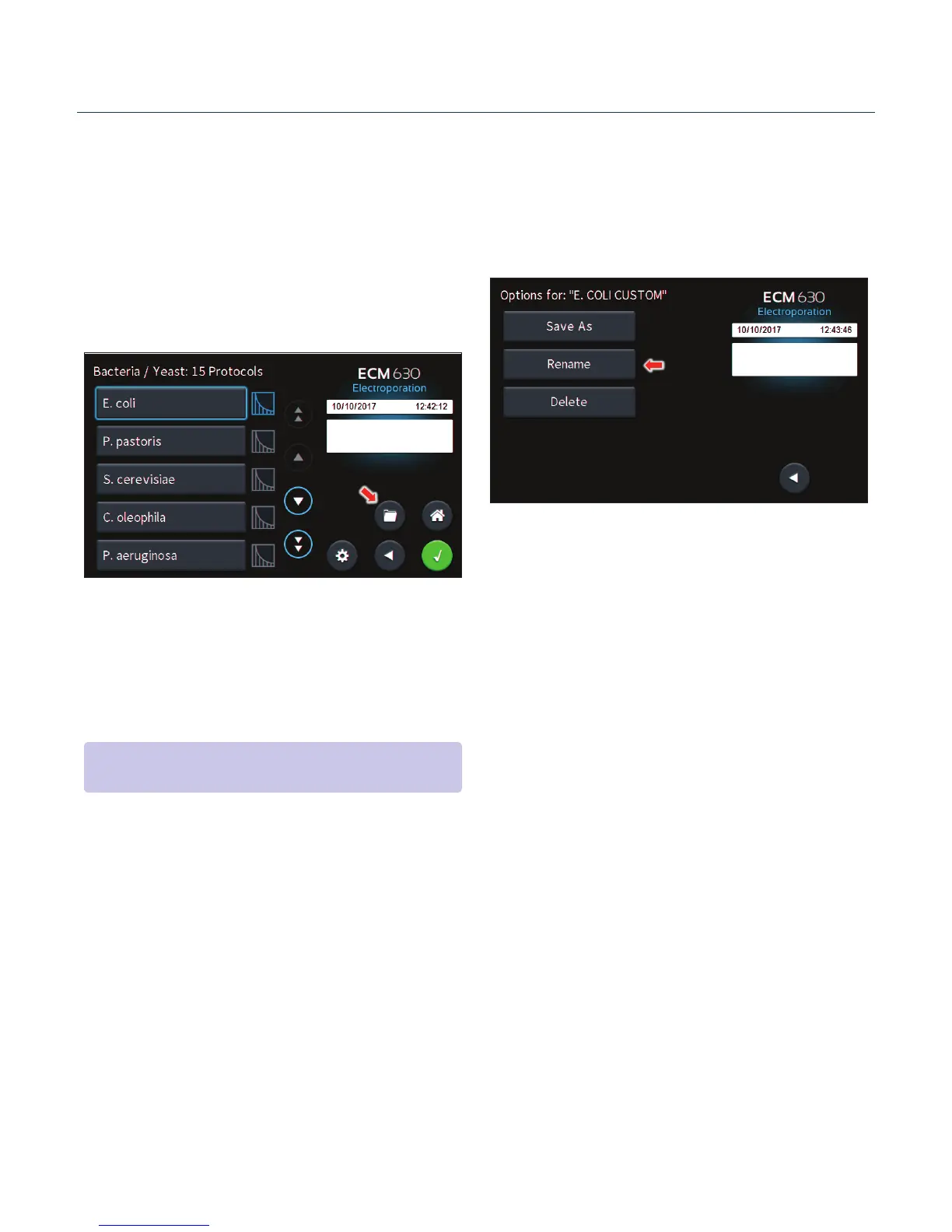
1. From the list of available protocols, select (press once) the
protocol you want to save a copy of, then choose the File
Opons icon to enter the File Opons screen.
2. Choose Save As/Copy to access the Protocol Name Entry
screen. The current protocol name will be displayed in the
text entry box.
3. On the Protocol Name screen, type the new name for
your protocol using the onscreen keyboard. Choose the
Symbols / Numbers icon (.@123) to display the list of
available numbers and symbols that can be included in
the protocol name. To switch the keyboard back to leers
mode, choose the Leers icon (ABC). [15 characters
maximum]
4. When nished entering the new Protocol Name, choose the
Green Check icon to save your changes.
Renaming a Protocol
Follow these instrucons to rename a previously saved user
protocol:
1. From the list of available protocols, select (press once) the
protocol you want to rename, then choose the File Opons
icon to enter the File Opons screen.
2. Choose Rename to access the Protocol Name Entry screen.
3. On the Protocol Name screen, type the new name for
your protocol using the onscreen keyboard. Choose the
Symbols / Numbers icon (.@123) to display the list of
available numbers and symbols that can be included in
the protocol name. To switch the keyboard back to leers
mode, choose the Leers icon (ABC). [15 characters
maximum]
4. When nished entering the new protocol name, choose the
Green Check icon to save your changes.
Managing Protocols
NOTE: If saving a Preset Protocol as a new User Protocol, the File
Opons icon will directly open up to the Protocol Name screen.


 To Next Page