24
Publicaon 5423-020-REV 1.0 • www.btxonline.com
Installaon
Download the soware from BTX website www.btxonline.com.
Click on Technical Resources drop-down menu and select
Downloads. Download and install le named Protocol Manager.
1. Connect the generator to the PC using a USB cable.
2. Turn the generator on.
3. Start Protocol Manager.
4. Select the proper COM port.
Overview
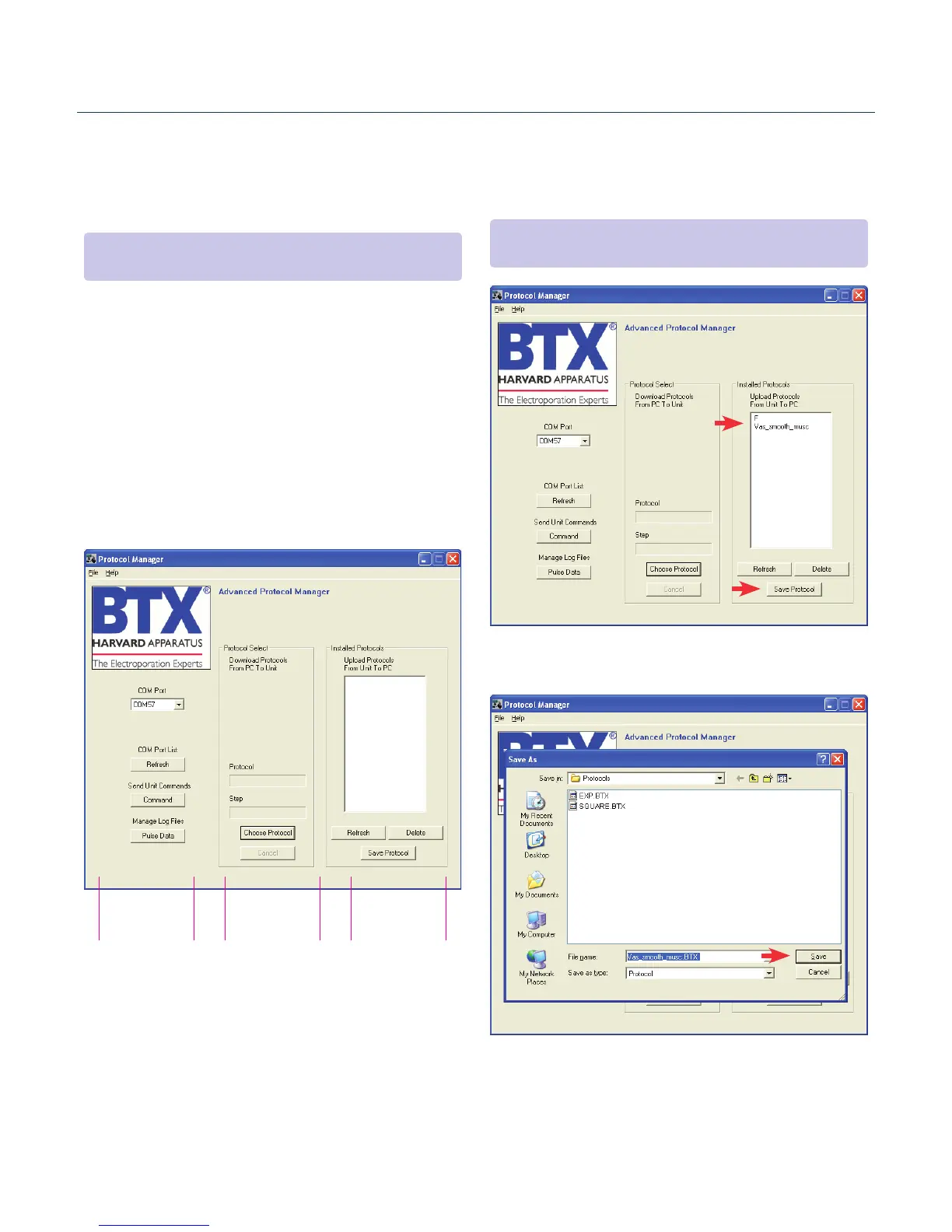
Protocol Manager allows the user to:
• Upload protocols from the ECM 630 generator to a PC.
• Download protocols from a PC to the ECM 630 generator.
• Upload log les from the ECM 630 generator to a PC.
Log File
Control
PC to Generator
Protocol Control
Generator to PC
Protocol Control
Upload from Generator to PC
1. Select Protocol(s).
2. Click ‘Save Protocol’.
3. Select the drive and folder locaon.
4. Click ‘Save’.
Protocol Manager Software
NOTE: Compable with Windows® XP or later.
NOTE: Hit ‘Refresh’ to update the list aer creang or eding
protocols on the ECM 630 generator.


 To Next Page