30
Publicaon 5423-020-REV 1.0 • www.btxonline.com
USB Virtual CommPort Driver
Installaon
When you connect the ECM 630 to a computer via USB
for the rst me, Windows® will seek to install a driver for
communicaon. The following secon details the installaon of
the Virtual CommPort Driver supplied with the ECM 630.
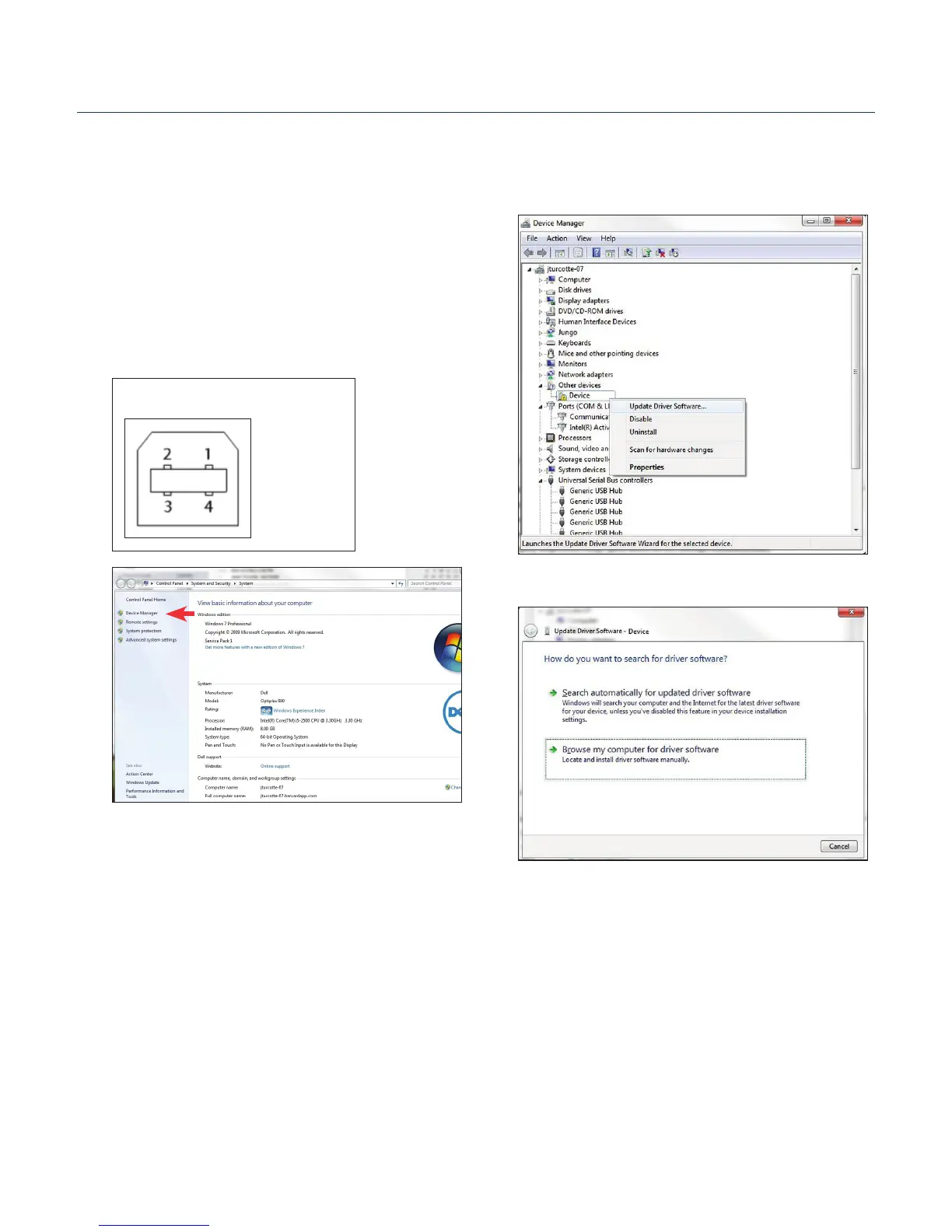
1. Connect the ECM 630 generator to the computer via USB.
Open the control panel and select System and Security
and then System. Click Device Manager on the le hand
menu.
Pin # Signal
1 +5V
2 - Data
3 + Data
4 GND
Mating Face
2. Two Flash update applicaons will be displayed in the
device manager, under Other Devices. Right click on either
of the ash update applicaons and select Update Driver
Soware.
3. Select Browse my computer for driver soware.
Upgrading ECM 630 Series Software


 To Next Page