27
Publicaon 5423-020-REV 1.0 • www.btxonline.com
Installaon
Download the soware from the BTX website www.btxonline.com.
Click on Technical Resources drop-down menu and select
Downloads. Download and install le named Remote Screen
Interface.
Overview
Remote Screen Interface allows you to control the ECM 630
remotely. When you click on the computer screen, you control
the generator.
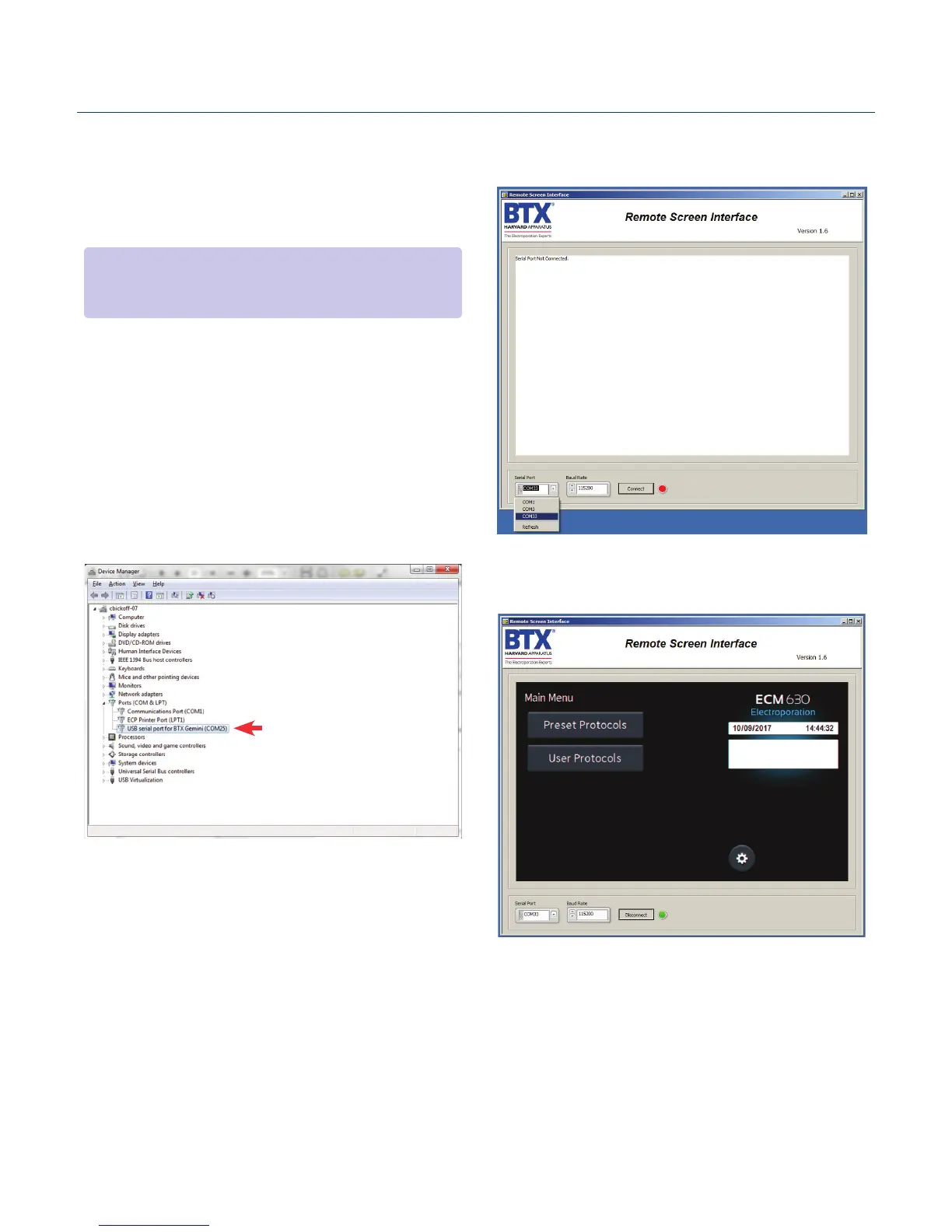
While the ECM 630 generator is connected to the computer via
USB, open the Control Panel and select System and Security, and
then System. Click Device Manager on the le hand menu. Under
Ports, search for the ‘USB serial port for ECM 630.’ This will show
the COM Port to which the generator is connected, as shown
below.
Once the COM port is known, open the Remote Screen Interface
applicaon. Choose the correct COM port and click ‘Connect’.
You should now be able to control your ECM 630
generator remotely.
Remote Control Software
NOTE: During the installaon, it will ask you to provide a locaon to
install your applicaon les. There is a known issue with this installer
where it will not actually create this directory.


 To Next Page