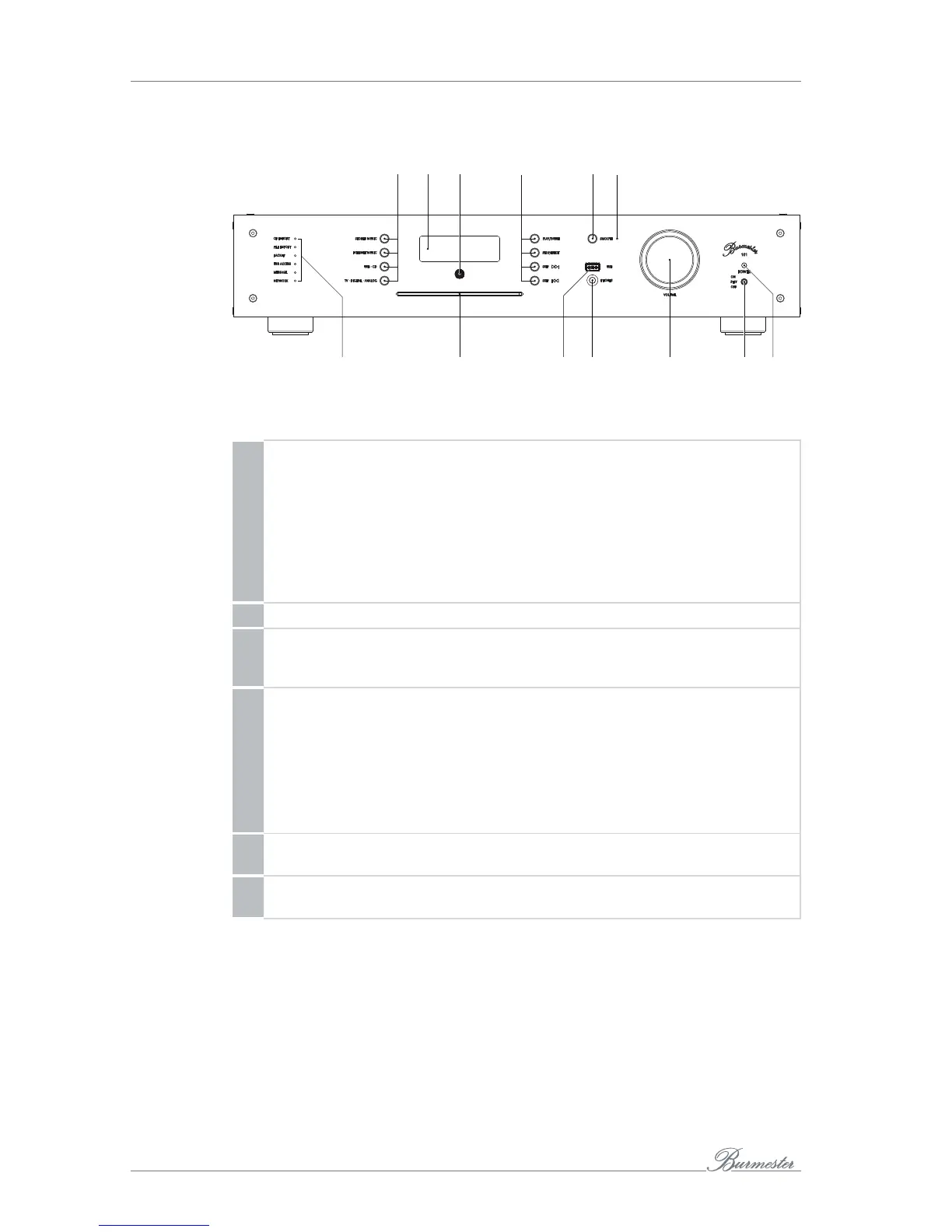
THE DEVICE AT A GLANCE
10
Front side
1 42 3 5 6
7
8 9
11
10
12 13
1 Left bank of buttons for signal source selection
The selected signal source is shown on the display.
• STORED MUSIC: Playback of internally stored music.
• INTERNET MUSIC: Selects Internet radio or, by pressing again, TIDAL as
source (if TIDAL has been configured for this device).
• USBCD: Selects sequentially the USB port or the CD as source.
• TVDIGITALANALOG: Selects sequentially the TV input, the digital input or
the analog input as source..
2 Display
3 Infrared receiver
The IR receiver receives the remote control signals.
Do not place objects in front of the receiver.
4 Right bank of buttons to operate all sources
• PLAY/PAUSE: Starts or pauses playback at the current position.
• STOP/EJECT: Stops playback.
• SKIP >>I: Playback skips to the next title.
• SKIP I<<: Playback skips to the previous track or the beginning of the track
currently playing. With Internet radio, playback skips to the next or previous
station on the list.
5 SMOOTH button
Pressing the button turns the Smooth function on or off.
6 LED (SMOOTH)
Shows if the Smooth function is activated.



 To Next Page