THE DEVICE AT A GLANCE
12
The remote control
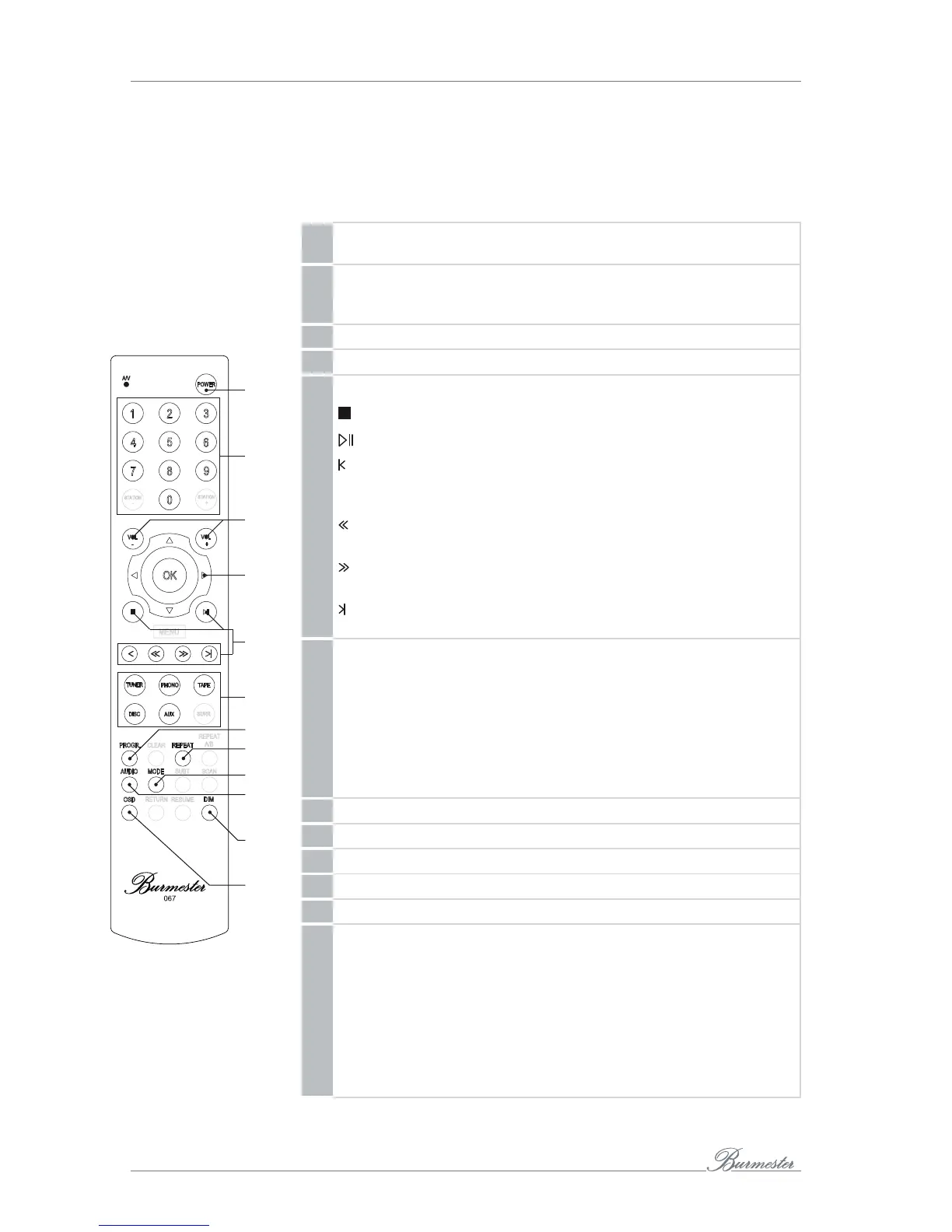
The supplied remote control allows the control of the devices’s playback functions.
Advanced options are available from the optional iPad® app and the web interface and
are described in more detail in the separately enclosed instructions.
29 Power on/off
Power on the Phase 3 or set it to stand-by mode.
30 Number keys
Enter numbers to display device settings (see OSD)
and to select a track directly.
31 Change the volume
32 Change information on the display
33 Playback control:
Stop playback.
Start playback or pause ongoing playback.
CD, Player, TIDAL: Skip to the beginning of the track currently
playing. Pressing twice skips to the previous track.
Internet radio: Navigate between stations in the station list.
Move playback back by 10 seconds.
Internet radio: Not assigned
Move playback forward by 10 seconds.
Internet radio: Not assigned
CD, Player, TIDAL: Skip to the next track.
Internet radio: Navigate between stations in the station list.
34 Sources:
TUNER Selects Internet radio or, if pressed again,
TIDAL as signal source.
PHONO Selects the analog input as source.
TAPE Playback of internally stored music.
DISC Selects sequentially USB or CD as source.
AUX Switches sequentially between TV input and digital inputs.
35 Shuffle
36 Repeat
37 Smooth
38 AUDIO Switch between 96 kHz and 192 kHz sampling frequency.
39 DIM dims the Display.
40 OSD Display and change device settings.
►
To display device settings, first press the OSD button and then
enter one of the following codes using the number keys on the
remote control:
– 1 – 1 – 1: IP address and MAC address
– 2 – 2 – 2: Serial number and device versions (see page32)
– 2 – 5 – 8: Perform a firmware update (see page32)
– 7 – 8 – 9: Switch between standard, Wi-Fi and stand-alone
mode (see page21)
29
30
31
32
33
34
38
36
39
40
37
35



 To Next Page