17
NICE - MIRIAM - CRISTAL - PRETTY - KRISS - MARY - TECNA - EVO
EN
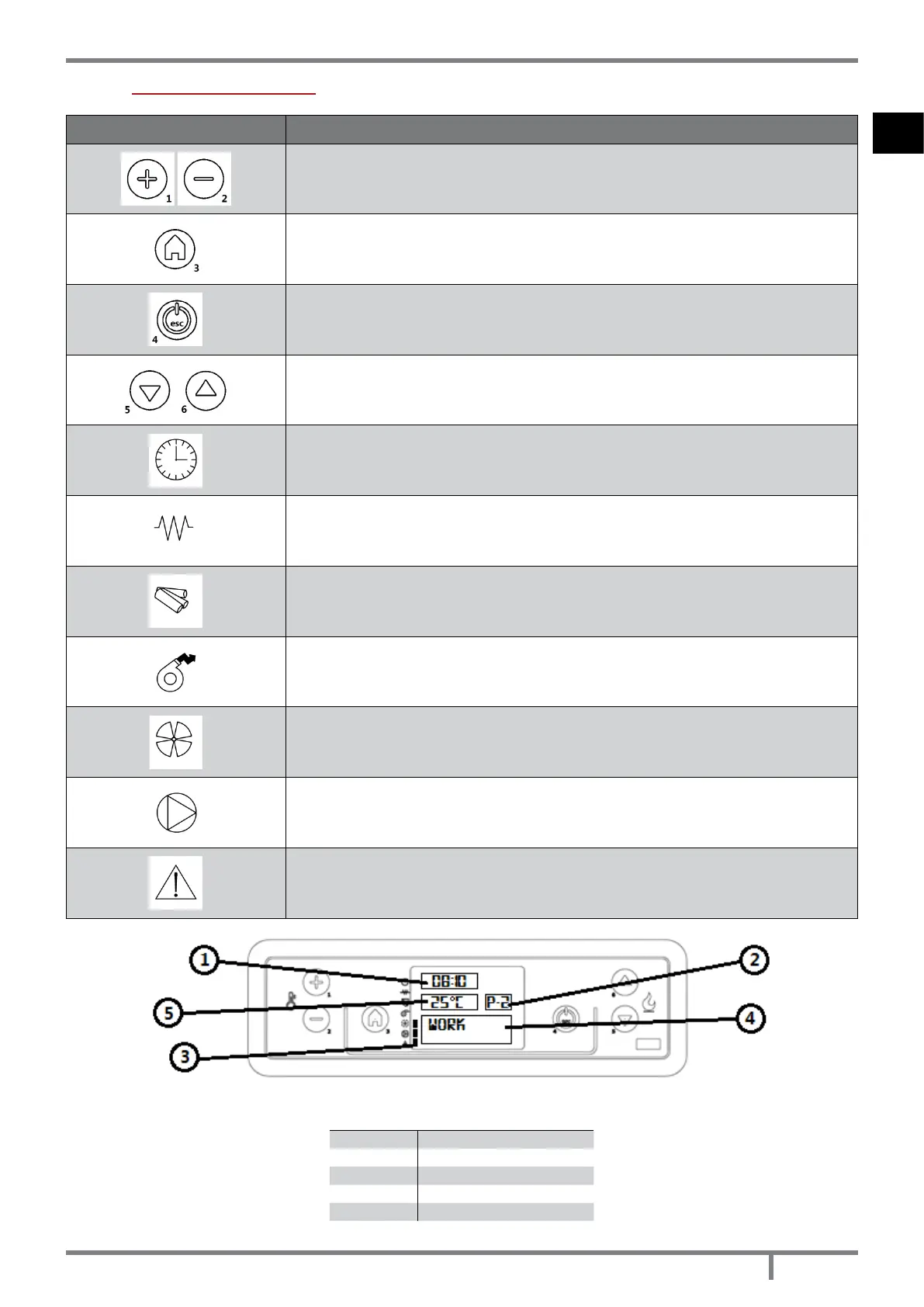
11.3 CONTROL PANEL
PANEL ELEMENT DESCRIPTION
P1 and P2: when in set temperature mode, they are useful to increase or decrease the
thermostat value from min. 6°C to max 40°C. Keeping pressed P2 key it is possible to see
the fume temperature at the exhaust. Both have programming functions.
P3: it enables to enter set temperature and User and Technician parameters menu.
P4: switching on and off, alarm reset and exit from programming.
P5 and P6: increase and decrease the caloric power from 1 to 5.
Chrono: active time programming.
Ignition plug: active ignition.
Auger: active.
Fume fan: active.
Exchanger fan: active.
-
Alarm: active.
Fig. 20 - LCD control display
LEGEND Fig. 20 page 17
1 Time
2 Power
3 State
4 Message
5 Temperature


 To Next Page