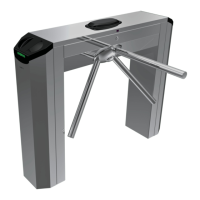
The CAME TWISTER Tripod Turnstile (model PST001) is an electromechanical access control device designed for managing high-volume pedestrian traffic in various environments such as stadiums, airports, stations, and public buildings. It is built by CAME Cancelli Automatici S.p.A. in compliance with current safety legislation.
Function Description:
The turnstile allows for one person to pass at a time in a desired direction. When a command device (e.g., a transponder) is activated, the internal mechanism releases the tripod, allowing it to rotate freely. After a single passage, the arms automatically return to their original position, and the mechanism locks, awaiting the next command. The PST001 model is a bi-directional electromechanical tripod turnstile constructed from AISI 304 steel with a scotch-brite finish. It includes a control board, transponder sensors, and a high-luminosity LED bi-directional traffic light with a display. A key safety feature is the automatic release of the tripod in case of a blackout, ensuring emergency egress.
Important Technical Specifications:
- Power Supply: 230 V AC, 50/60 Hz
- Power Draw: 260 mA max
- Insulation Class: II
- Protection Rating: IP44
- Weight: 60 Kg
- Operating Temperature: -20°C to +55°C
- Dimensions: 1200 mm (length) x 750 mm (width) x 950 mm (height), with a tripod arm diameter of 40 mm.
- Control Panel Power Supply: 230 V AC (max 50/60Hz), 24 V DC (SELV type) for command and control devices/accessories (max 35W).
- Fuses: Control board (line) 1.6A-F, Accessories 1.6A-F.
- Card Capacity: Up to 500 user cards can be created.
- Timeout Time: Adjustable between 10 and 60 seconds for the turnstile to remain released after a command.
- Maximum Passages: Can be set from 1 to 65,000 passages, or unlimited ("OFF").
Usage Features:
The turnstile offers various programmable functionalities through its internal keypad or a Master pass, displayed on a software-managed display.
- Activation: Clockwise or counter-clockwise activation.
- Command Systems: Supports panic buttons (N.C. contact for total block), clockwise/counter-clockwise activating buttons (N.O. contact for tripod release), and emergency buttons (N.C. contact for free rotation in both directions). Short circuits are required if these contacts are unused.
- Access Control: Compatible with the RBM84 access control system for recording user movements and managing personalized permits.
- Transponders: Uses TSP1 for confirming functions and settings (ENTER) and TSP2 for changing, increasing, or decreasing values (< >).
- Master Card: A Master card is used to activate programming functions without opening the turnstile's small door. It allows for creating new user cards (up to 500), cancelling individual cards, or cancelling all memorized cards.
- Display Information: The display can show the number of passages, the current time, or be turned off.
- Time and Date Setting: Allows for setting the current time and date, including automatic daylight savings time adjustment.
- Intrusion Alarm: A buzzer can be activated in case of intrusion or deactivation, with an adjustable activation time between 1 and 60 seconds.
- Operating Modes: Can operate in Stand-Alone mode (automatic operation) or On-Line mode (managed by the RBM84 access control system).
- Peripheral Device Number: Allows assigning a peripheral number to each turnstile in multi-turnstile installations.
- Passage Counter Direction: The counter can be set to record entrances in a specific direction.
- Antipassback Mode: Can be activated or deactivated to prevent users from entering an area if they are already inside, or to restrict consecutive accesses with the same pass. When activated, the differential entrance management and maximum number of transits functions are deactivated.
- Differentiated Passage Management: Offers six modes:
- OFF: Passage allowed for enabled users in both directions.
- -1- Controlled/Blocked: Controlled passage in one direction, blocked in the other.
- -2- Free/Blocked: Free passage in one direction, blocked in the other.
- -3- Blocked/Controlled: Blocked passage in one direction, controlled in the other.
- -4- Blocked/Free: Blocked passage in one direction, free in the other.
- -5- Controlled/Free: Controlled passage in one direction, free in the other.
- -6- Free/Controlled: Free passage in one direction, controlled in the other.
- Memory Roll: Allows for data recording and reading of registered users and settings.
Maintenance Features:
- Safety First: Always cut off the power supply before performing any maintenance work to prevent accidental movement.
- Periodic Checks:
- Inspect internal cabling for disconnections or damage.
- Manually turn the tripod to check for smooth, homogenous rotation and absence of faulty movements, which could indicate a malfunction.
- Verify that the turnstile is properly secured to the ground, as unstable securing can be dangerous.
- Cleaning: Do not use chemical agents, abrasive products, or cloths that could scratch stainless steel or plastic parts.
- Troubleshooting: The manual provides a troubleshooting guide for common issues such as the turnstile remaining released, releasing in only one direction, staying blocked, or blocking suddenly, along with possible causes and remedies (e.g., checking power source, reloading emergency button, calling assistance).
Important Safety Instructions:
- Installation must be performed by skilled, qualified staff in compliance with current legislation.
- Turnstile-controlled exits are not to be used as emergency exits; dedicated emergency exits and accessible exits for disabled persons must always be available.
- Do not lean on the turnstile until it is solidly anchored to prevent toppling.
- Opening the turnstile only 60° will cause the tripod to automatically return.
- Leaning on the tripod arms before release will prevent the lock function from working, keeping the turnstile closed.
- The product is intended for its specific purpose; any other use is considered dangerous.
- Keep children away from the operating range and command devices.
- Regularly check the system for anomalies, wear, or damage.
- Cut off power before manual openings or cleaning.
- Users are forbidden from carrying out actions not explicitly instructed in the manual. Repairs and modifications must be done by technical assistance staff.


 To Next Page
 General