136
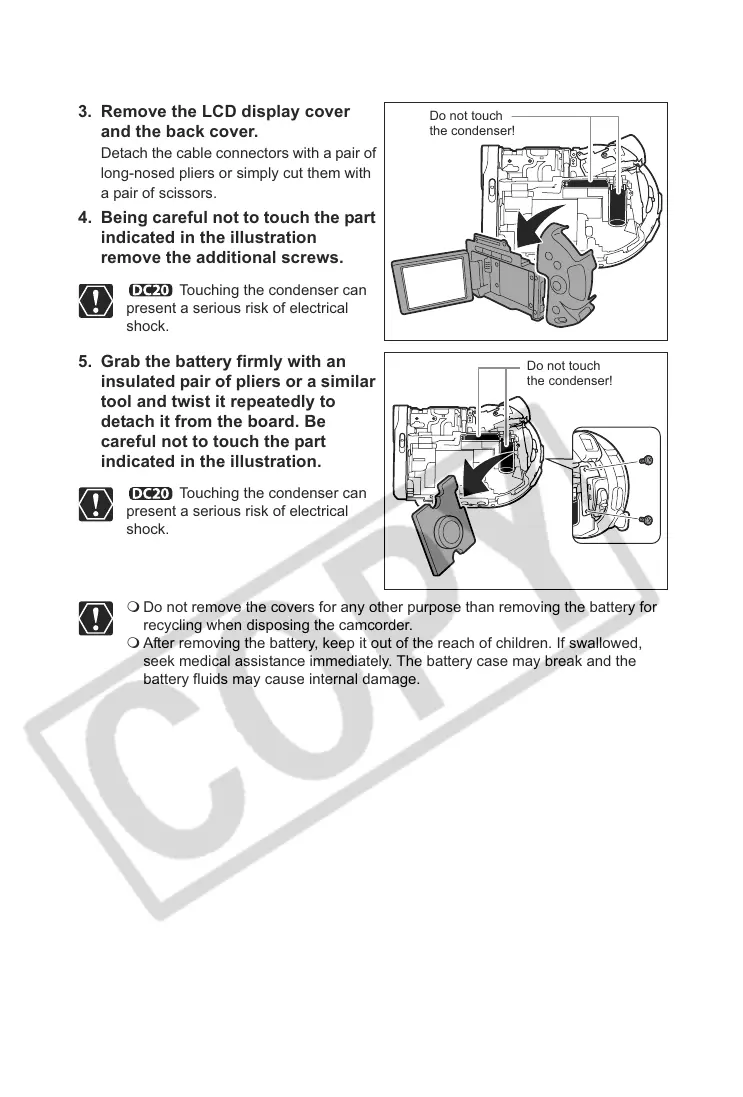
3. Remove the LCD display cover
and the back cover.
Detach the cable connectors with a pair of
long-nosed pliers or simply cut them with
a pair of scissors.
4. Being careful not to touch the part
indicated in the illustration
remove the additional screws.
Touching the condenser can
present a serious risk of electrical
shock.
5. Grab the battery firmly with an
insulated pair of pliers or a similar
tool and twist it repeatedly to
detach it from the board. Be
careful not to touch the part
indicated in the illustration.
Touching the condenser can
present a serious risk of electrical
shock.
Do not remove the covers for any other purpose than removing the battery for
recycling when disposing the camcorder.
After removing the battery, keep it out of the reach of children. If swallowed,
seek medical assistance immediately. The battery case may break and the
battery fluids may cause internal damage.
Do not touch
the condenser!
Do not touch
the condenser!



 To Next Page