98
Disc Finaliza tion
Preparing your Disc for Playing on a
DVD Player
In order to play the disc you recorded on a DVD player, a computer’s DVD drive or other
digital device, you need to finalize it first. Refer also to the instruction manual of the DVD
player/recorder or the computer’s DVD drive.
When finalizing a disc, always power the camcorder directly from a power
outlet. The finalization process cannot be started if the camcorder is powered
only with the battery pack.
Do not disconnect the power adapter while the disc finalization is in progress.
Doing so can interrupt the process and result in lost data.
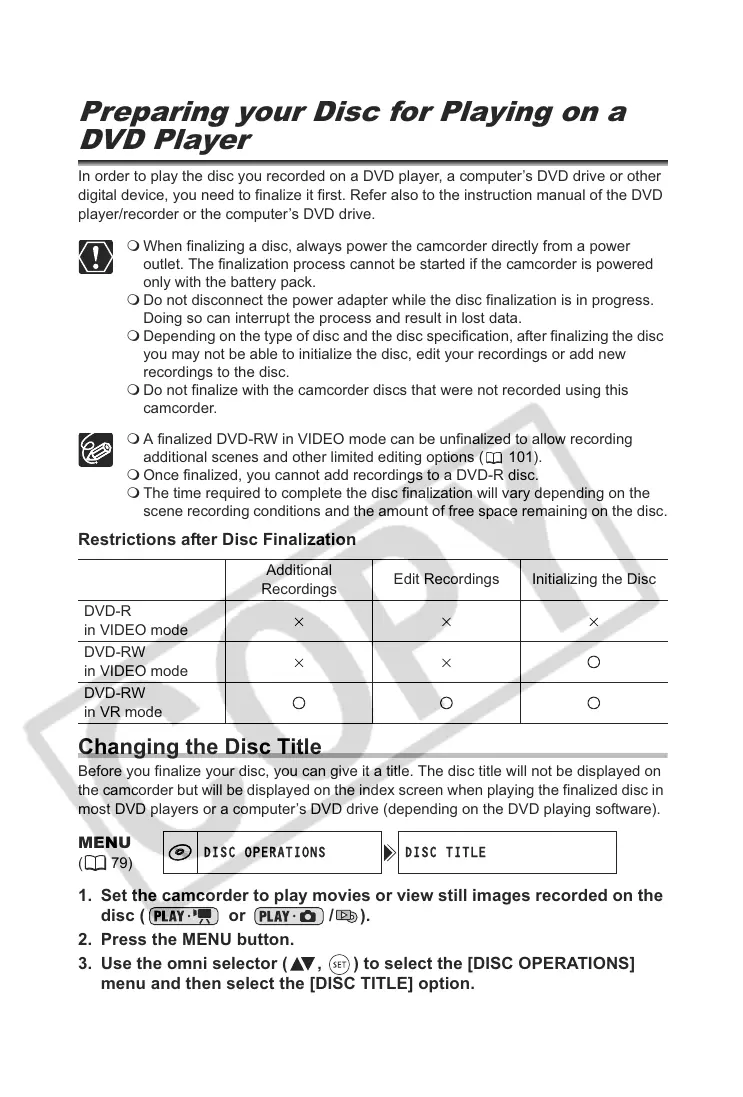
Depending on the type of disc and the disc specification, after finalizing the disc
you may not be able to initialize the disc, edit your recordings or add new
recordings to the disc.
Do not finalize with the camcorder discs that were not recorded using this
camcorder.
A finalized DVD-RW in VIDEO mode can be unfinalized to allow recording
additional scenes and other limited editing options ( 101).
Once finalized, you cannot add recordings to a DVD-R disc.
The time required to complete the disc finalization will vary depending on the
scene recording conditions and the amount of free space remaining on the disc.
Restrictions after Disc Finalization
Changing the Disc Title
Before you finalize your disc, you can give it a title. The disc title will not be displayed on
the camcorder but will be displayed on the index screen when playing the finalized disc in
most DVD players or a computer’s DVD drive (depending on the DVD playing software).
1. Set the camcorder to play movies or view still images recorded on the
disc ( or / ).
2. Press the MENU button.
3. Use the omni selector ( , ) to select the [DISC OPERATIONS]
menu and then select the [DISC TITLE] option.
Additional
Recordings
Edit Recordings Initializing the Disc
DVD-R
in VIDEO mode
DVD-RW
in VIDEO mode
DVD-RW
in VR mode
MENU
(79)
DISC OPERATIONS DISC TITLE



 To Next Page