67
Advanced Features
Changing the FUNC. Settings
E
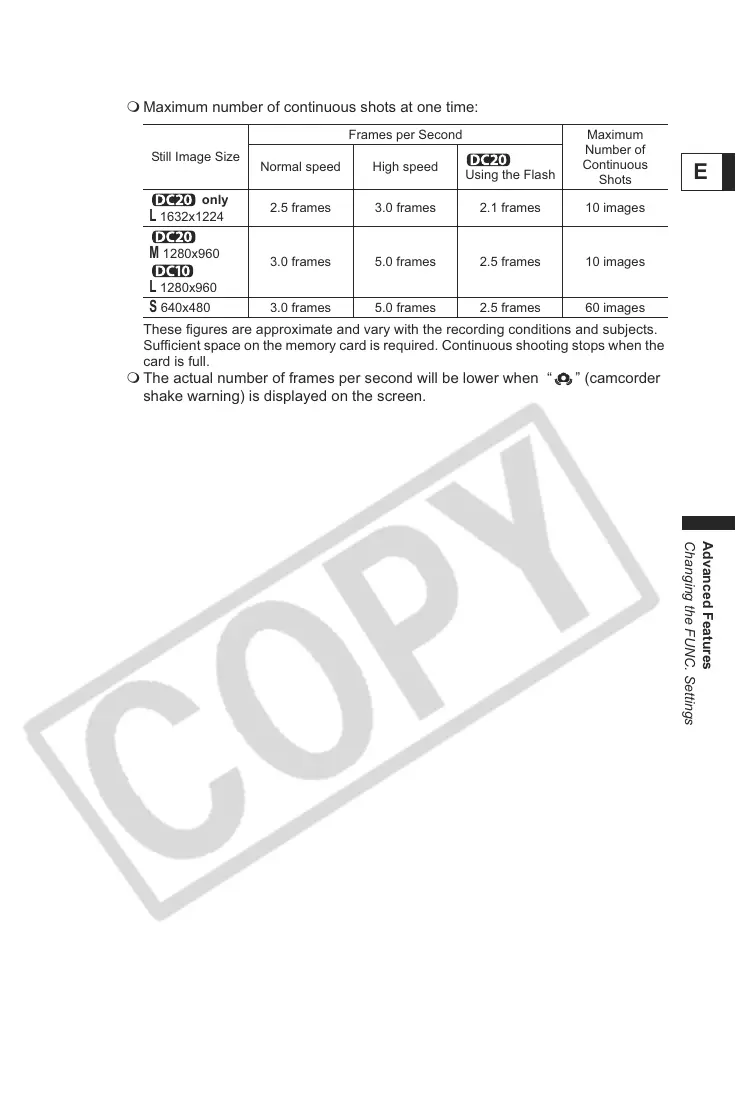
Maximum number of continuous shots at one time:
These figures are approximate and vary with the recording conditions and subjects.
Sufficient space on the memory card is required. Continuous shooting stops when the
card is full.
The actual number of frames per second will be lower when “ ” (camcorder
shake warning) is displayed on the screen.
Still Image Size
Frames per Second Maximum
Number of
Continuous
Shots
Normal speed High speed
Using the Flash
only
L
1632x1224
2.5 frames 3.0 frames 2.1 frames 10 images
M
1280x960
L
1280x960
3.0 frames 5.0 frames 2.5 frames 10 images
S
640x480 3.0 frames 5.0 frames 2.5 frames 60 images



 To Next Page