EasyManua.ls Logo

Canon EOS EOS 300D - Image Zone

Canon EOS EOS 300D
141 pages
Print Icon
To Next Page IconTo Next Page
To Previous Page IconTo Previous Page
Loading...
14
11
11
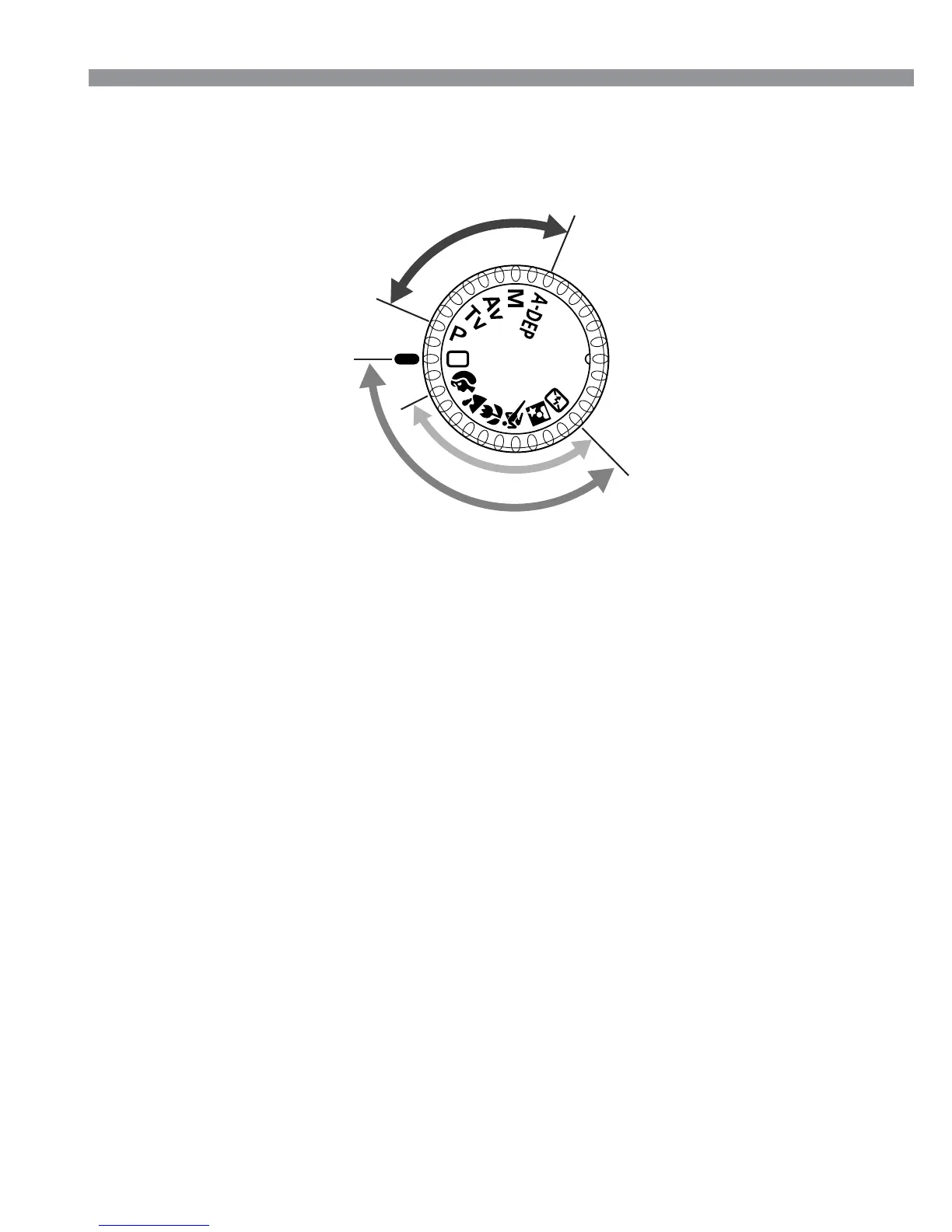
1 Basic Zone
All you do is press the
shutter button.
Y: Full Auto (p.38)
Allows you fully automatic
shooting—the camera
makes all the settings.
Image Zone
Allows you fully automatic
shooting in specific
situations.
U : Portrait (p.40)
I : Landscape (p.40)
O : Close-up (p.40)
P : Sports (p.41)
A : Night Portrait (p.41)
S : Flash off (p.41)
Mode Dial
The Mode Dial is divided into two functional zones.
22
22
2 Creative Zone
Lets you make a variety of
settings.
T : Program AE (p.66)
R : Shutter-priority AE
(p.68)
E : Aperture-priority AE
(p.70)
W : Manual exposure
(p.72)
Q: Automatic Depth-of-
field AE
(p.74)
Nomenclature
B
a
s
i
c
Z
o
n
e
I
m
a
g
e
Z
o
n
e
C
r
e
a
t
i
v
e
Z
o
n
e
Full Auto

Table of Contents

Related product manuals