34
Cleaning the Image Sensor (CMOS)
The image sensor is like the film in a film-based camera. If any dust or
other foreign matter adheres to the image sensor, it may show up as a
dark speck in the images.
To avoid this, follow the procedure below to clean the image sensor.
Note that the image sensor is a very delicate component. If possible,
you should have it cleaned by a Canon Service Center.
While you clean the image sensor, the camera must be turned on. Use
the AC Adapter Kit ACK-E2 (optional accessory, see page 128) or a
battery. If you use a battery, make sure the battery level is sufficient.
Before cleaning the image sensor, detach the lens from the camera.
Insert the DC coupler (p.22) or a
fully charged battery into the
battery compartment and set the
Power switch to <1>.
1
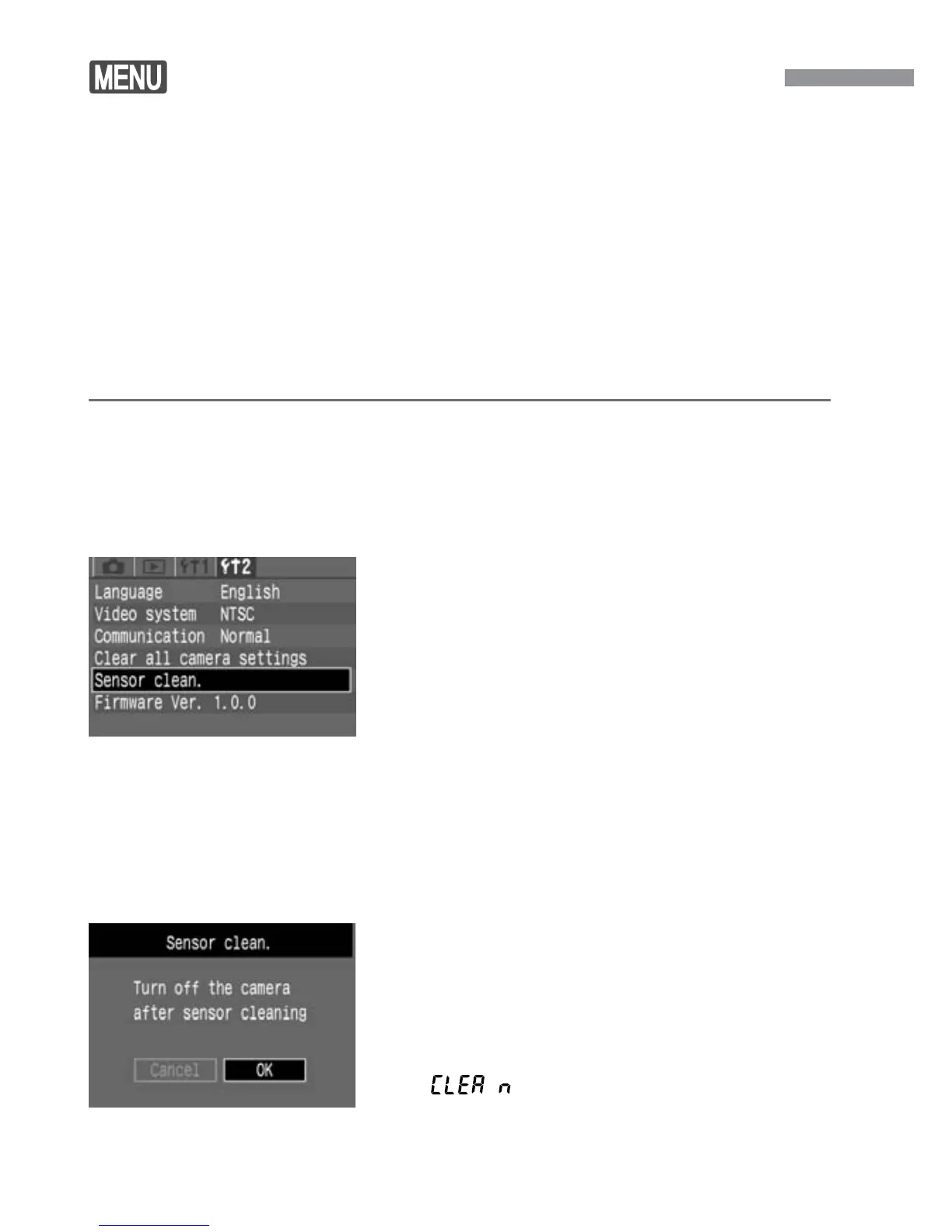
Select [Sensor clean.].
•
Select the [˚] tab.
•
Press the <å> keys to select
[Sensor clean.], then press <p>.
s
If you are using a battery with sufficient
power, the screen shown in step 3 will
appear.
•
If the battery is exhausted, a warning
message will appear and you will not
be able to proceed further. Either
recharge the battery or use a DC
coupler and start from step
1 again.
2
Select [OK].
•
Press the <µ> keys to select [OK],
then press <p>.
s
The mirror will lock up and the shutter
will open.
s
“ ” will blink on the LCD panel.
3













 To Next Page