31
The color LCD monitor on the back of the camera enables you to
review and select recorded images and set various menu settings.
•
The LCD monitor cannot be used as a viewfinder to shoot.
•
The LCD monitor’s brightness can be adjusted with the menu’s [LCD
Brightness] setting (∆).
AF point selection
Drive mode
Exposure compensation
AEB
Automatic
Single
0 (Zero)
Canceled
Shooting Settings Image Recording Settings
Quality
ISO speed
White balance
WB-BKT
Parameters
Auto rotate
File numbering
da (Large/Fine)
100
Z (Auto)
Canceled
Parameter 1
On
Continuous
LCD Monitor
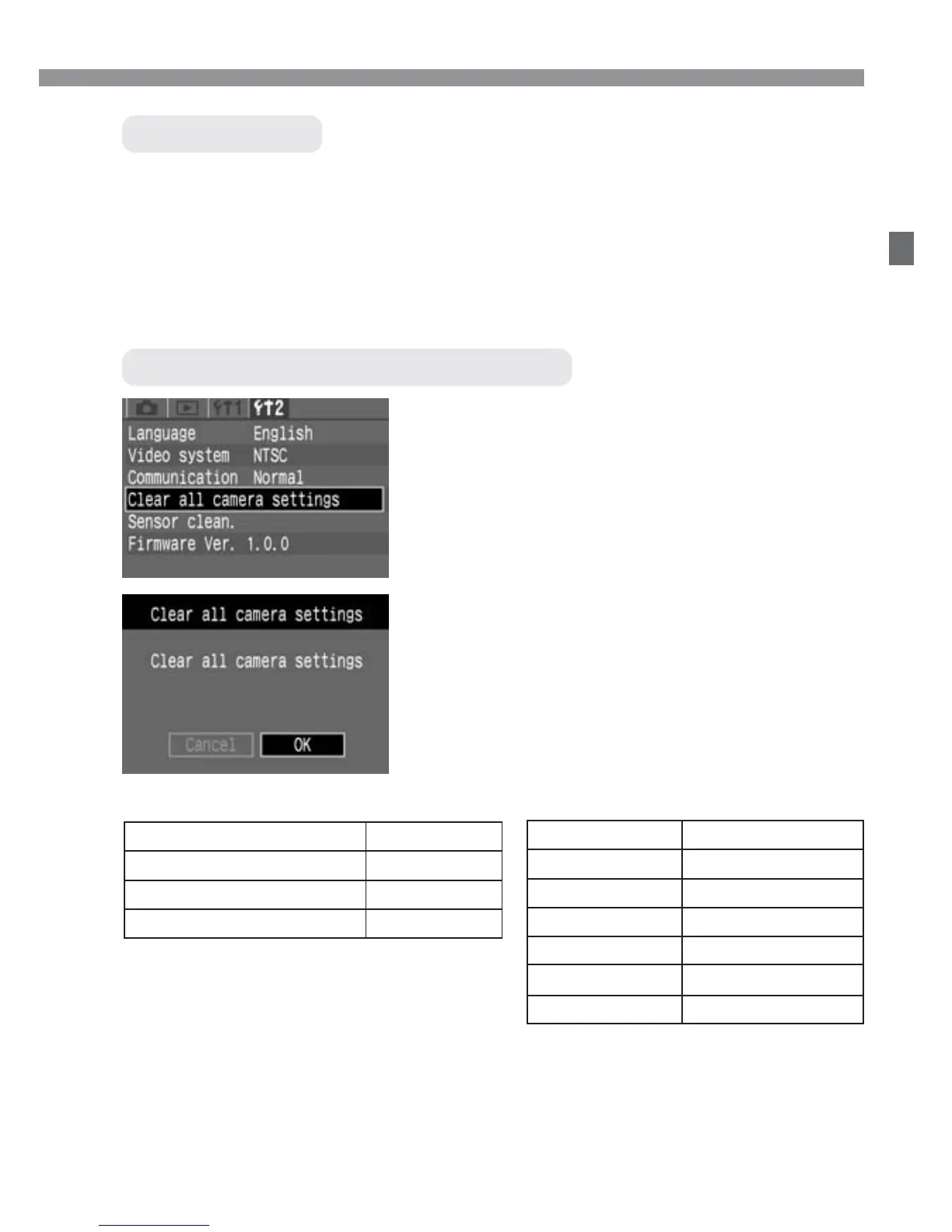
Reverting to the Default Settings
Select [Clear all camera settings].
•
Select the [˚] tab.
•
Press the <å> keys to select [Clear
all camera settings], then press
<p>.
1
Clear the settings.
•
Press the <©> key to select [OK], then
press <p>. The camera settings will
then be reset to the default settings.
s
The camera’s default settings will be as
shown below.
2
Menu Operations













 To Next Page