LASER CLASS 730i/720i/710 Chapter 3: Assembly and Disassembly
3-9
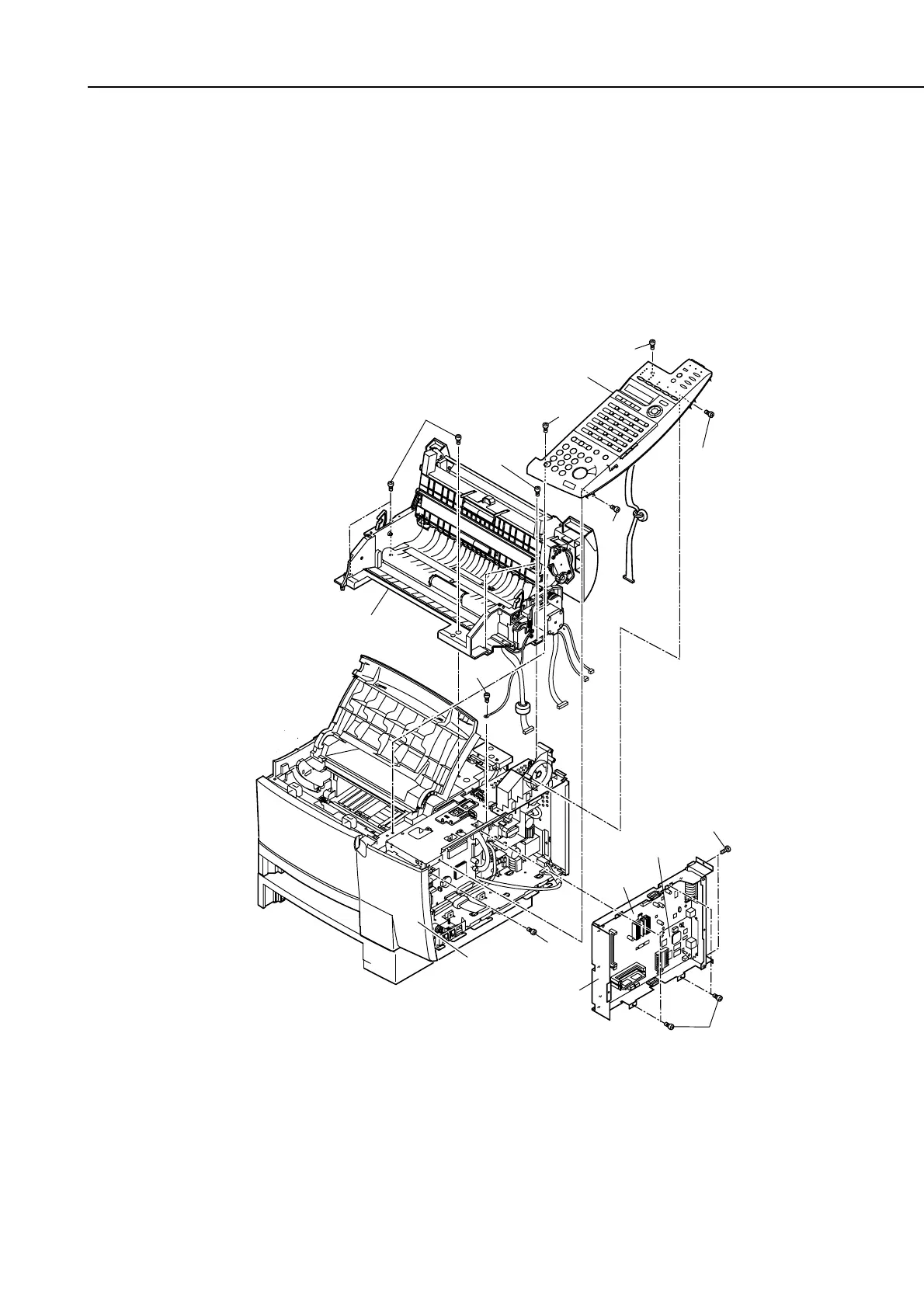
(6) Disconnect the connectors J5 and J6 of the PCL board. (LASER CLASS 730i/720i)
(7) Disconnect the two connectors of the NIC board; then, remove the 6 screws (f), and
detach the PCL/NIC unit. (LASER CLASS 730i/720i)
(8) Disconnect the connector J32 of the SCNT board; then, remove the 4 screws (g), and
detach the operation panel ass’y.
(9) Disconnect the connectors J801, J803, J804, and J805 of the SCNT board; then,
remove the 5 screws (h), and detach the reader ass’y.
(10) Remove the screw (i), and detach the front right cover.
Figure 3-10 Paper Pick-up Roller (multi-purpose) 3
h
h
g
Operation panel ass'y
g
g
f
g
h
Reader ass'y
PCL/NIC unit
NIC board
PCL board
i
Front right cover
f









 To Next Page