3-55
2-sided Printing
Loading and Outputting Paper
3
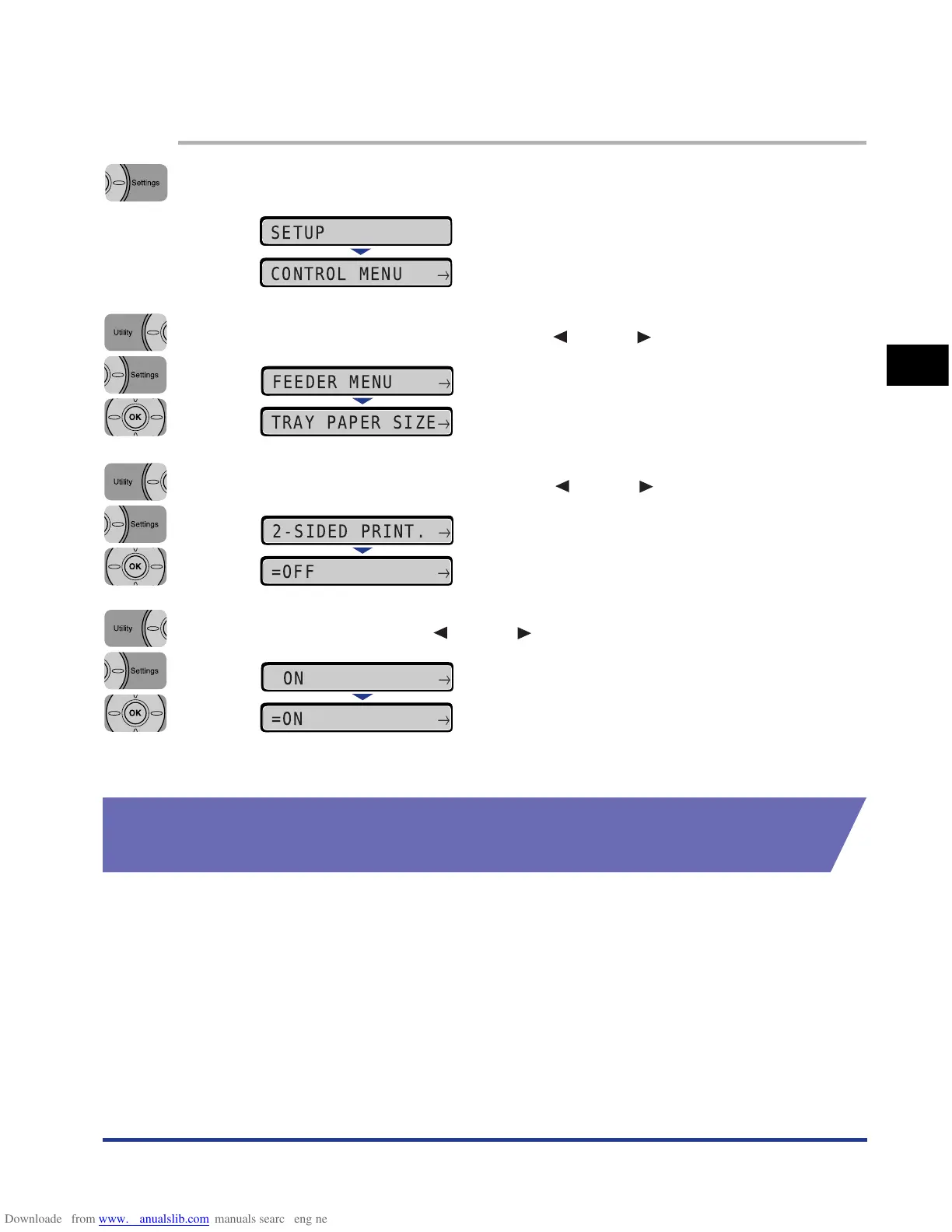
Switch between automatic 2-sided printing and 1-sided printing with the printer's control
panel using the following procedure.
1
Press [Settings].
2
Select FEEDER MENU using [ ] and [ ], then press [OK].
3
Select 2-SIDED PRINT. using [ ] and [ ], then press [OK].
4
Select ON using [ ] and [ ], then press [OK].
"=" is displayed on the left of ON, and 2-sided printing is specified.
Loading Paper When Performing Automatic 2-sided
Printing
In automatic 2-sided printing, the orientation of the paper you load is opposite to
that when performing 1-sided printing because the reverse side of paper is printed
first. When printing paper such as that with a letterhead in which faces and printing
orientation specified, load the paper using the following procedure:
SETUP
CONTROL MENU
→
FEEDER MENU
→
TRAY PAPER SIZE
→
2-SIDED PRINT.
→
=OFF
→
ON
→
=ON
→











 To Next Page