3-3
Paper Requirements
Loading and Outputting Paper
3
*1 You can load paper of the following custom sizes.
-When loading paper in portrait orientation: Width 76.2 to 215.9 mm; Length 127.0 to 355.6 mm
-When loading paper in landscape orientation: Width 127.0 to 215.9 mm; Length 127.0 to 215.9 mm
*2 You can load paper of the following custom sizes.
-When loading paper in portrait orientation: Width 148.0 to 215.9 mm; Length 210.0 to 355.6 mm
-When loading paper in landscape orientation: Width 210.0 to 215.9 mm; Length 210.0 to 215.9 mm
Paper Type
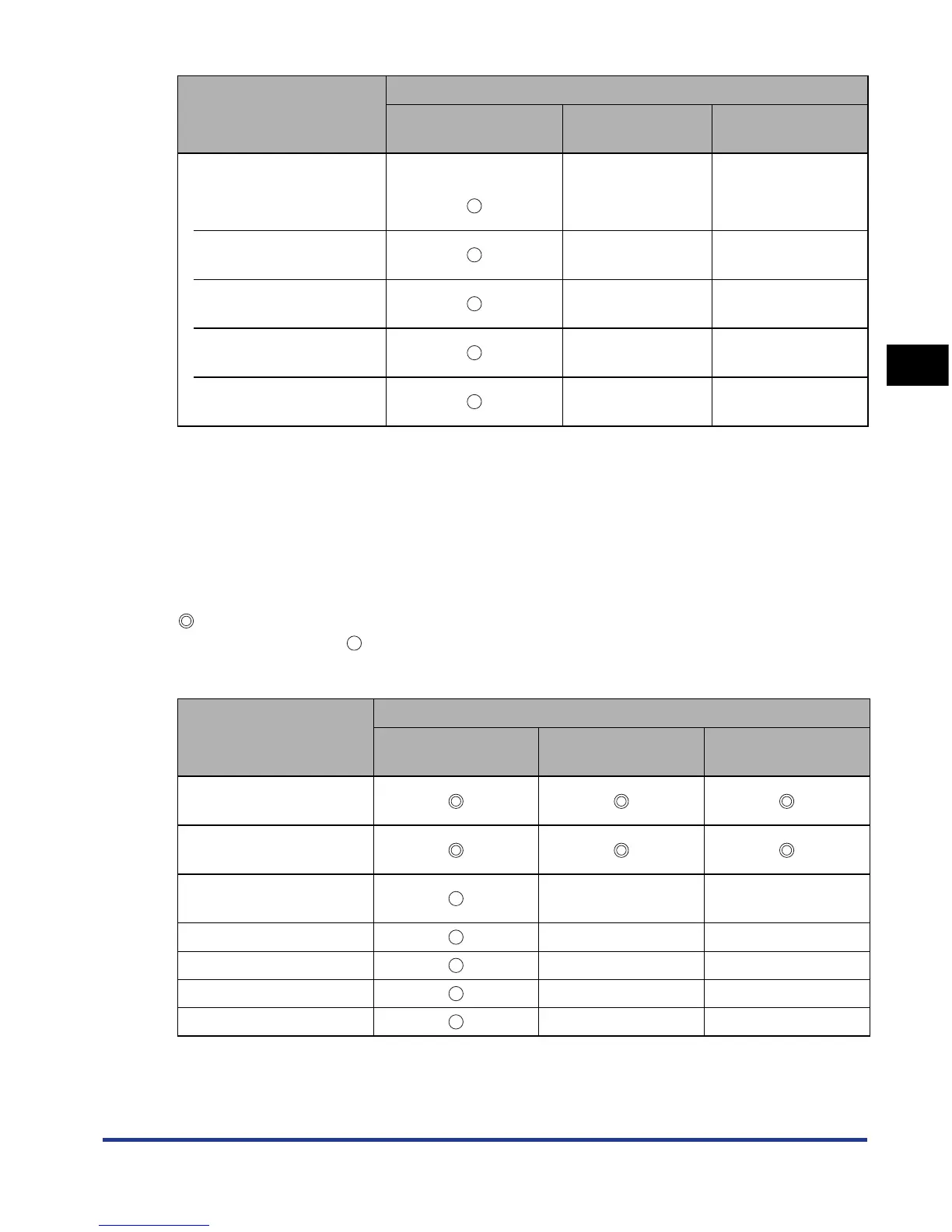
The following shows the paper types that can be used with this printer. The symbol
indicates the paper that can be used for 1-sided printing and automatic 2-sided
printing, the symbol indicates the paper that can be used for only 1-sided
printing, and the symbol X indicates the paper that cannot be used.
Envelope
Envelope DL
110.0 mm x 220.0 mm
xx
Envelope COM10
104.7 mm x 241.3 mm
xx
Envelope C5
162.0 mm x 229.0 mm
xx
Envelope Monarch
98.4 mm x 190.5 mm
xx
Envelope B5
176.0 mm x 250.0 mm
xx
Paper Type
Paper Source
Multi-purpose Tray Cassette 1
Cassette 2
(Optional)
Plain paper (64 - 80 g/
m
2
)
Heavy paper (90 - 120 g/
m
2
)
Heavy paper (121 - 163
g/m
2
)
xx
Heavy paper (199 g/m
2
)xx
Transparency x x
Label x x
Envelope x x
Paper Size
Paper Source
Multi-purpose Tray Cassette 1
Cassette 2
(Optional)











 To Next Page