2-11
Using the Printer
2
Canceling a Job
Canceling the Process Currently Being Performed (Soft
Reset)
If you want to cancel the process currently being performed, perform [Soft Reset]
using the following procedure. A soft reset deletes the print data received by all the
interfaces, the job being processed, and the print data in the printer memory.
IMPORTANT
•
Be sure to operate the printer from the computer to canceling printing before canceling
the job from the printer (Soft Reset).
•
When a soft reset is performed, the data being printed and the data being received by all
the interfaces is deleted. Therefore, perform printing from the computer again as needed.
•
The data that has been already sent to the memory are all deleted even if it is the data of
other interface. If you are using the printer on a network, be careful so this operation
does not affect the data from other computers when performing this procedure.
NOTE
Hard resets delete all the registered files such as the form data saved in the RAM of the
printer, but soft resets do not delete them.
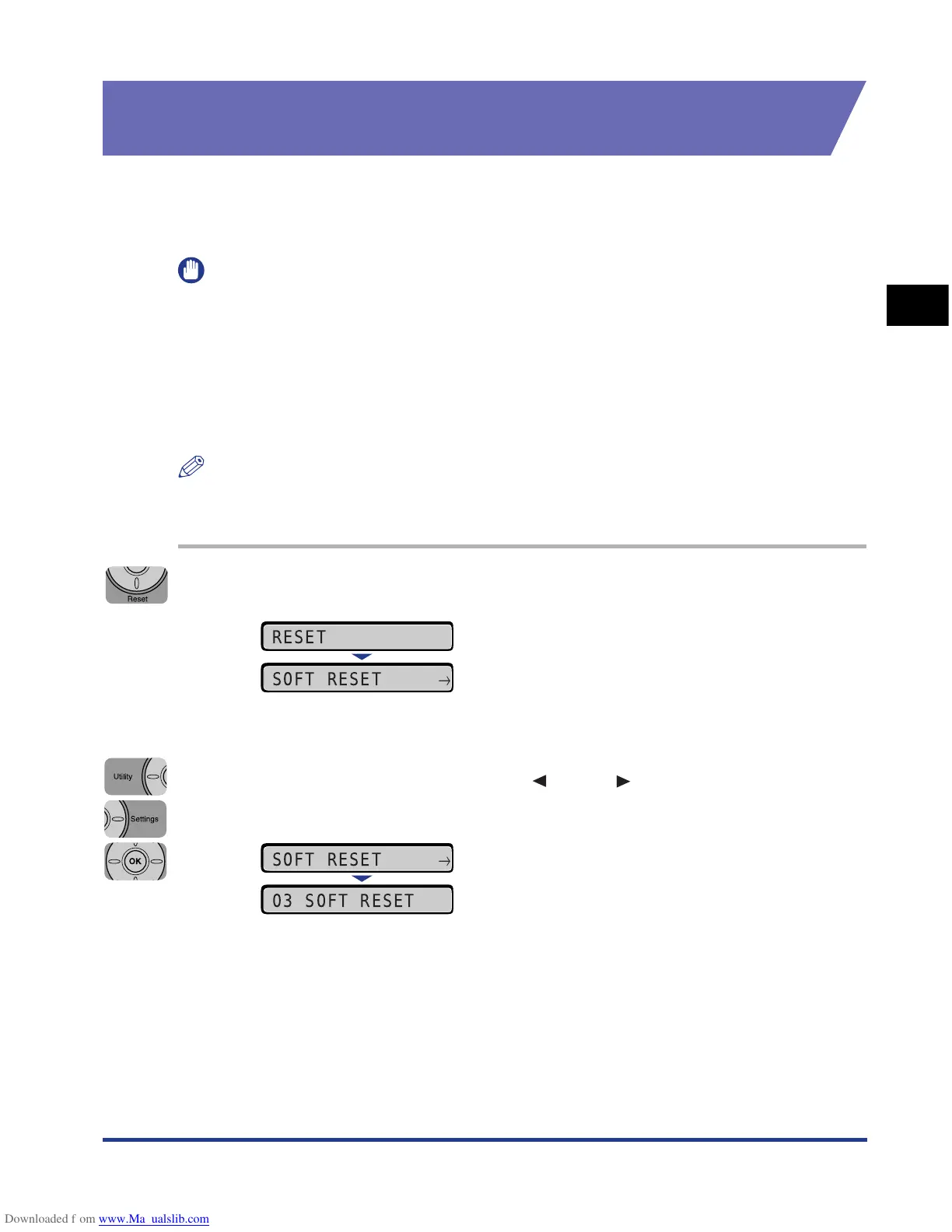
1
Press [Reset].
The RESET menu is displayed.
2
Select SOFT RESET using [ ] and [ ], then press [OK].
Holding down the [OK] key 3 seconds or more is the operation for HARD RESET.
When <03 SOFT RESET> disappears, the soft reset is completed.
RESET
SOFT RESET
→
SOFT RESET
→
03 SOFT RESET











 To Next Page