3-2. Special Notes on Repair Servicing
(Click on the image to enlarge it.)
******************************************************************************
If there is a power failure or if you disconnect the power cord, the date/time settings as well as
all documents stored in memory will be lost. User data and speed dialing settings are retained.
******************************************************************************
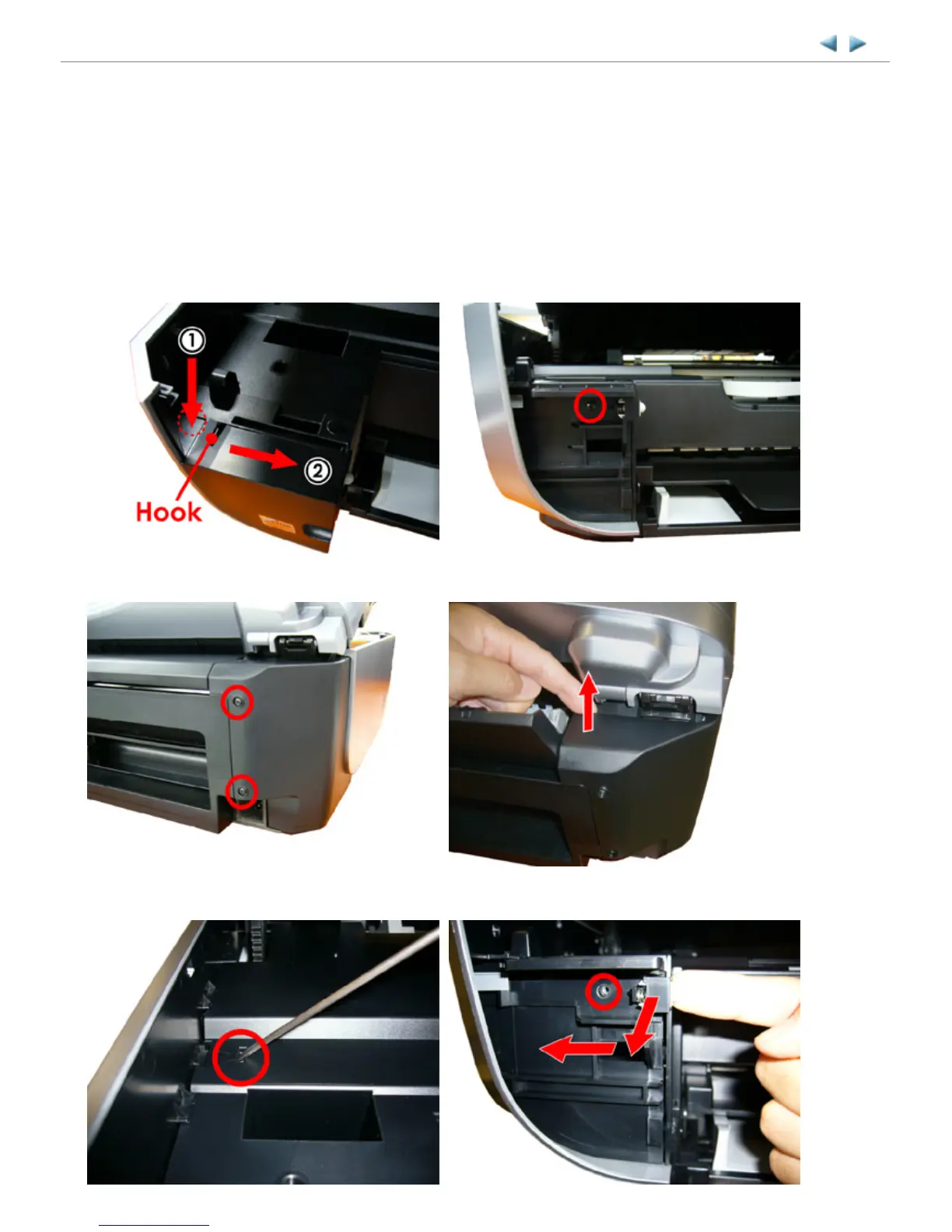
(1) Side cover L unit removal
MX700 TABLE OF CONTENTS
1) Press on the location (1) to release the hook, and slide
the front panel L to the direction (2) to remove.
2) Remove 1 screw from the front side.
3) Remove 2 screws from rear side. 4) Release the rear hook by pulling it upward.
5) Release the middle frame hook by pressing it using
such as a flat-blade screwdriver.
6) Pull the side cover L unit toward the front to disengage
it from the round boss, then slide the unit to the left.



 To Next Page