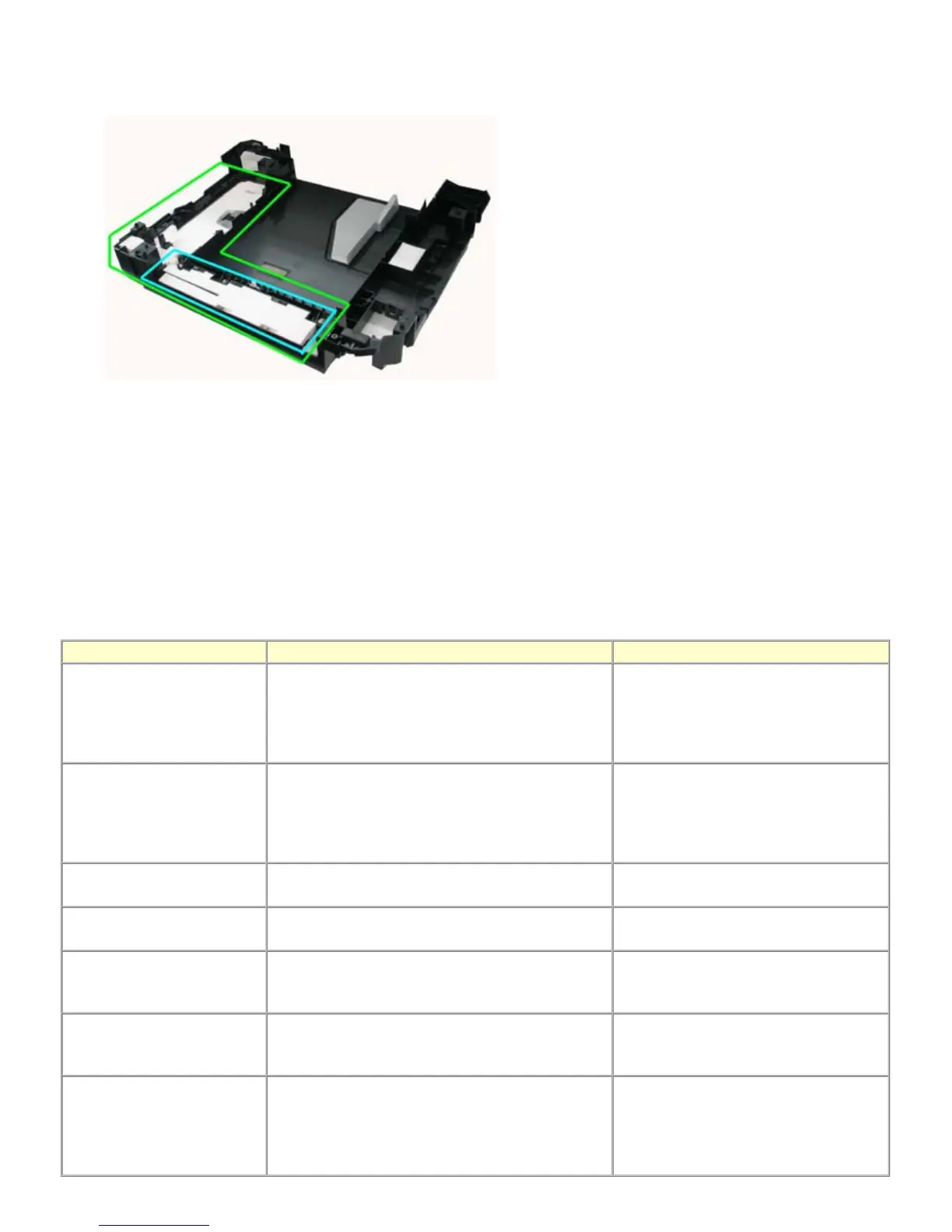
<The portion replaced in the partial replacement>
- Entire main ink absorber: Indicated by the green lines
- The portion to be replaced in partial replacement: Indicated by the blue lines
(8) Ink absorber counter setting
Before replacement of the logic board, check the ink absorber counter value, and register it to the replaced new logic board.
In addition, according to the ink absorber counter value, replace the ink absorber (ink absorber kit). When the ink absorber is
replaced, reset the applicable ink absorber counter (to 0%).
- How to check the ink absorber counter value:
See 3-4. Verification Items, (1) Service test print.
- How to set the ink absorber counter:
See "Ink absorber counter setting" below.
(9) User mode
Function Procedures Remarks
Print head manual cleaning - Cleaning both Black and Color:
Perform via the machine operation panel.
- Cleaning Black or Color separately, or both Black and
Color:
Perform from the MP driver Maintenance tab.
Print head deep cleaning - Cleaning both Black and Color:
Perform via the machine operation panel.
- Cleaning Black or Color separately, or both Black and
Color:
Perform from the MP driver Maintenance tab.
Rear tray paper feed roller
cleaning
Perform via the machine operation panel, or from the
MP driver Maintenance tab.
Front tray paper feed roller
cleaning
Clean the rollers manually.
Nozzle check pattern printing Perform via the machine operation panel, or from the
MP driver Maintenance tab.
Set a sheet of plain paper (A4 or Letter) in
the rear tray or the front tray which is
selected on the Paper Feed Switch button.
Manual print head alignment Perform via the machine operation panel, or from the
MP driver Maintenance tab.
Set 2 sheets of plain paper (A4 or Letter) in
the rear tray or the front tray which is
selected on the Paper Feed Switch button.
Bottom plate cleaning Perform via the machine operation panel, or from the
MP driver Maintenance tab.
Cleaning of the platen ribs when the back
side of paper gets smeared.
Fold a sheet of plain paper (A4 or Letter) in
half crosswise, then unfold and set it in the
rear tray with the folded ridge facing down.



 To Next Page