1-22
Setting the Image Size, Quality and Frame Rate
(Video)
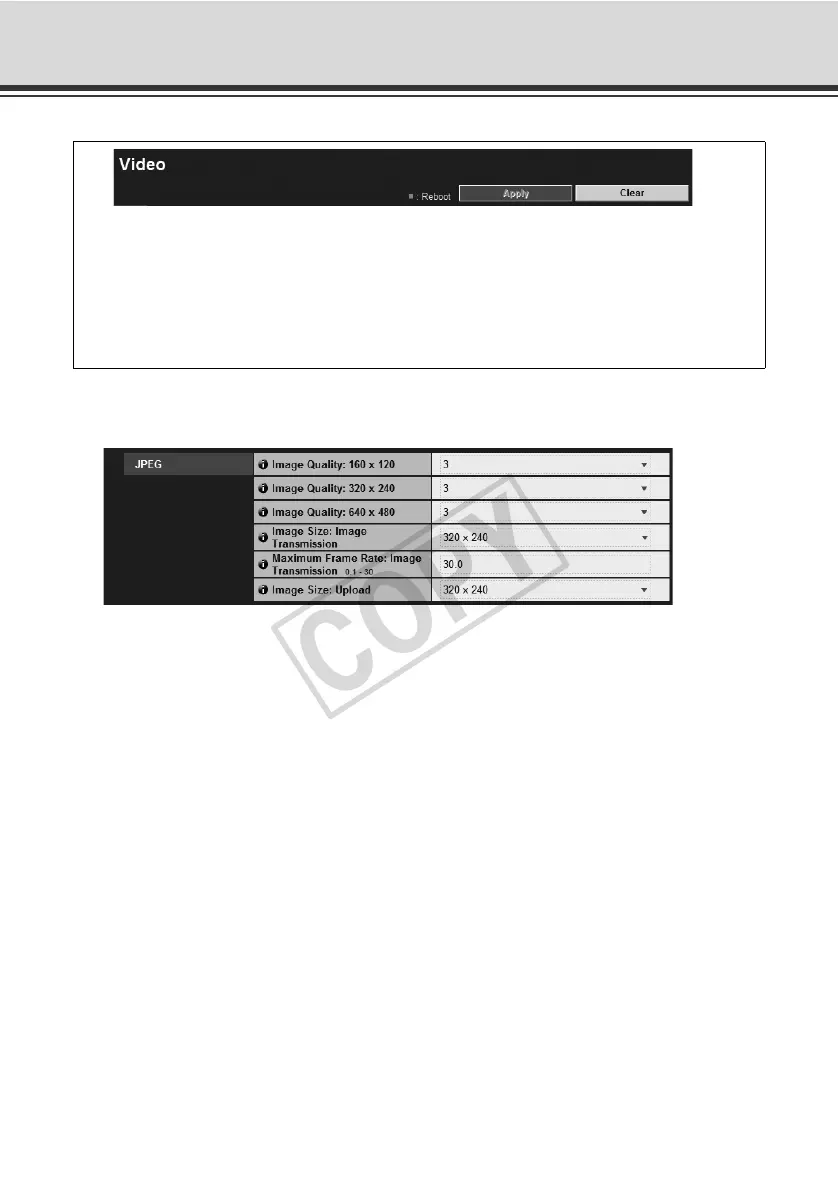
JPEG
(1) [Image Quality]
Select a desired quality from 1 to 5 (total 5 levels) for image transmitted at each image size in
JPEG.
The greater the value, the higher the quality becomes.
(2) [Image Size: Image Transmission]
Select the image transmission size from [160 x 120], [320 x 240] and [640 x 480]. The default
image size used by each viewer is selected.
(3) [Maximum Frame Rate: Image Transmission]
Limit the maximum transmission frame rate per second to reduce the viewer load. The
maximum is 30 frames/sec. Enter a value between 0.1 and 30.0.
(4) [Image Size: Upload]
Select [160 x 120], [320 x 240] or [640 x 480] for the size of transmitted image using the
upload function. For details of upload settings, see "Setting HTTP/FTP Upload and E-mail
Notification (Upload)" ( P. 1- 2 4 ).
You can set the following items.
z JPEG
Set the image quality, size and maximum frame rate in JPEG.
z MPEG-4
Set the video quality, size and capture frame rate in MPEG-4.



 To Next Page