2-6
Launching VBAdmin Tools
How to Launch
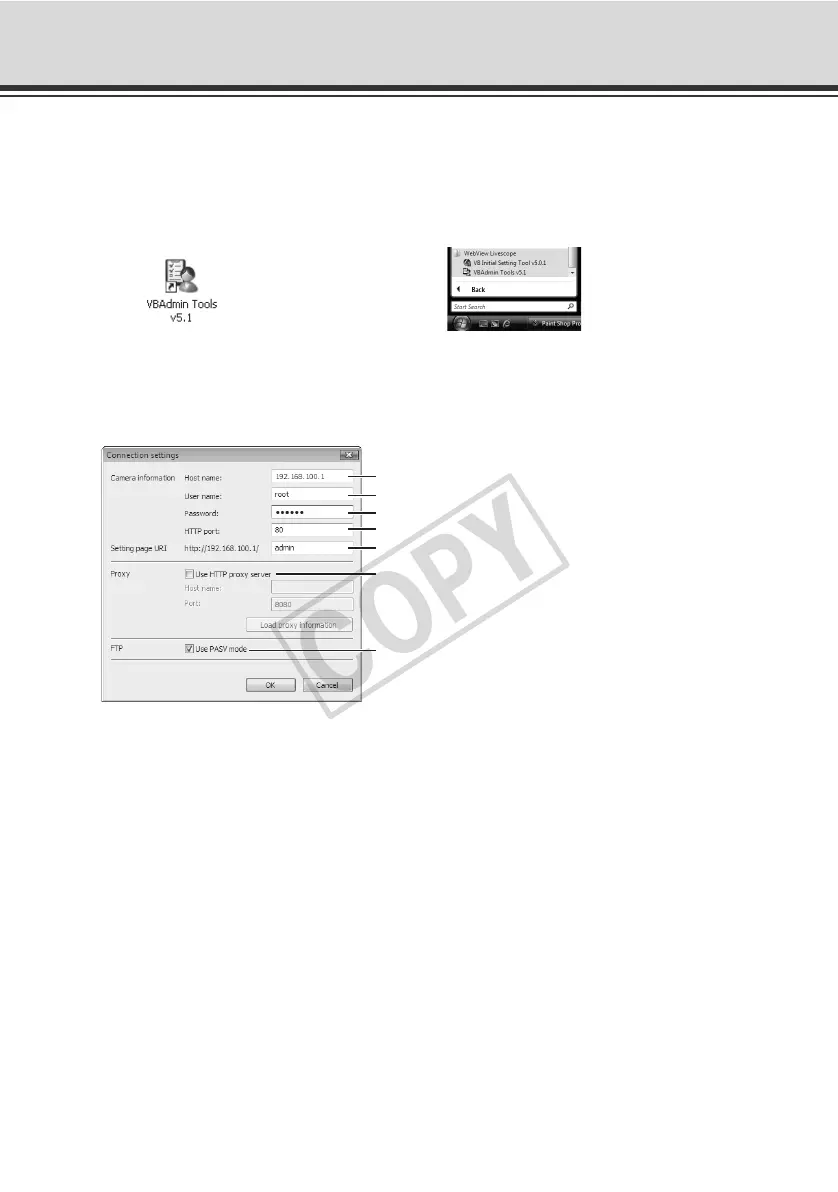
1. Double-click the [VBAdmin Tools v5.1] icon on the desktop, or select [WebView Livescope]
[VBAdmin Tools v5.1] from [Programs] in the [Start] menu.
Starting from the Desktop Icon Or starting from the [Start] menu
2. The dialog box for specifying the camera to connect to appears.
To use VBAdmin Tools, you must connect to the camera first. Enter each item and then click
[OK].
(1)Host name ( P. 1-8, P. 1-10)
Specify the IP address or host name of the camera.
(2)User name
Enter the Administrator account "root" set for the camera.
(3)Password ( P. 1-7)
Enter the Administrator password (the factory setting is "VB-C60" for both VB-C60 and
VB-C60B).
(4)HTTP port ( P. 1-33)
The default is "80".
(5)Setting page URI
The Setting page URI set for this camera is fixed to "admin" and cannot be changed.
(1)
(4)
(3)
(2)
(5)
(6)
(7)



 To Next Page