Control Panel Overview
2–6 CS 9300C OVERVIEW
Control Panel Overview
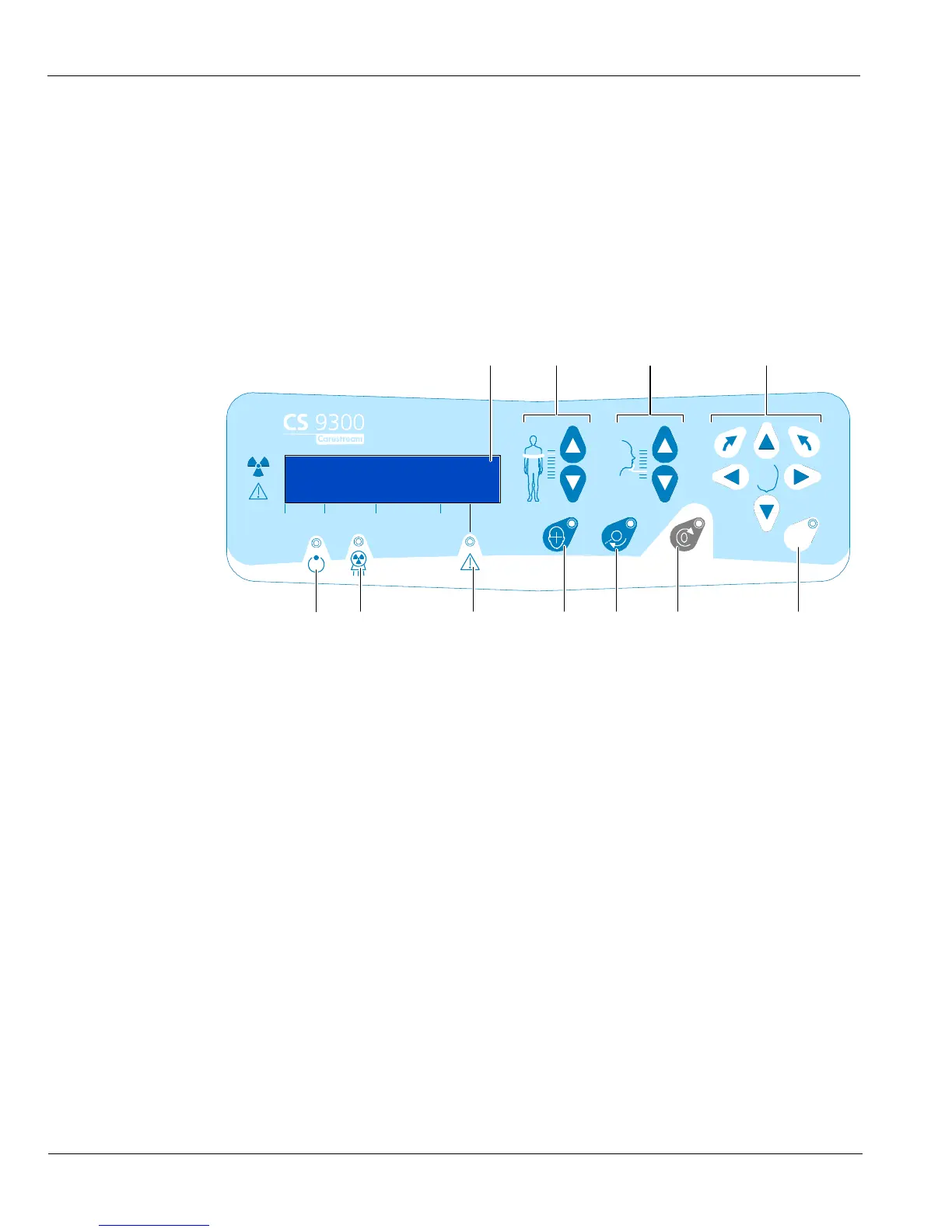
The control panel is an alphanumeric, digital soft touch console. It allows the operator to
control certain unit functions. It also displays the operating parameters and error
messages.
Figure 2–5 Unit Control Panel
8
1 Height Adjustment button: Adjusts the height of the unit to the height of
the patient.
2
3D Head Adjustment button: Adjusts the patient head to the X-ray
beams.
3 3D Adjustment button (active in Technical Mode only): Adjusts the unit
rotative arm movements.
4 Laser Beam button: Activates the beams to correctly position the patient.
5 3D Position Verification button: Positions the unit rotative arm at the
selected or memorized 3D position.
6 Reset button: Resets the unit arm to the initial position to enable the
patient to enter and exit the Unit.
7 3D Memorization button (active in Technical Mode only): Memorizes the
3D current positioning parameter settings that override the default
parameters.
8 Display Screen: Displays the current acquisition parameters and the error
messages.
9 Ready Indicator LED: Green, indicates the unit is ready for acquisition.
10
X-Ray Emission LED: Yellow, indicates the X-rays are being emitted.
11 System Status LED: Red, indicates the error alerts.











 To Next Page