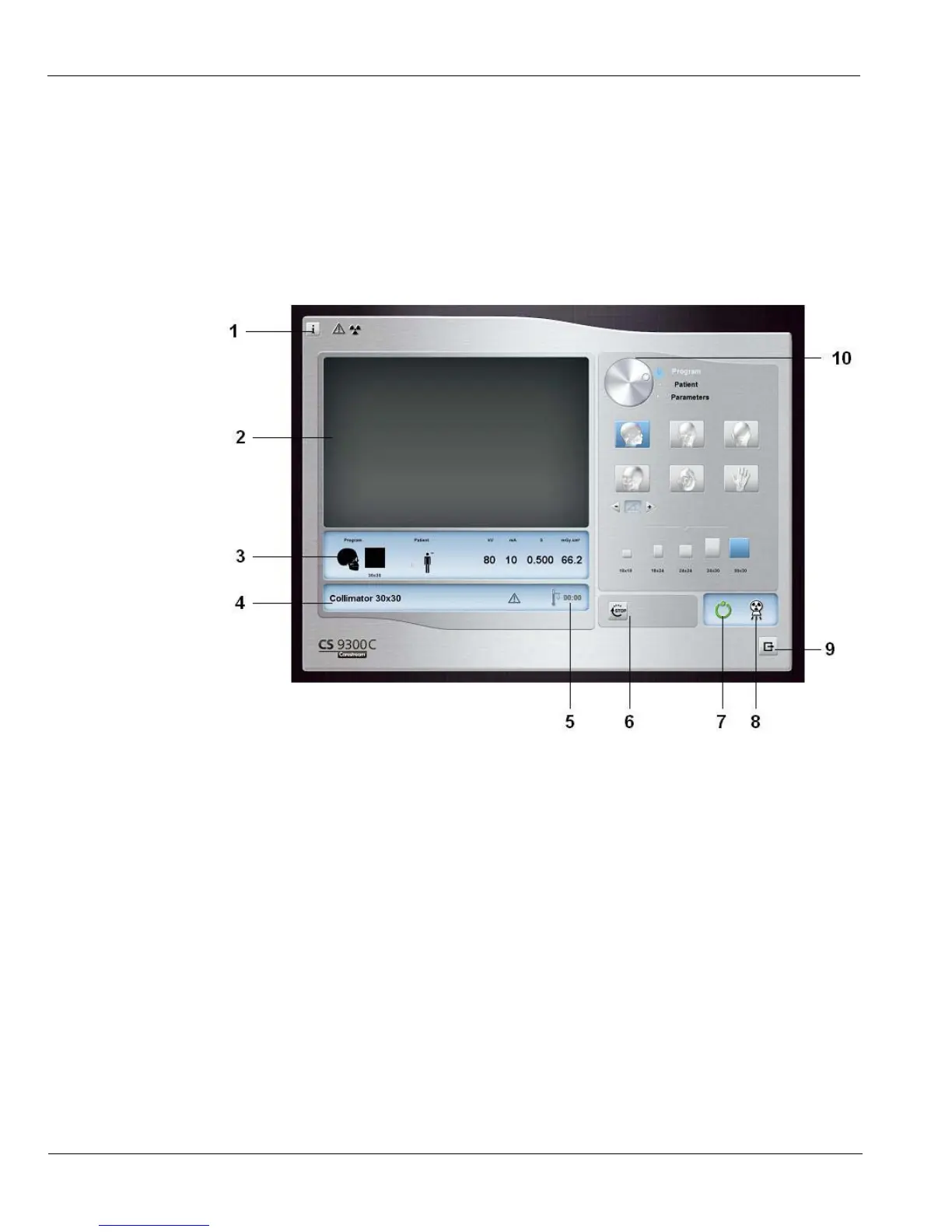
Cephalometric Acquisition Interface
3–2 IMAGING SOFTWARE OVERVIEW
Cephalometric Acquisition Interface
Cephalometric Acquisition Interface Overview
The Cephalometric Acquisition interface is the main cephalometric interface with the
CS 9300C system that provides you with imaging acquisition functions.
Figure 3–1 Cephalometric Acquisition Interface
1 Information button:
About: Identifies the Software and the Firmware versions.
Reset of the Values: Resets to the manufacturing parameter settings.
Memorize settings: Memorizes the user preference settings for each patient type (kV,
mA and seconds).
Save current mode as default: Sets the current selected program to be available by
default each time you access the Acquisition interface.
2 Preview Screen: Displays the acquired image in real time.
3 Selected Parameter Display: Displays the current acquisition parameter settings.
4 System Status Screen: Displays various alert or warning messages originating from the unit.
5 Generator Cooling indicator: Indicates the automatic cooling time (mm:ss) required for the
generator to reach 0 for a new acquisition.











 To Next Page