Basic Operating Tasks
2–2 AA2204_en | 2012-07-27
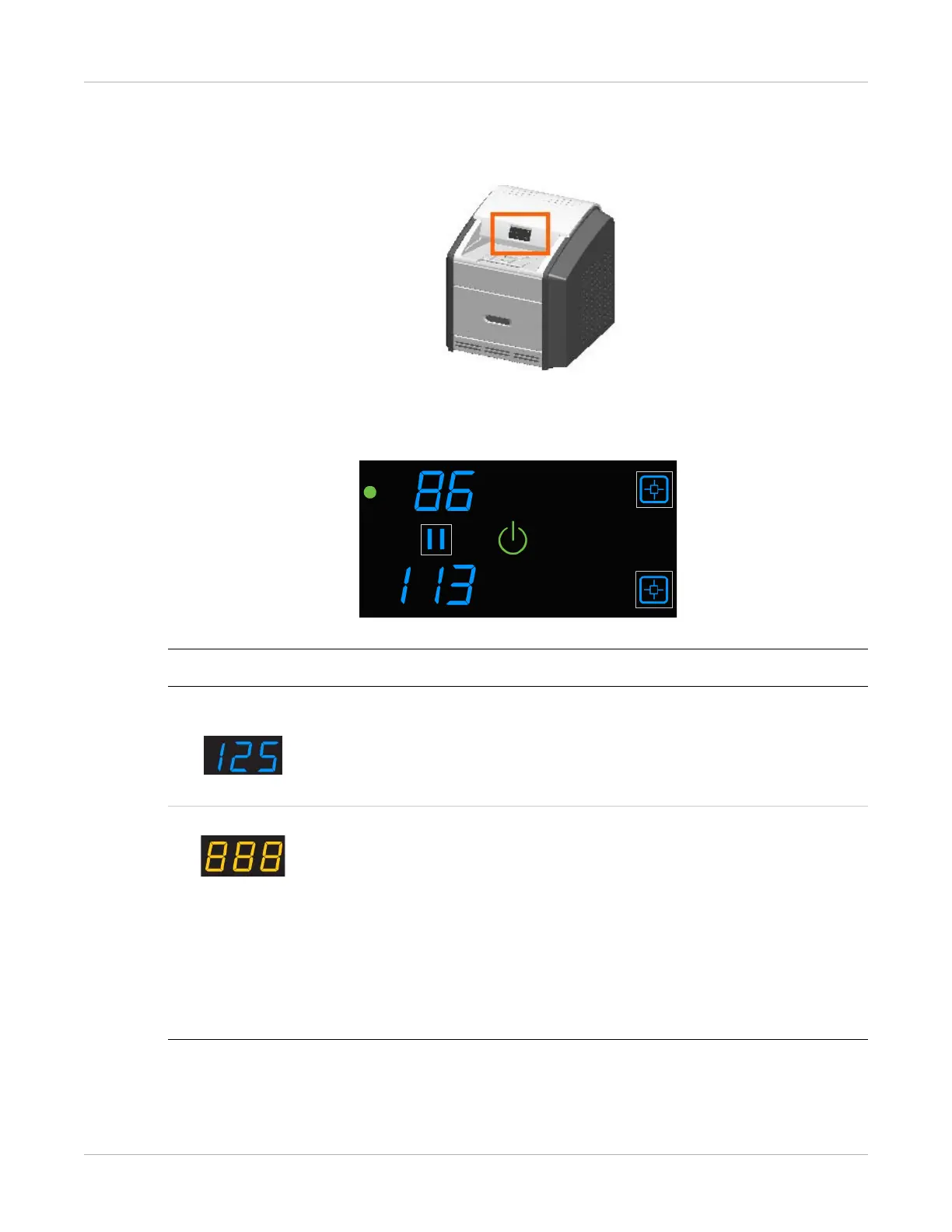
The Display Screen
The display screen communicates the status of the imager.
Figure 1: Display screen: normal state, processing a print job from the upper supply. In this
example, there are 86 sheets of film in the upper cartridge and 113 sheets in the lower cartridge.
Symbol or code Description
Upper and lower
left side:
Film counts. Displays the number of films that are remaining in the upper
and lower film cartridges.
If a blue number does not display while the imager is powered on, the
associated film cartridge is not inserted (or not fully inserted) into the
imager.
Center right: Error or status code. The 3-digit code displays when the error or status
condition is present. If the imager is on and a 3-digit code does not
display, the imager is operating normally.
• If a different film size or type has been requested than either of the
loaded sizes, the requested film size displays. For mammography film,
an M displays in front of the film size; B indicates the blue base film,
and C indicates the clear base film.
• When the imager is starting, a countdown displays the number of
minutes until the imager will be ready to print (for example, -4 means
4 minutes until the imager will be ready to print).



 To Next Page