5.49
ATTENTION
To be recognised by the CPU of the machine, the le must neces-
sarily be named “DosesBackup.txt”.
This le includes all doses set, but not the congurations.
ATTENTION
The cloning of the recipes is allowed only between machines
with the same conguration.
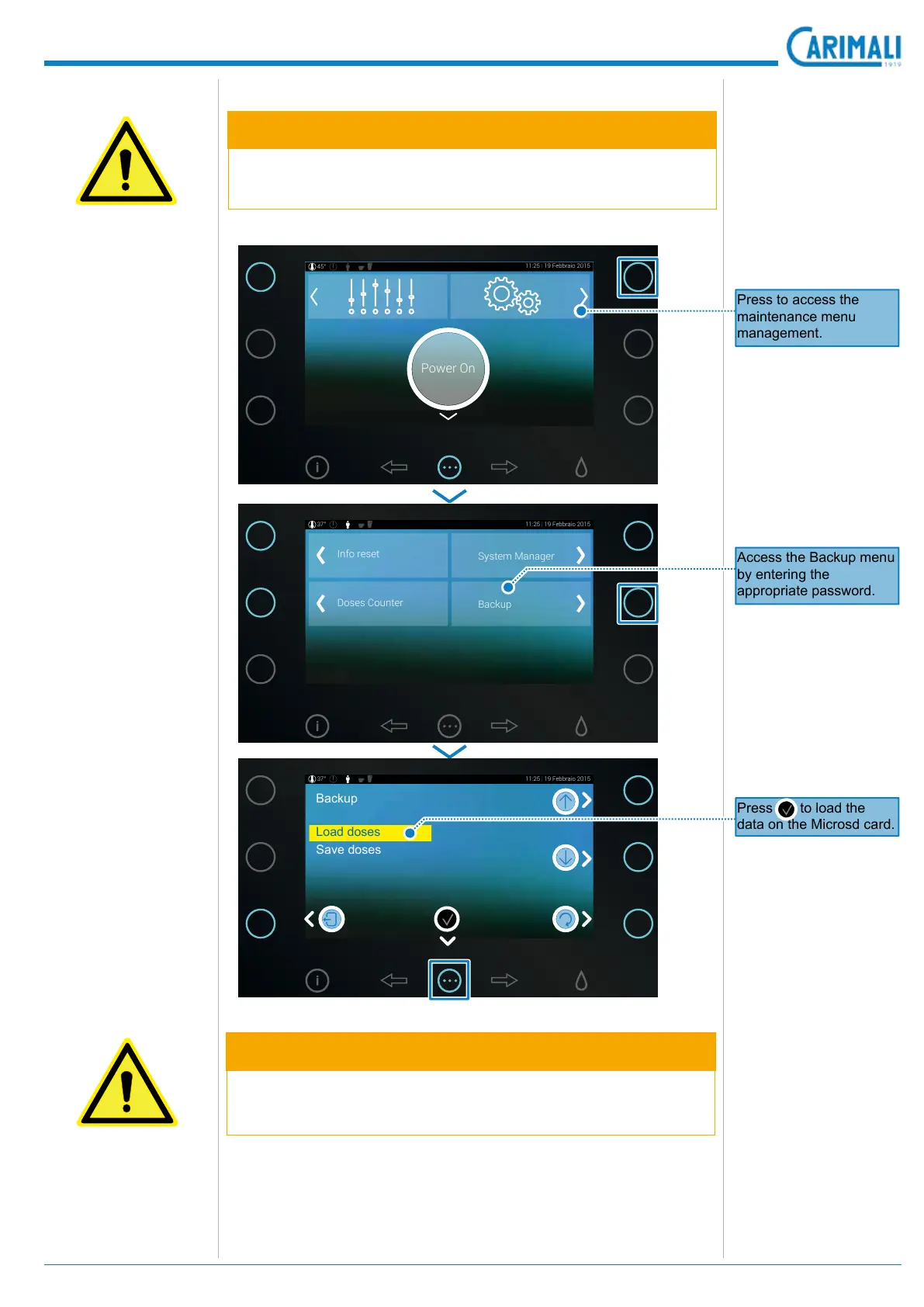
5.9.2 Load Doses
11:25 | 19 Febbraio 2015
Enjoy Your Drink !45°
11:25 | 19 Febbraio 2015
Enjoy Your Drink !45°
11:25 | 19 Febbraio 2015
Enjoy Your Drink !45°
11:25 | 19 Febbraio 2015
Enjoy Your Drink !45°
11:25 | 19 Febbraio 2015
Enjoy Your Drink !45°
11:25 | 19 Febbraio 2015
Enjoy Your Drink !45°
11:25 | 19 Febbraio 2015
Enjoy Your Drink !45°
11:25 | 19 Febbraio 2015
Enjoy Your Drink !45°
11:25 | 19 Febbraio 2015
Enjoy Your Drink !45°
11:25 | 19 Febbraio 2015
Enjoy Your Drink !45°
11:25 | 19 Febbraio 2015
37°
Backup
Load doses
Save doses
Power On
11:25 | 19 Febbraio 2015
45°
11:25 | 19 Febbraio 2015
Enjoy Your Drink !45°
11:25 | 19 Febbraio 2015
Enjoy Your Drink !45°
11:25 | 19 Febbraio 2015
Enjoy Your Drink !45°
11:25 | 19 Febbraio 2015
Enjoy Your Drink !45°
11:25 | 19 Febbraio 2015
Enjoy Your Drink !45°
11:25 | 19 Febbraio 2015
Enjoy Your Drink !45°
11:25 | 19 Febbraio 2015
Enjoy Your Drink !45°
11:25 | 19 Febbraio 2015
Enjoy Your Drink !45°
11:25 | 19 Febbraio 2015
Enjoy Your Drink !45°
11:25 | 19 Febbraio 2015
Enjoy Your Drink !45°
11:25 | 19 Febbraio 2015
37°
Info reset
System Manager
Doses Counter
Backup
Access the Backup menu
by entering the
appropriate password.
Press to load the
data on the Microsd card.
Press to access the
maintenance menu
management.









 To Next Page