EN-117
Configuring Function Settings
*1 Includes the same sub-menus as Pad 1.
*2 Depends on the “Target DSP module” (DSPModle) specification.
*3 Setting range depends on the Digital Keyboard model.
*4 Includes sub-menu for USB flash drive operations. For details about the operation, see “USB Flash Drive Operations” (page
EN-121).
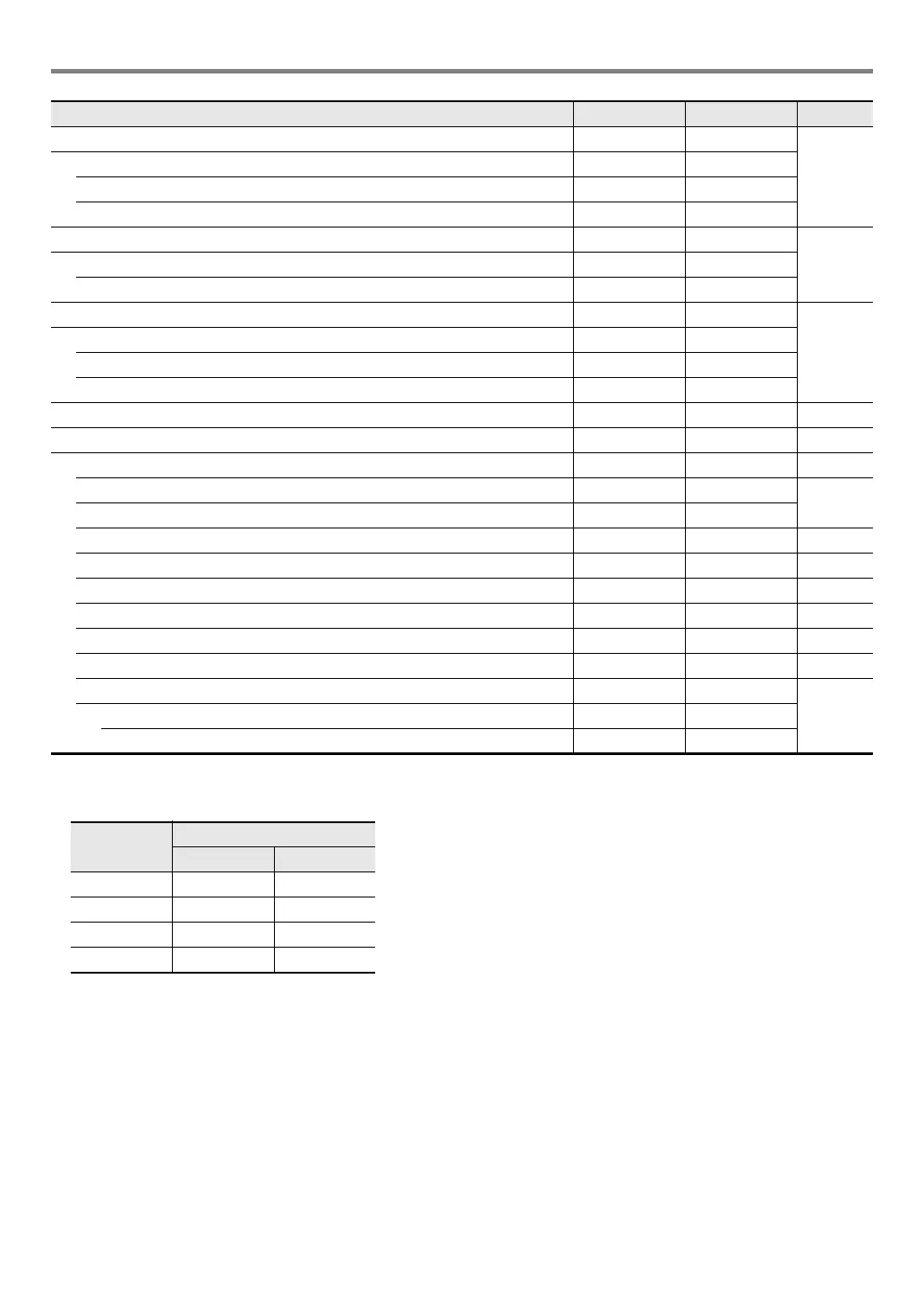
Metronome Metronom –
EN-27
Metronome time signature numerator BeatNume 0 to 16
Metronome time signature denominator BeatDeno 1 to 2
Metronome volume Volume 0 to 127
Speakers Speaker –
EN-11Speaker on/off Enabled On, Off
Enabled when PHONES connected PhoneSpk On, Off
MIDI MIDI –
EN-125
Keyboard channel Keybd Ch 1 to 16
Local control Local On, Off
Accomp out AcompOut On, Off
Media*
4
Media – EN-119
Other Other – –
Tap rhythm start Tap Rhy On, Off EN-46
Right-hand (melody) part channel PartR Ch 1 to 16
EN-41
Left-hand part channel PartL Ch 1 to 16
Music preset key change MP Key –5 to 6 EN-54
Audio In Center Cancel AIn CCan On, Off EN-13
Examination Mode ExamMode On, Off EN-118
Display contrast Contrast 1 to 17 EN-10
Auto Power Off AutoOff On, Off EN-9
Auto resume AtResume On, Off EN-10
Reset Reset –
EN-118Setting reset Setting –
Factory reset Factory –
Function
Name
Settings
CT-X5000 CT-X3000
Reverb 1 to 33 1 to 25
Chorus 1 to 17 1 to 13
Delay 1 to 21 1 to 16
Equalizer 1 to 11 1 to 10
Function Name Display Settings See Page
CTX5000_3000_EN.book 117 ページ 2018年2月26日 月曜日 午後3時56分




 To Next Page