page 26 www.centsys.com
OPERATOR INSTALLATIONSECTION 7
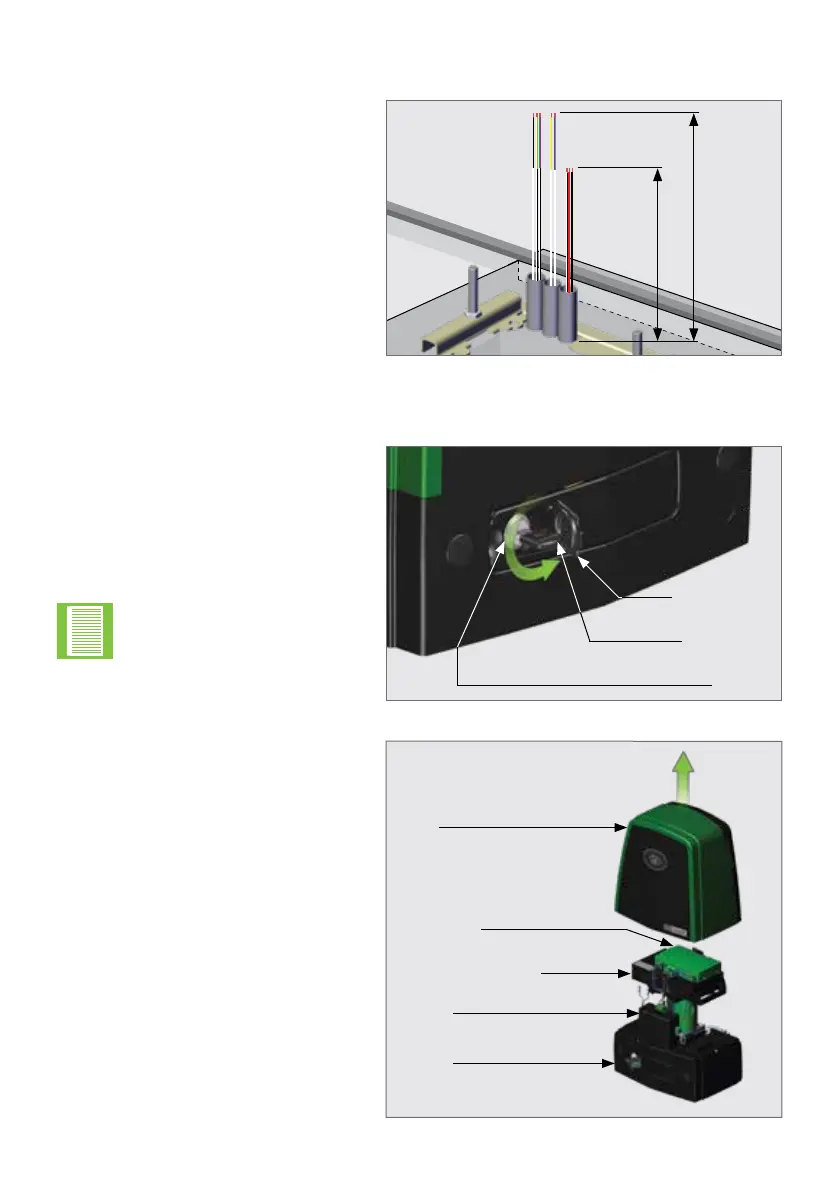
FIGURE 22
7.3. Conduit and Cable Length
Route the cables as determined in
Section 5.5 - "Cabling Requirements".
Make sure that the conduits protrude
above the concrete foundation.
The mains cables should protrude
450mm above the concrete
foundation, and all signal cables
(i.e. beams, etc.) 600mm above the
concrete foundation, as shown in
Figure 22.
30mm
(Mains)450mm
(Signal Cables) 600mm
7.4. Preparing the Operator for Installation
FIGURE 23
FIGURE 24
Open the Camlock Cover,
and insert the Operator Key into the
Camlock. Unlock it by turning the
key anti-clockwise.
Remove the cover of the D10
SMART / D10 Turbo SMART /
D20 SMART to expose the internal
components, and place it to one side
in a safe location.
There is no need to open
the Release Handle to
remove the cover of the
D10 SMART / D10 Turbo
SMART / D20 SMART.
Camlock Cover
Cover
Control Card Platform
Charger
Gearbox
Control Card
Operator Key
Camlock



 To Next Page