page 32 www.centsys.com
OPERATOR INSTALLATIONSECTION 7
In the event of a power failure,
it may be required to lock the
cover in place whilst "latching" the
manual release (i.e. manual release
permanently enabled).
This helps prevent theft of the unit,
or its components, and provides full
protection from the elements.
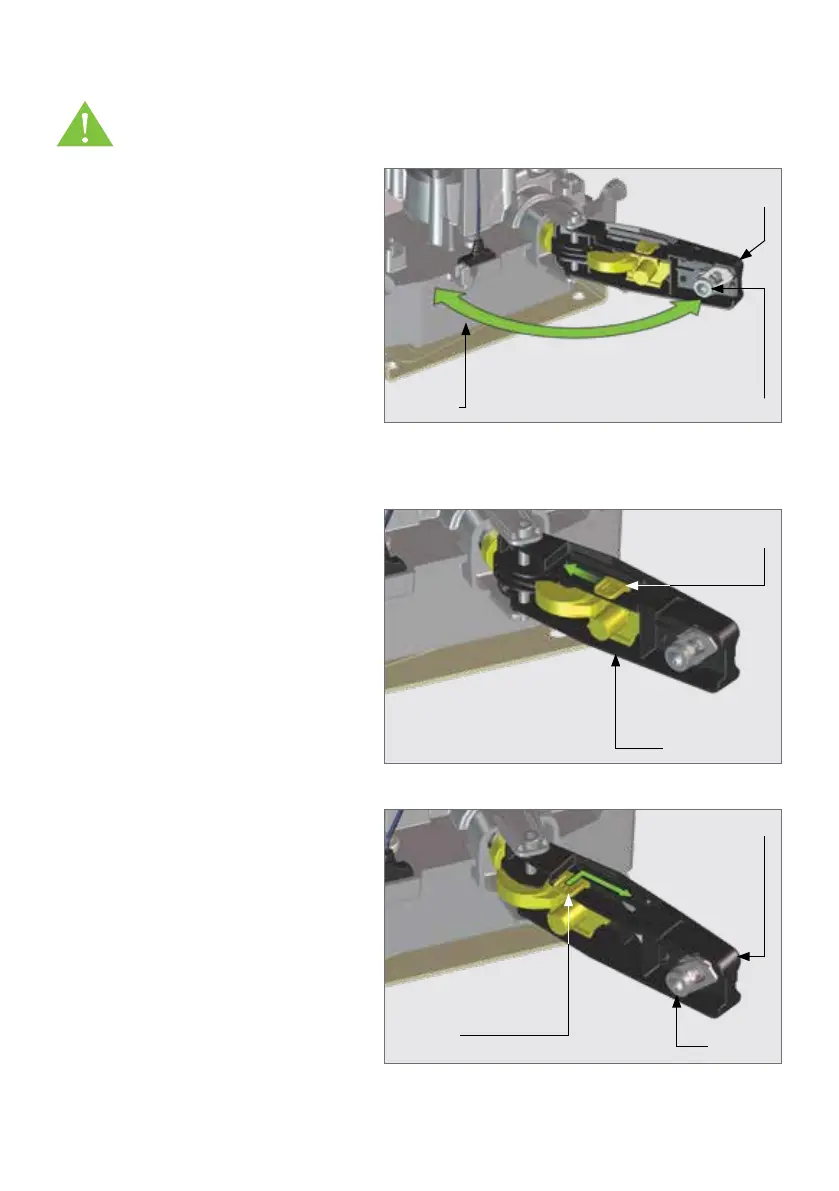
With the release handle in the open
position, slide the Override Cam
located on the inside of the handle
towards the gearbox, and a "click"
can be heard once it has located
correctly. Return the handle to the
closed, or locked, position. This
allows continued manual operation
of the gate while ensuring that the
cover remains securely locked in
place. See Figure 39.
To re-engage the D10 SMART /
D10 Turbo SMART / D20 SMART
(i.e. take the operator out of
latched Manual Override), push the
Release Handle Override Cam to the
right and then slide it towards the
Camlock. See Figure 40.
FIGURE 39
FIGURE 40
Release Handle
Override Cam
Release
Handle
Override
Cam
Release Handle
Release Handle
Camlock
7.7. Manual Override
Before mounting the rack to the gate, ensure that the D10 SMART /
D10 Turbo SMART / D20 SMART is in Manual Override. Follow the
instructions below.
FIGURE 38
Release
Handle
CamlockGearbox
To disengage (Manual Override) the
motor, ensure that the Camlock is
in the "unlocked" position, and pull
the Release Handle to a 90° position.
The Motor will then be placed in a
temporary state of disengagement.
Manual Override Latching



 To Next Page