page 27 www.centsys.com
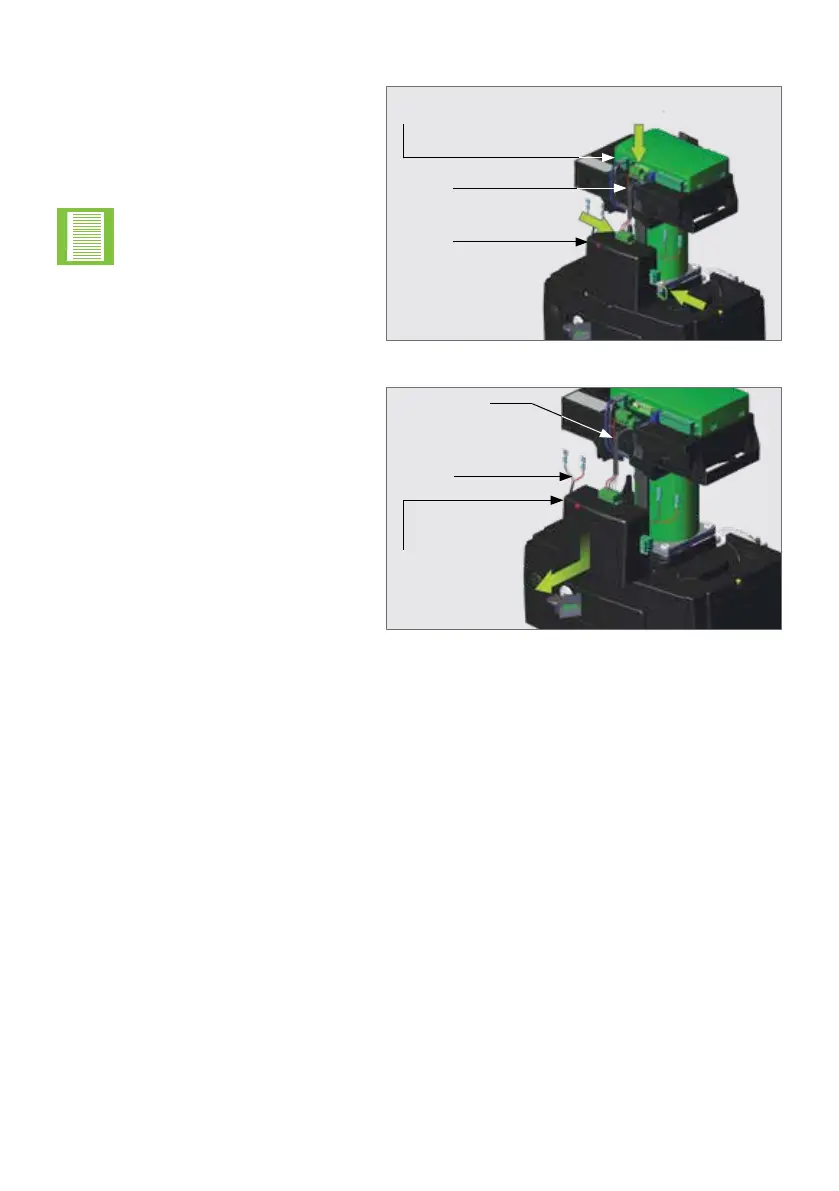
FIGURE 25
Disconnect the Charger from
the D10 SMART / D10 Turbo
SMART / D20 SMART Control Card
at either Point "A" or Point "B".
Disconnect the Earth Harness from
the Charger at Point "C", and store it
in a safe place.
If the disconnection
is made at Point "A",
note that there are two
connector blocks that need
to be disconnected from
the Control Card.
Charger
Harness
Control
Card
AA
BB
CC
OPERATOR INSTALLATIONSECTION 7
7.4.1. Removing the Charger
FIGURE 26
Remove the Charger from the lower
battery tray by gently pushing the
Charger slightly down whilst pulling
it towards the front of the
D10 SMART / D10 Turbo SMART /
D20 SMART. It should slide forward
and o with ease.
Charger
Battery
Harness
Power Supply
Harness



 To Next Page