page 41 www.centsys.com
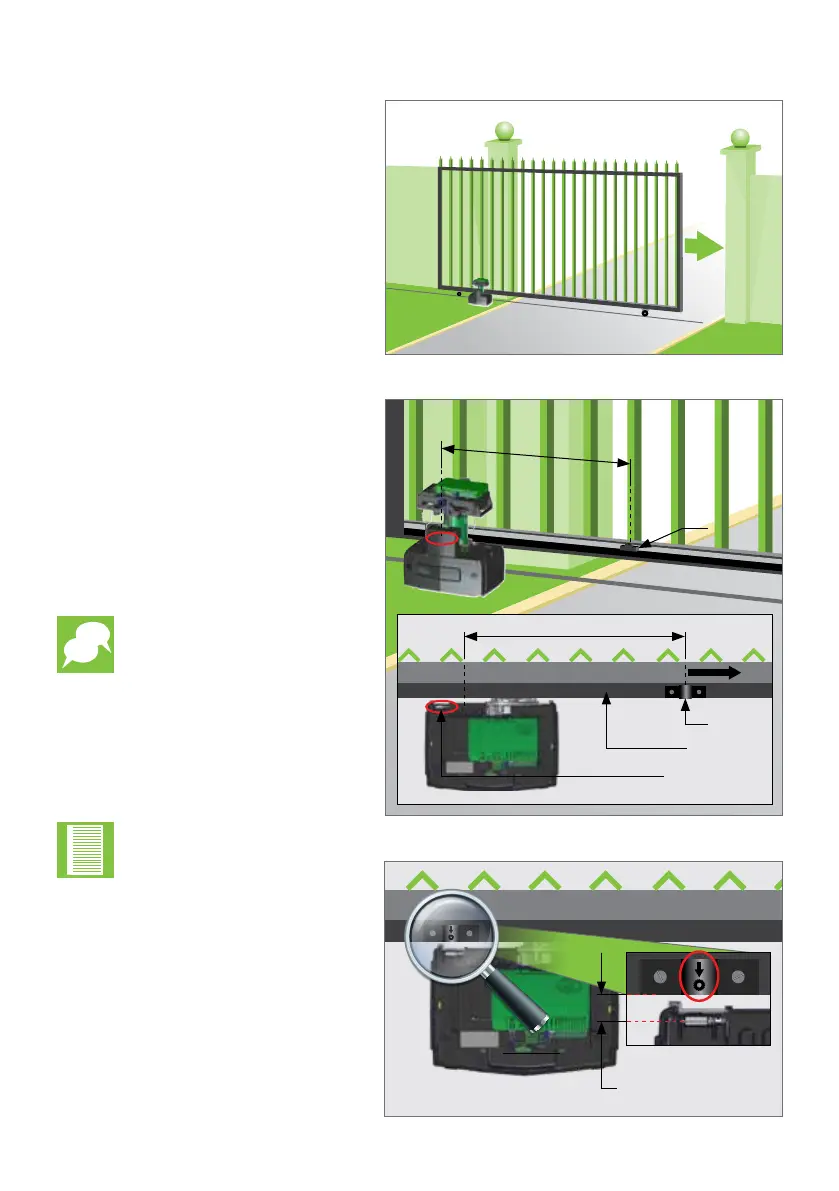
FIGURE 62
Top View
500mm
Gate Rack
Origin
Marker
GATE CLOSED
Origin
Marker
500mm
Mount the Origin Marker to the rack
a minimum of 500mm from the
origin sensor. Refer to Figure 62.
It is possible to make
the distance between the
marker and the sensor
much greater than 500mm.
However, if using the
pedestrian opening facility,
although the position of
the marker will not aect
the width of the pedestrian
opening, it is preferable to
have the marker mounted
inside of the pedestrian
opening point.
Manually slide the gate open until
the origin marker is in line with the
origin sensor.
Ensure the distance between the
face of the marker and front face of
the sensor is between 10 and 20mm.
Adjust distance by sliding the Origin
Marker along the slotted mounting
holes until the specied distance is
achieved.
Note the orientation of the
Origin Marker.
FIGURE 63
Gate
Rack
10-20mm gap
between the
Origin Marker and the
Origin Sensor
FIGURE 61
Firstly, close the gate completely.
Fully close
the gate
7.11.2. Mounting the Origin Marker
Origin Sensor
OPERATOR INSTALLATIONSECTION 7



 To Next Page