page 44 www.centsys.com
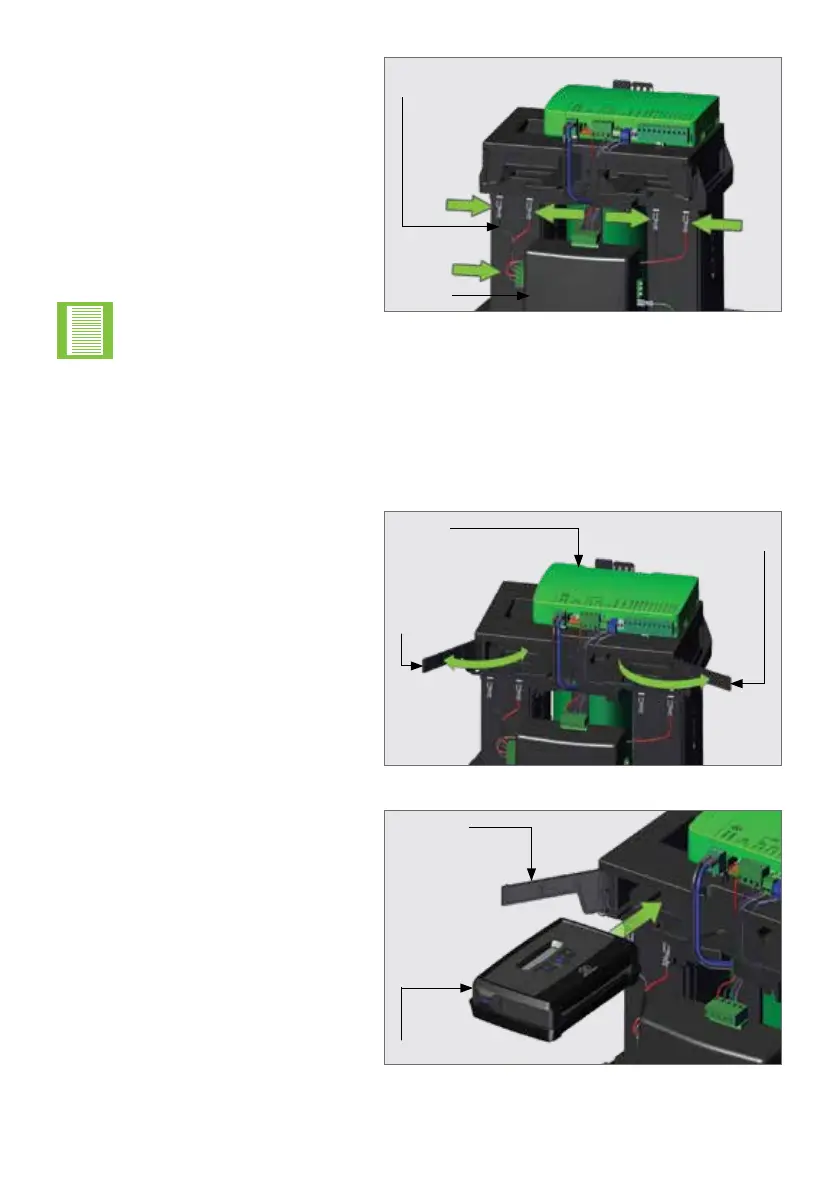
FIGURE 68
Battery
Harness
Charger
Connect both batteries up with the
supplied harness, and ensure that it
is connected to the left side of the
Charger.
Route the accessory cables around
the back of the Charger and through
the cable retainers found at the
bottom of the accessory storage.
COMPLETING THE INSTALLATIONSECTION 8
Opening the two retaining doors,
reveals the storage space for
accessory products, such as the
G-ULTRA, or External Receivers.
Wire the accessory device to the
Operator, place it into the space
provided, and close the door.
8.2. Accessory Installation and Storage
There are dedicated trays below the D10 SMART / D10 Turbo SMART / D20 SMART
Control Card to conveniently install and store any accessories connected to the Operator.
FIGURE 69
FIGURE 70
Right
Door
Left
Door
Control
Card
Accessory
Retaining
Door
G-ULTRA
Please ensure that the
battery connections match
the selected battery
terminals RED to RED,
BLACK to BLACK.



 To Next Page