page 48 www.centsys.com
Alternatively, go directly to the
app store of the operating system
being used, and search for the
app "MyCentsys Pro". Download
and install the application onto the
smartphone.
8.4. Commissioning the System
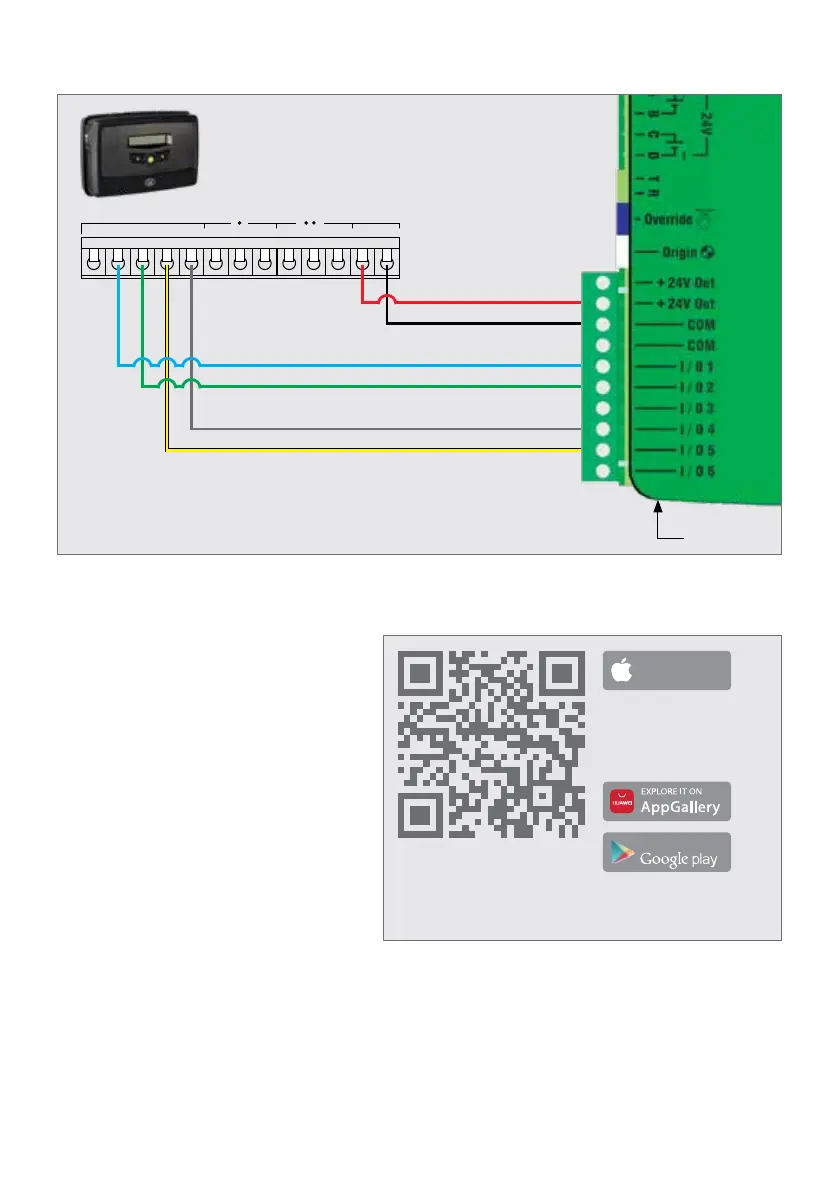
FIGURE 75
1. Scan the QR Code in Figure 75.
2. Select the App Store applicable
to the operating system being
used, either Apple App Store,
Android Google Play Store or the
Huawei App Gallery.
3. Download and install the
application.
1. Once installed, open the
application.
2. From the list of operators, select the operator that is applicable to this installation.
3. Connect to the relevant operator.
4. Use the app by following the prompts to congure the D10 SMART / D10 Turbo
SMART / D20 SMART.
COMPLETING THE INSTALLATIONSECTION 8
8.3.4. G-ULTRA to D10 SMART / D10 Turbo SMART / D20 SMART Wiring
FIGURE 74
Control Card
GND IO4 NOIO1 NO COMIO2 COM
RELAY 1 RELAY 2
NCIO3 NC + VDC -
G-ULTRA
STATUS
12V/24V +
COM
FRX
PED
TRG
Downloa d on the
App Store
Get it on
Minimum Requirements:
• BLE-enabled mobile phone
• iPhone 5s and above
• iOS10
Minimum Requirements:
• BLE-enabled mobile phone
• Android 5.0. (Lollipop)



 To Next Page