page 70 www.CentSys.com
28.3. LCD Display
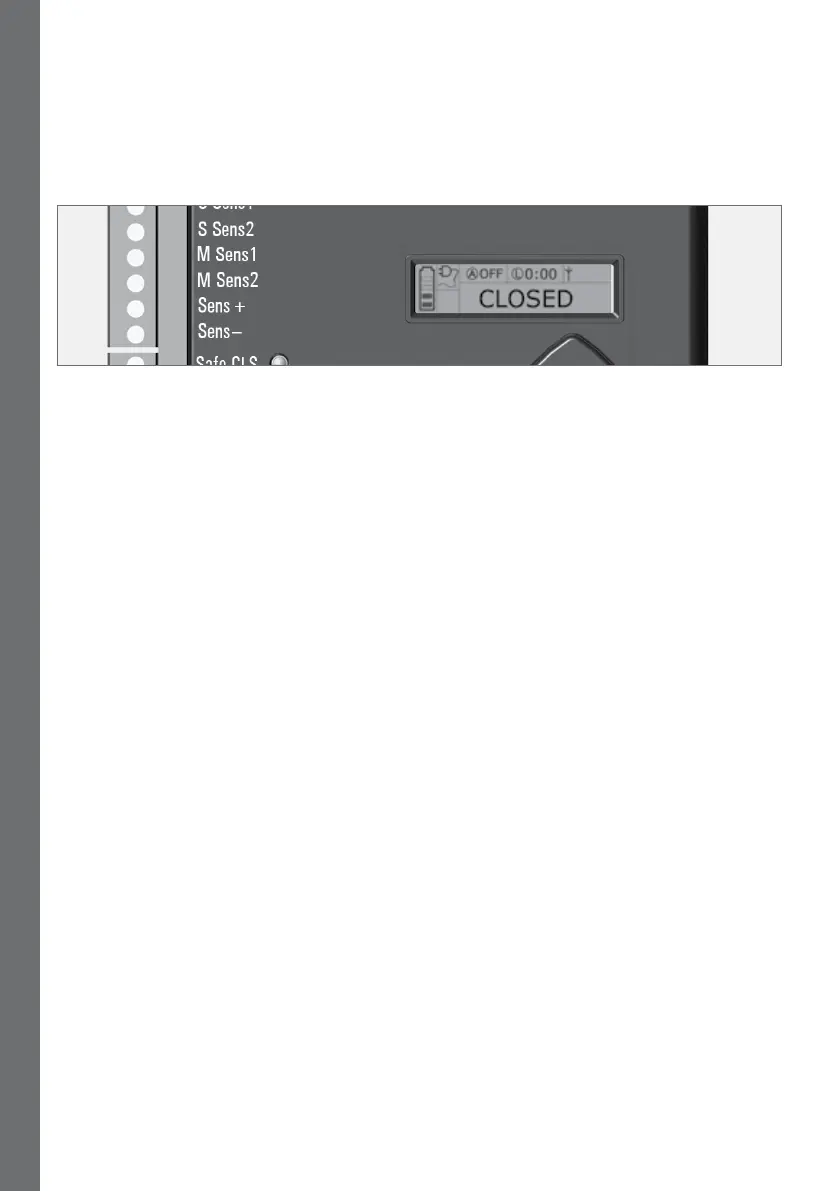
The LCD display shows useful information regarding the status of the system
FIGURE 37. CONTROLLER SCREEN
28.3.1. Battery icon
Indicates the state of charge of the battery:
• Foursolidbars=fullcapacity
• Twosolidbars=50%capacity
• Nosolidbars,withtheiconashing=batteryempty
28.3.2. Mains icon
Displays the presence/absence of mains voltage:
• Plugsolid=mainspresentandbatterycharging
• Plughollowandashing=nomainspresentandbatterynotcharging
28.3.3. Autoclose information
• Displays the state of the Autoclose function
• Displays OFF if Autoclose is not selected
• OVRifAutocloseisoverridden
• RemainingAutoclosetimeifAutocloseisactive
28.3.4. Pillar Light information
• Displays the remaining light time if Courtesy Light Mode is selected
• Pre-ashingModeisdisplayedifPre-ashisselected
• LIT will be indicated if the Pillar Light has been turned on permanently
28.3.5. Onboard receiver information
Displays the current input being activated by the onboard receiver
28.3.6. Status information
Displays useful information regarding the status of the gate
SECTION 28 DIAGNOSTICS



 To Next Page