50
Troubleshooting (continued)
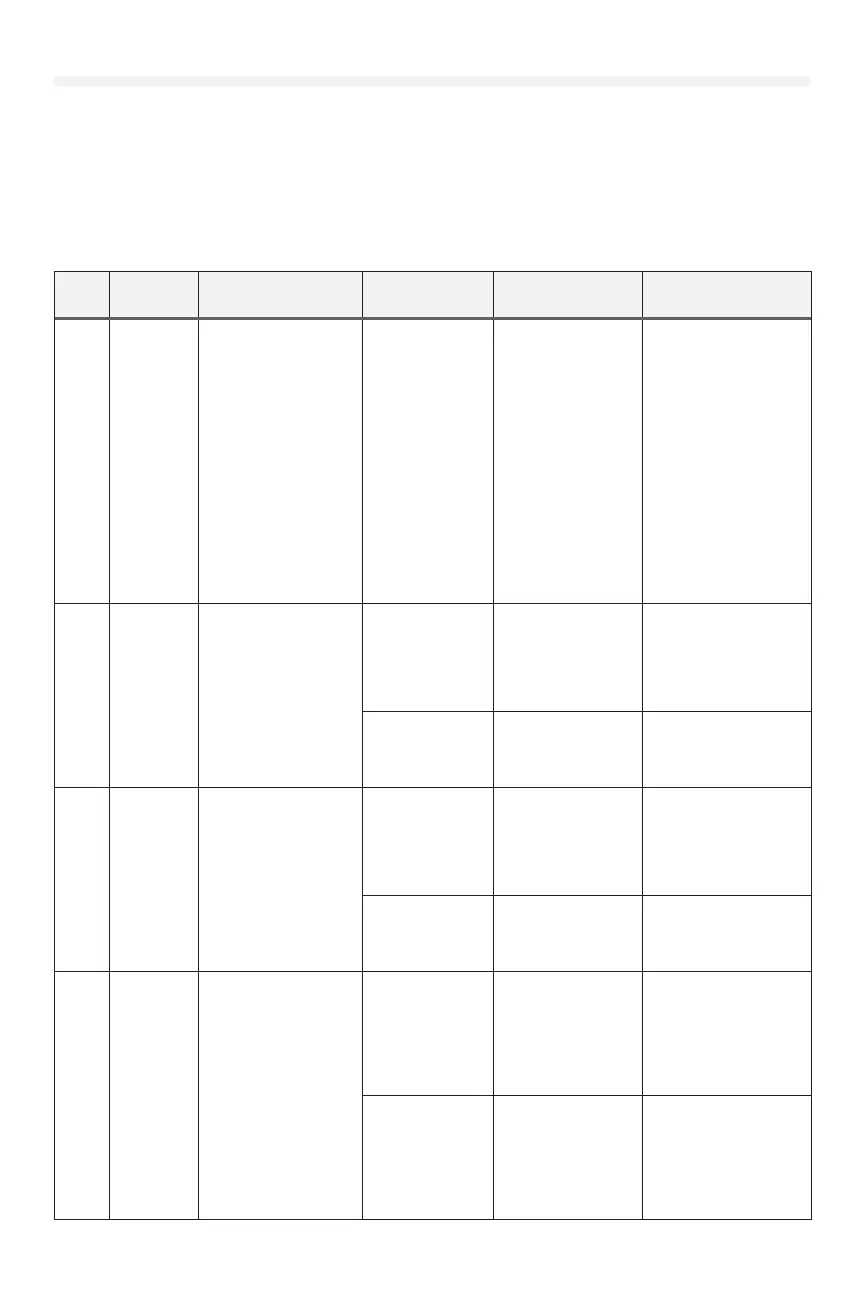
If an error occurs, the idle screen is replaced by a screen showing the error code and a description of the error.
Error messages originate in one of three categories:
• Motor drive and power circuitry
• Door control codes related to the motor and encoder
• Option codes related to accessories used with the industrial DC operator.
Consult the Table of Error Codes below to determine the cause and corrective action. Depending on the type of error,
user interaction may be required to clear the error. The error window closes when the error has been cleared/corrected.
Code
Display
Message
Description Possible Causes Diagnosis Resolution
MOVE THE
DOOR
Displayed in limit learn
mode.
The position encoder
requires some
movement before
the position can be
determined on powerup.
Once the position has
been successfully
determined, the
position will be
maintained until power
is lost.
Door has not been
moved since the
last power cycle
Upon initial powerup,
this message will
be displayed in the
limit learn menu if no
other movement has
occurred.
Move the door slightly in
either direction using the
up or down buttons on
the wall control. 'MOVE
THE DOOR' message will
disappear.
If door does not move,
or moves and stops, see
troubleshooting steps
for F04 UNAUTHORIZED
STOP.
If door moves without
issue but 'MOVE
THE DOOR' stays
on the screen, see
troubleshooting steps
for F91 ENCODER.
F01 F01 CLOSE
LIMIT
Door has moved
beyond the lower end
position
Operator has
been manually
hoisted below the
lower end position
(hoisted jackshaft
models only)
Check position of
door/operator with
manual hoist
Move position back
within normal limits.
Adjust door position
limits if necessary.
Door is falling or
drifting downward
when operator is
stopped
Check for excessive
door imbalance in
down direction
Rebalance door
replace broken springs
ensure correct springs
and drums are used
F02 F02 OPEN
LIMIT
Door has moved
beyond the upper end
position
Operator has been
manually hoisted
above the upper
position limit
(hoisted jackshaft
models only)
Check position of
door/operator with
manual hoist
Move position back
within normal limits.
Adjust door position
limits if necessary.
Door is drifting
upward when
operator is
stopped
Check for excessive
door imbalance in up
direction
Rebalance door
Ensure correct springs
and drums are used
F04 F04
UNAUTH.
STOP
(continued)
No motor motion
was detected when
the operator was
attempting to move the
motor.
Door encountered
obstruction or
other mechanical
jam
Check doorway
for obstruction.
Check to ensure the
mechanical system
moves properly and
without hangups or
excessive resistance.
Remove obstruction
Motor cable is
disconnected or
wiring fault
Check that motor
cable is plugged into
the powerhead main
board completely.
Ensure that motor
cable is intact and in
good condition.
Ensure motor connector
is fully seated.
Repair any problems
with the cabling.
If cabling is beyond
repair, replace motor.











 To Next Page