ECO 6 Digital Color Doppler Ultrasound System
102
7.3 Comment
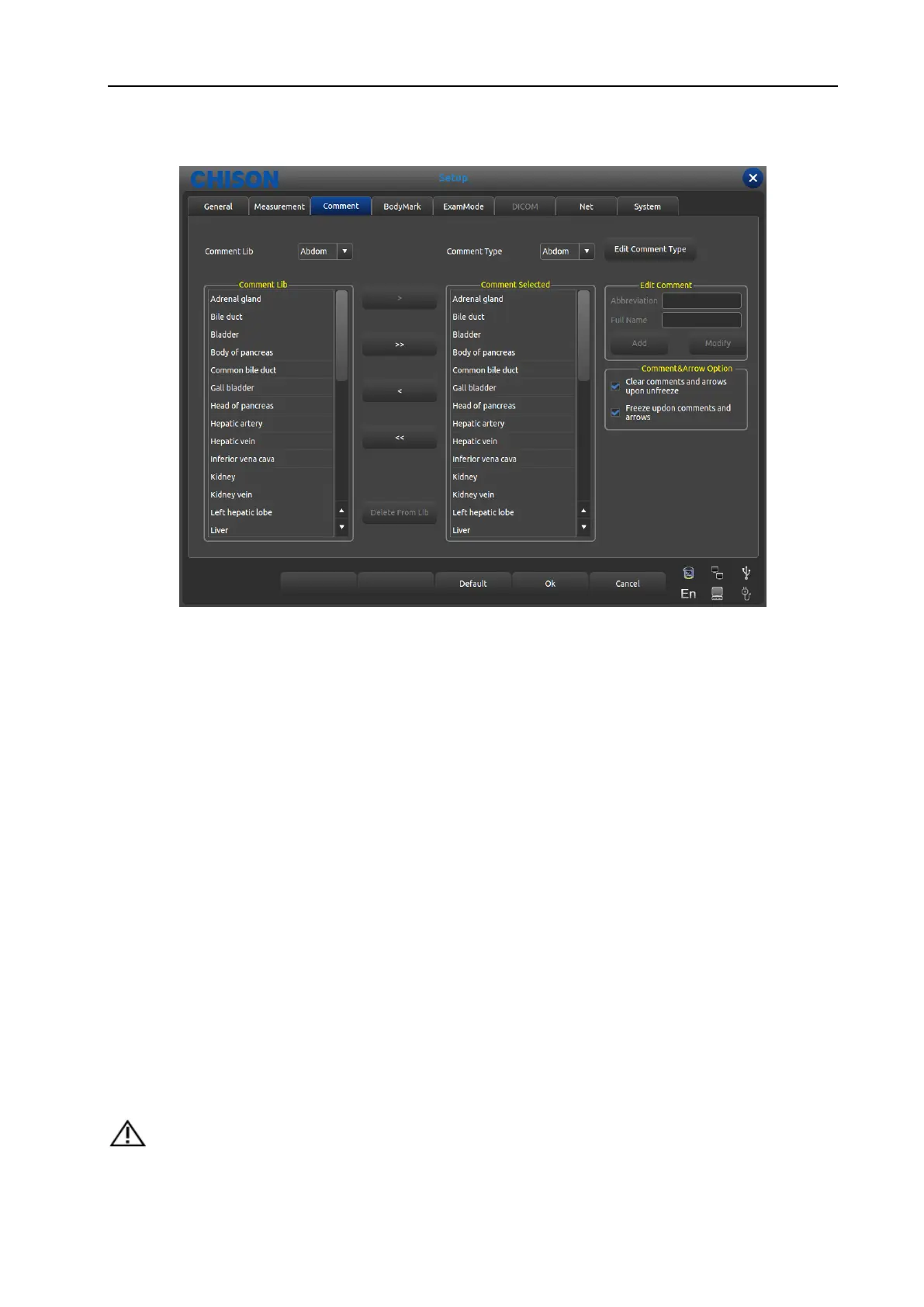
Fig. 38 Comment Setting Interface
7.3.1 Comment Library
The annotation database of the system is classified as: Abdomen, OB, GYN, Cardiac, Small part, Pathological
change Annotation can be made by inputting characters from the soft keyboard or recalling the terms saved in
annotation database.
Press [Comment Lib] pull down button, pop up annotation name within system, through trackball and
[ENTER] to show required annotation status.
7.3.1.1 Edit Comment Library
Operation:
1. At the annotation status, Move the cursor to the [Edit Comment Type] button then press [ENTER]; the
annotation will be updated, and can be edited.
2. Input name into the new created annotation status box, move the cursor to the [Create] button then press
[ENTER], then create new annotation status and appear in selected annotation status list.
3. Move the cursor to the [Delete] button, press [ENTER], then delete current annotation status in the selected
annotation list.
4. Alter name of current annotation status list in [Current Type Name] input box, press [ENTER] on the
[Rename] button, then rename the selected annotation status name.
Note:
Factory Settings comments cannot be deleted or renamed.
WWW.CFS.IT - CFS PRODOTTI MEDICALI SRL



 To Next Page