16 EN
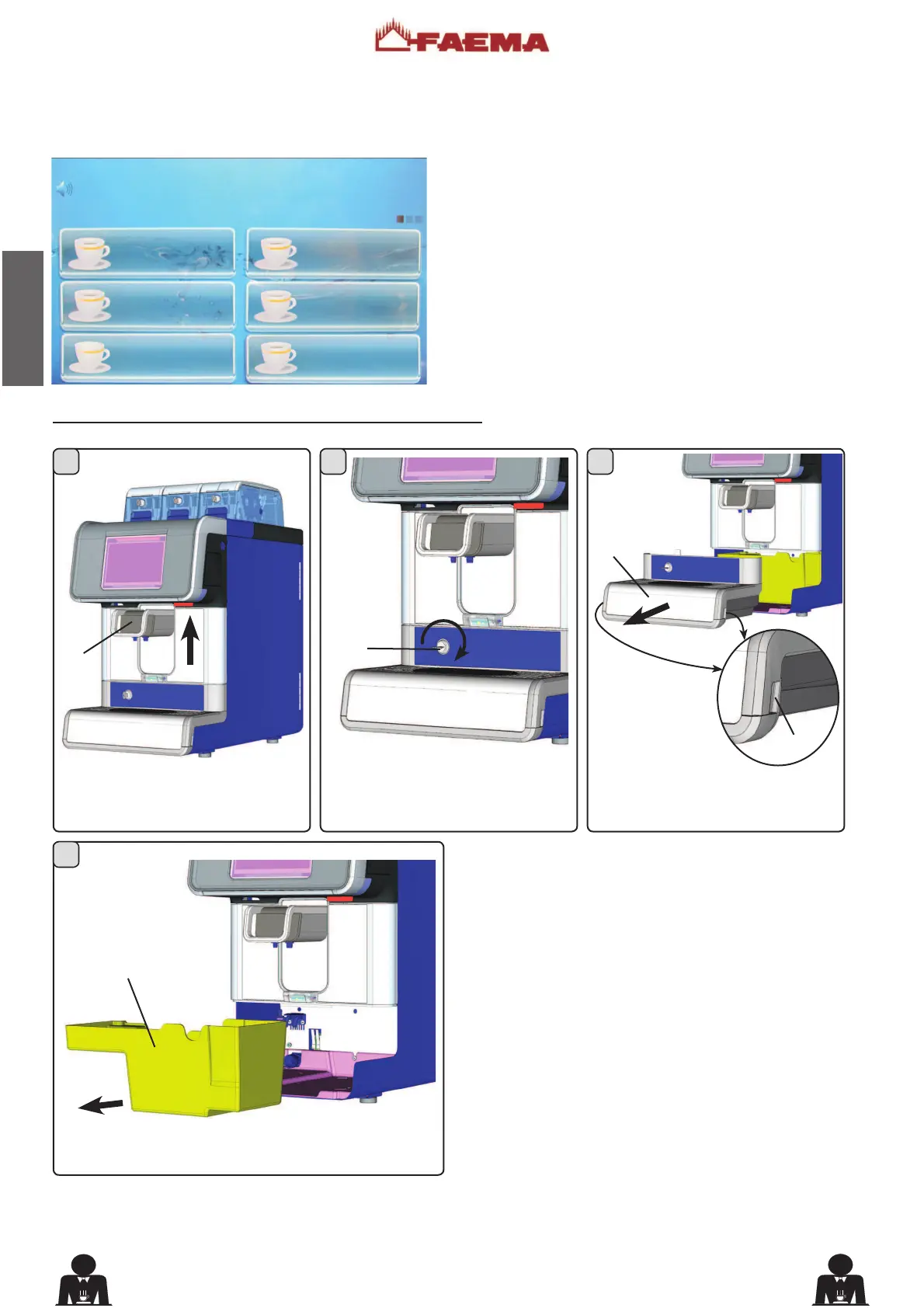
Emptying the coffee grounds drawer
Raise the dispensing nozzle (1).
Pull out the drawer (16); lifting it
slightly at points (A).
Remove the coffee grounds drawer (17) and empty it.
Insert the coffee grounds drawer (17); reposition the tray
(16); and place the dispensing nozzle (1) in the original
position.
Open the lock (F).
(*)
Self version only
When the machine has reached the amount of coffee
grounds set by the installer, the following warning message
will appear on the display:
This message warns the user that the coffee grounds
drawer is full. It is still possible to dispense ten coffee-based
beverages before the machine is blocked.
Immediately empty the drawer to reset the counter.
Otherwise, it will be possible to work until the message
“EMPTY DRAWER” appears. At this point, the machine is
blocked and stops any coffee dispensing.
Activities are restored only after the coffee grounds drawer
is emptied.
15:15:04 14 March 2012
GROUNDS DRAWER FULL
1 COFFEE
1 COFFEE
1 COFFEE
1 COFFEE
1 CAPPUCCINO
1 COFFEE
7RHPSW\WKHFRIIHHJURXQGVGUDZHUSOHDVHIROORZWKHVHVWHSV:











 To Next Page