42 EN
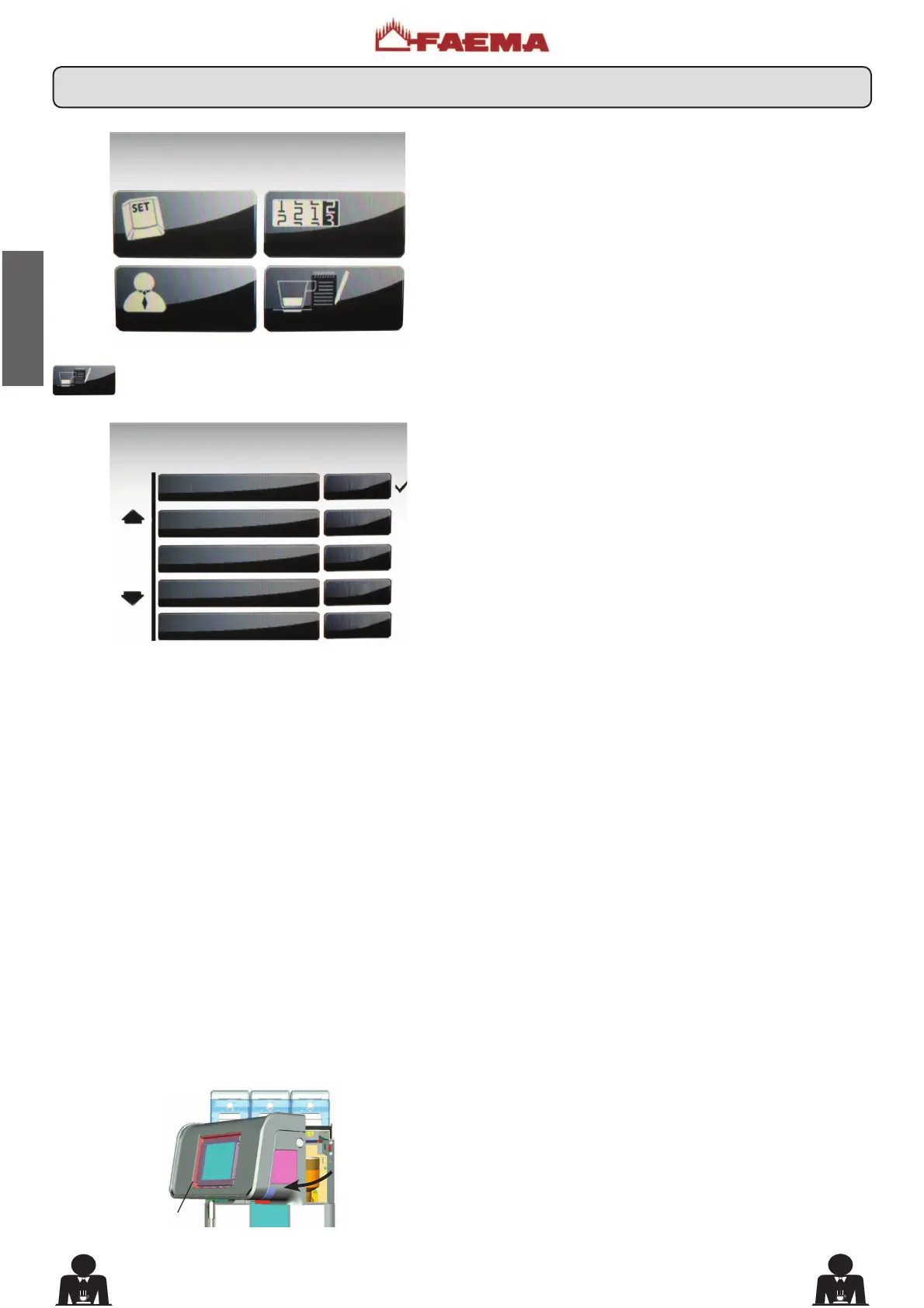
To access the "PERSONALIZATION" menu, press the
key.
The following will appear on the Touch Screen:
The parameters of the personalization menu are:
- screen saver YES / NO (when the screensaver is enabled,
default images appear in sequence on the display);
- screen saver start (the screensaver starts after the
machine has been idle for a set time between 1 and 999
seconds, which can be increased in increments of 1);
-
screen saver type (makes it possible to set the type of
screensaver, photos or videos. 0 for photos and 1 for videos).
- images permanence time (determines how many seconds
each image must remain on the touch screen, between
1 and 99 seconds);
- screen saver effect (the transition time between the
images, between 0 and 9 seconds).
* only possible with the memory interface connected to the machine.
Note: Customize images (different from standard ones) and videos
through the SD memory card on the card reader inside the machine.
To access the memory card, open the control panel (B).
CUSTOMER PROG.
KEY MENU
COUNTERS MENU
CUSTOMER PROG.
PERSONALIZATION
PERSONALIZATION
screen saver NO
screen saver start 15 s
screen saver type 0
imag. perman. time 10 s
screen saver effect 0
20. Personalization Menu











 To Next Page