37 EN
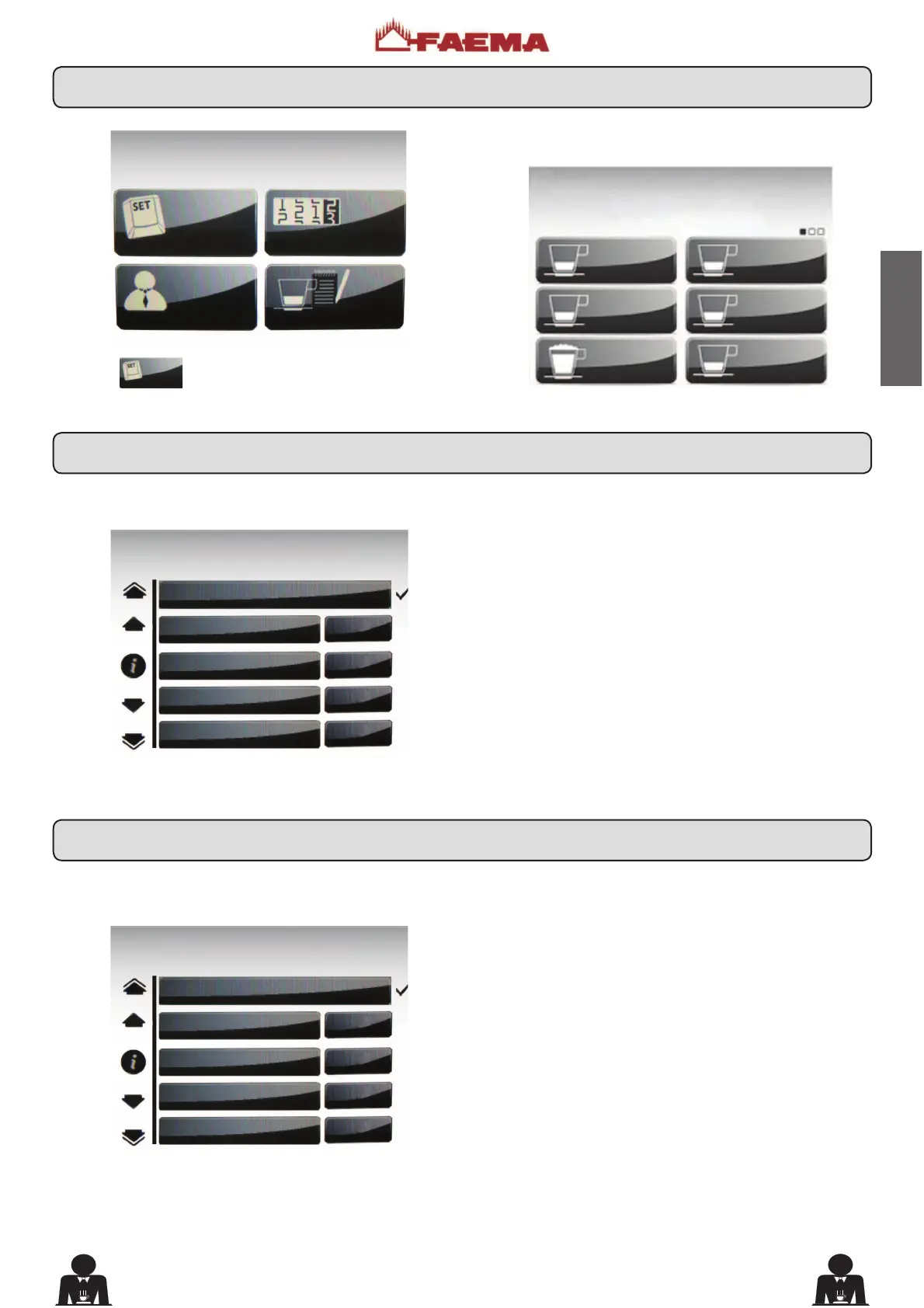
Press the
key to view the recipes associated with
the dispensing keys.
The following message will appear on the Touch Screen:
Press one of the coffee dispensing keys. The following
message will appear on the display:
7KHIROORZLQJFRIIHHVHOHFWLRQSDUDPHWHUVFDQEHPRGL¿HG
- repetition (it represents the number of distributions of
the selected drink, from 001 to 099);
- water dose (volumetric dosage pulses, from 0 to 999,
with increments of 1);
- grinder (chosen between grinder MM1 or MM2);
- coffee dose... (coffee dose grinde ...impulses, 0 ÷ 200
with increments of 1);
- water start (determines if the water must be added (before)
or (after) the coffee dispensing);
- Additional water (volumetric dosage pulses, from 0 to
999, with increments of 1);
- label (the text indicating the beverage that appears on
the key);
- icon (the picture of the beverage that appears on the key).
Press one of the cappuccino dispensing keys. The following
message will appear on the display:
The following cappuccino selection parameters can be
PRGL¿HG
- repetition (it represents the number of distributions of
the selected drink, from 001 to 099);
- milk dose (milk dispensing time: 0 ÷ 60 seconds, with
increments of 0.1););
- emulsion ((foamed milk dispensing time, 0 ÷ time set in
the milk dose);
- cold milk dose (cold milk dose; the setting of this parameter
makes it possible to obtain warm milk; setting between 0
to 20 with increments of 0.1 seconds);
- water dose (volumetric dosage pulses, from 0 to 999,
with increments of 1);
- grinder (chosen between grinder MM1 or MM2);
- coffee dose... (coffee dose grinde ...impulses, 0 ÷ 200
with increments of 1);
- water start (determines if the water must be added (before)
or (after) the coffee dispensing);
- Additional water (volumetric dosage pulses, from 0 to
999, with increments of 1);
- label (the text indicating the beverage that appears on
the key);
- icon (the picture of the beverage that appears on the key).
COFFEE
COFFEE
COFFEE
COFFEE
CAPPUCCINO
COFFEE
KEY MENU
KEY MENU
type 1 coffee
Repetition 1
Water dose 95
Grinder MM1
MM1 cof. dose 40
CUSTOMER PROG.
KEY MENU
COUNTERS MENU
CUSTOMER PROG.
PERSONALIZATION
KEY MENU
type 1 cappuccino
Repetition 1
Milk dose 7.0
Emulsion 7.0
cold milk dose 0.0
17. Key menu
17.1 Key menu - Coffee selection
17.2 Key menu - Cappuccino selection











 To Next Page