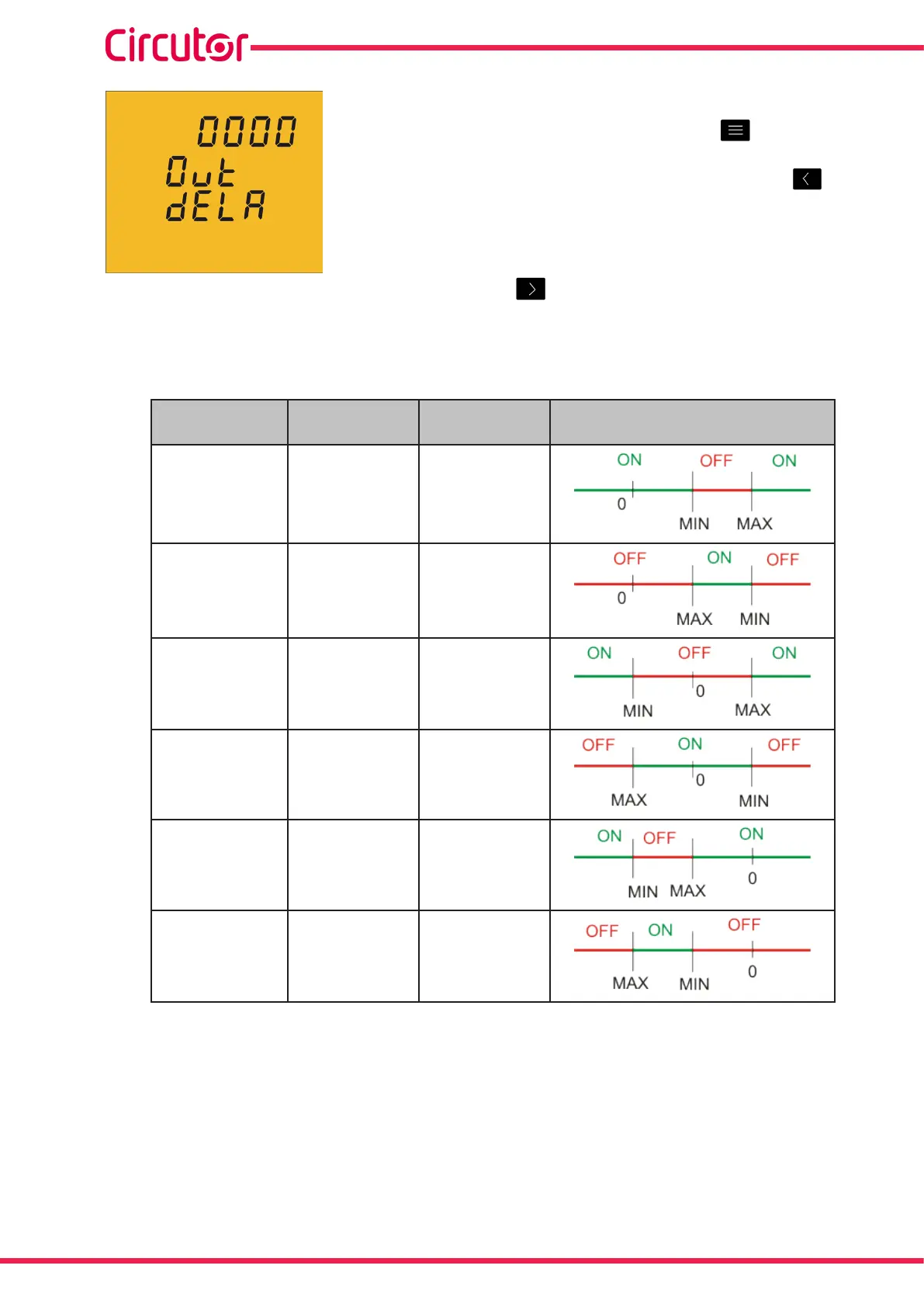
Thisiswherethedevice'sconnectionanddisconnectiondelay(in
seconds)areprogrammed�
Toenterormodifythedelayvalue,pressthe keyrepeatedly,
increasingthevalueoftheashingdigit�
Whentheon-screenvalueisthatdesired,pressthe keyto
gotothenextdigittomodifytheothervalues�
Oncethedelayhasbeenprogrammed,pressthe keytogotothenextprogrammingstep�
InTable 15wecanseethefunctioningofthedigitaloutputbasedontheprogrammedmaxi-
mumandminimumvalues�
Table 15: Functioning of the digital output based on the programmed maximum and minimum values�
Minimum value
Maximum
value�
Condition Digital output functioning
Positive Positive MAX>MIN
Positive Positive MAX<MIN
Negative Positive
Positive Negative
Negative Negative MAX>MIN
Negative Negative MAX<MIN
38
CVM-C5-xxx-485
Instruction Manual













 To Next Page