3-70
Cisco Aironet 1552 Series for Hazardous Locations Installation Guide
Chapter 3 Installing the 1552 Series Access Points in Hazardous Locations
Rebooting the Access Point
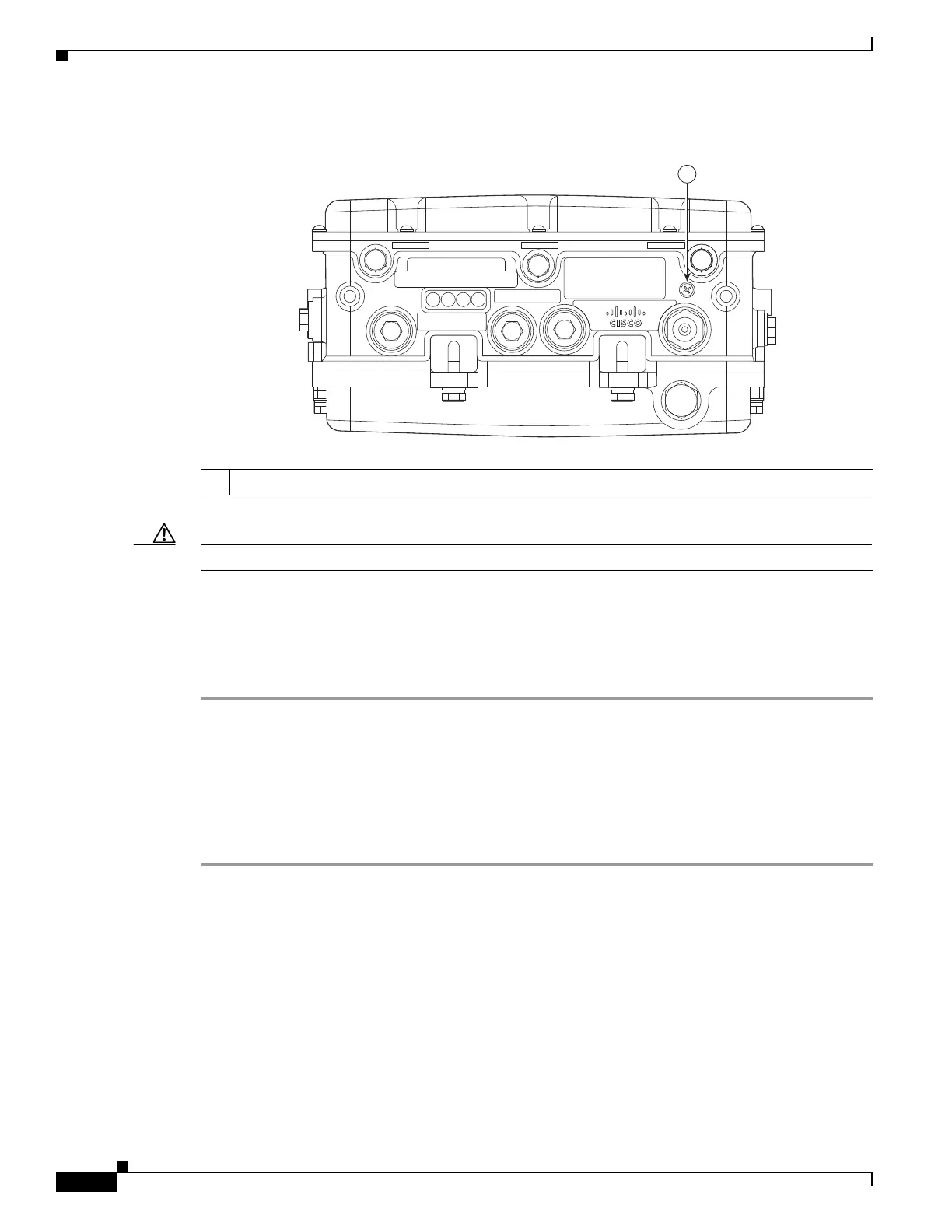
Figure 3-19 Reset Button Location - Models AIR-CAP1552SA/SD-x-K9 and AIR-CAP1552H-x-K9
Caution Do not access the reset button in a Hazardous Location.
Rebooting the Access Point
To reboot (power cycle) the access point, follow these steps:
Step 1 Use a Phillips screwdriver to remove the reset button screw (Figure 3-19). Be careful not to lose the
screw.
Step 2 Use a straightened paperclip, and push the reset button for less than 10 seconds. This action causes the
access point to reboot (power cycle), all LEDs to turn off for approximately 5 seconds, and then the
LEDs to reactivate.
Step 3 Replace the reset button screw and use a Phillips screwdriver to tighten to 22 to 24 in. lbs
(2.49 to 2.71 Nm).
1 Reset button












 To Next Page