1-23
Cisco Aironet 1552 Series for Hazardous Locations Installation Guide
Chapter 1 Overview
Hardware Features
Point-to-Point Bridging
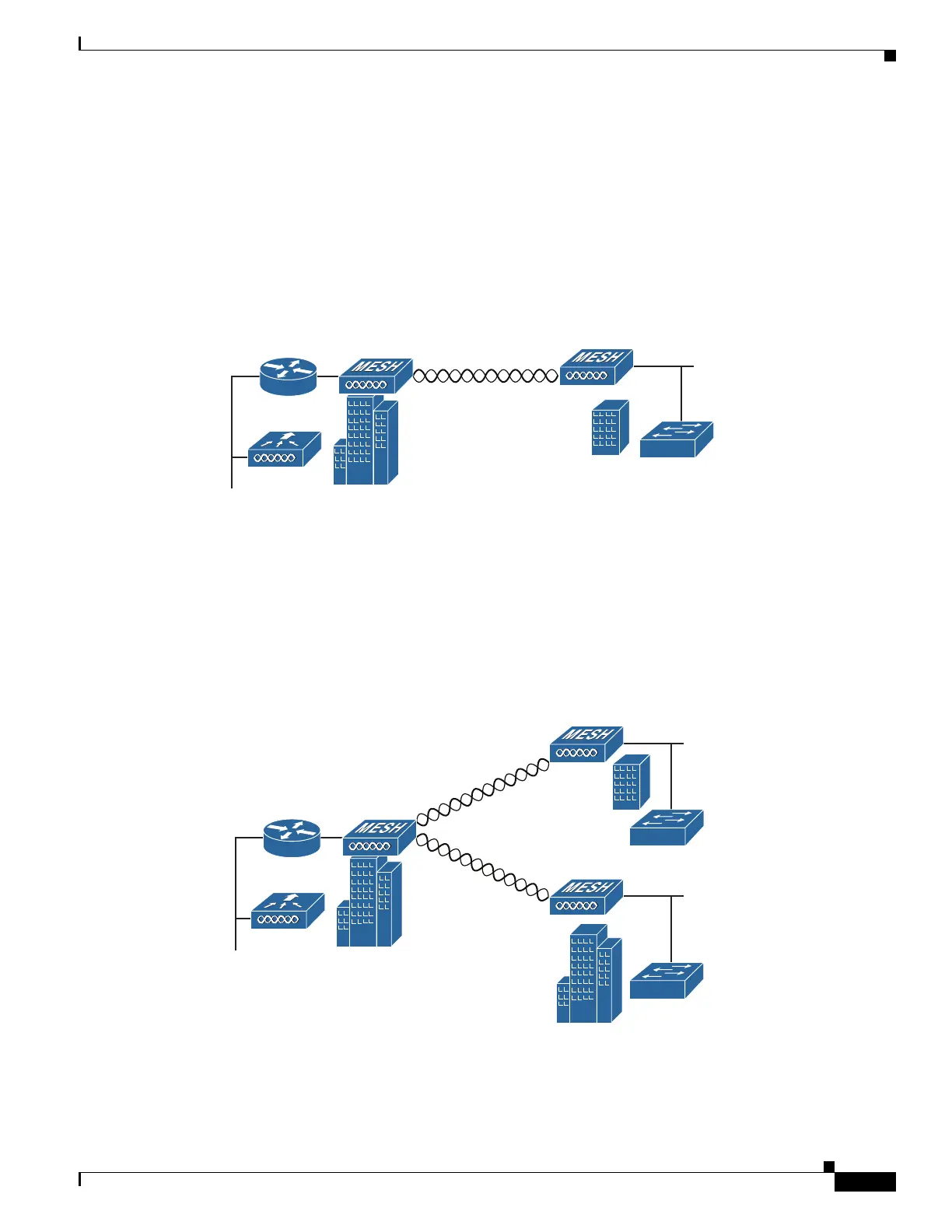
The access points can be used to extend a remote network by using the 2.4 GHz or 5 GHz backhaul radio
to bridge the two network segments as shown in Figure 1-14. To support Ethernet bridging, you must
enable bridging on the controller for each access point. By default this capability is turned-off for all
access points.
Wireless client access is supported; however, if bridging between tall buildings, the 2.4 GHz wireless
coverage area may be limited and possibly not suitable for direct wireless client access.
Figure 1-14 Access Point Point-to-Point Bridging Example
Point-to-Multipoint Bridging
The access points can be used as a RAP to connect multiple remote MAPs with their associated wired
networks, or with 2.4 GHz or 5 GHz radio. By default this capability is turned-off for all access points.
To support Ethernet bridging, you must enable bridging on the controller for each access point. Wireless
client access can be provided over the bridging link; however, if bridging between tall buildings, the 2.4
GHz wireless coverage area may be limited and possibly not suitable for direct wireless client access.
Figure 1-15 illustrates an example of access point-to-multipoint bridging.
Figure 1-15 Access Point to Multipoint Bridging Example
255495
(5 GHz)












 To Next Page