4-84
Cisco Aironet 1552 Series for Hazardous Locations Installation Guide
Chapter 4 Troubleshooting
Using DHCP Option 43
Using DHCP Option 43
You can use DHCP Option 43 to provide a list of controller IP addresses to the access points, enabling
the access point to find and join a controller. Refer to the product documentation for your DHCP server
for instructions on configuring DHCP Option 43. For additional information, refer to Appendix F,
“Configuring DHCP Option 43”.
Monitoring the Access Point LEDs
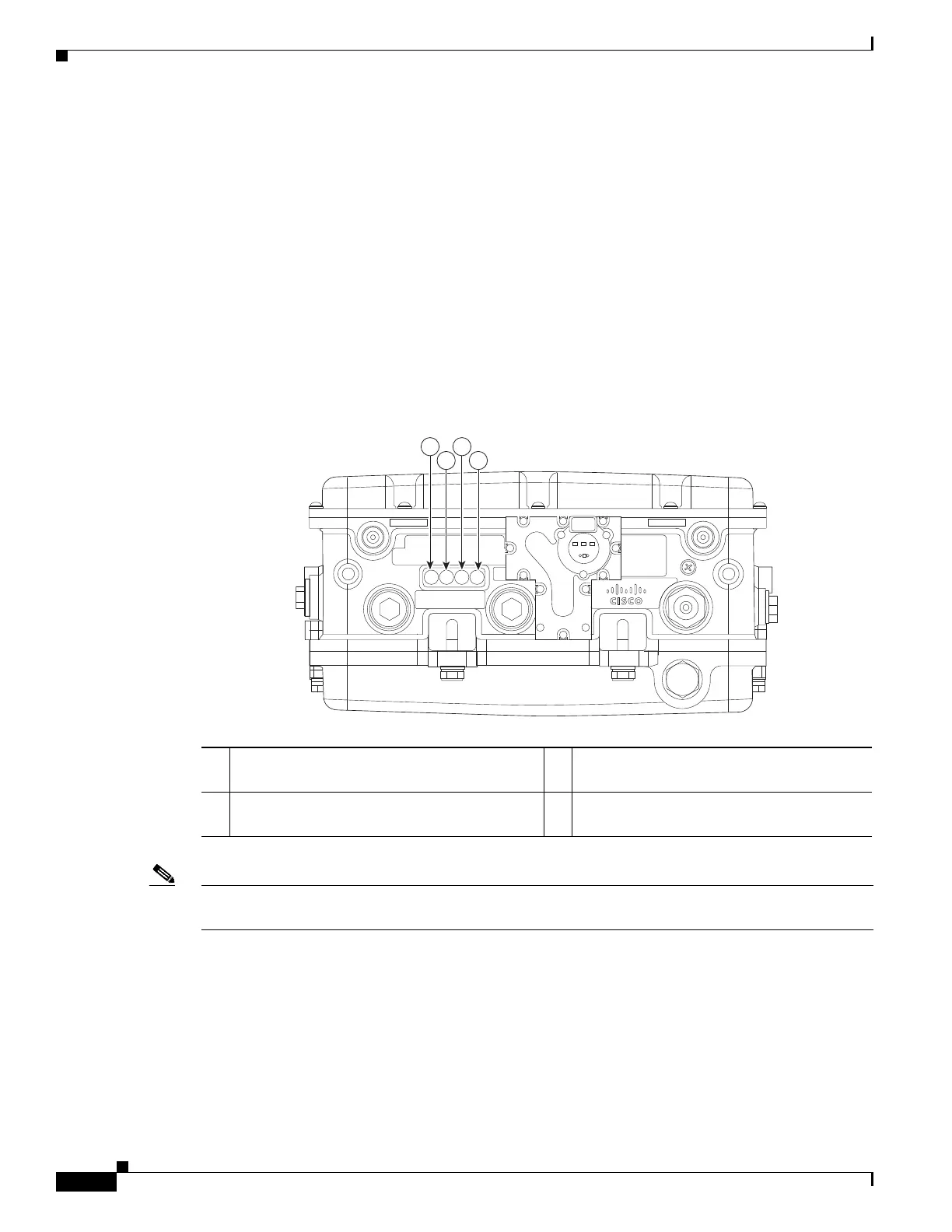
If your access point is not working properly, look at the LEDs on the bottom of the unit. You can use
them to quickly assess the status of the unit. Figure 4-1 shows the location of the access point LEDs.
Figure 4-1 Access Point LEDs - Shown on the Bottom of Model AIR-CAP1552SA/SD-x-K9
Note It is expected that there will be small variations in LED color intensity and hue from unit to unit. This is
within the normal range of the LED manufacturer specifications and is not a defect.
The access point LED signals are listed in Table 4-1.
1 RF-2 LED—Status of the 5 GHz MIMO
backhaul radio
3 Uplink LED—Ethernet, cable, or fiber status
2 RF-1 LED—Status of the 2.4 GHz MIMO
access radio
4 Status LED—access point and software
status












 To Next Page