Chapter 1 Product Overview
Front Panel Description
1-4
Catalyst 2970 Switch Hardware Installation Guide
OL-6422-01
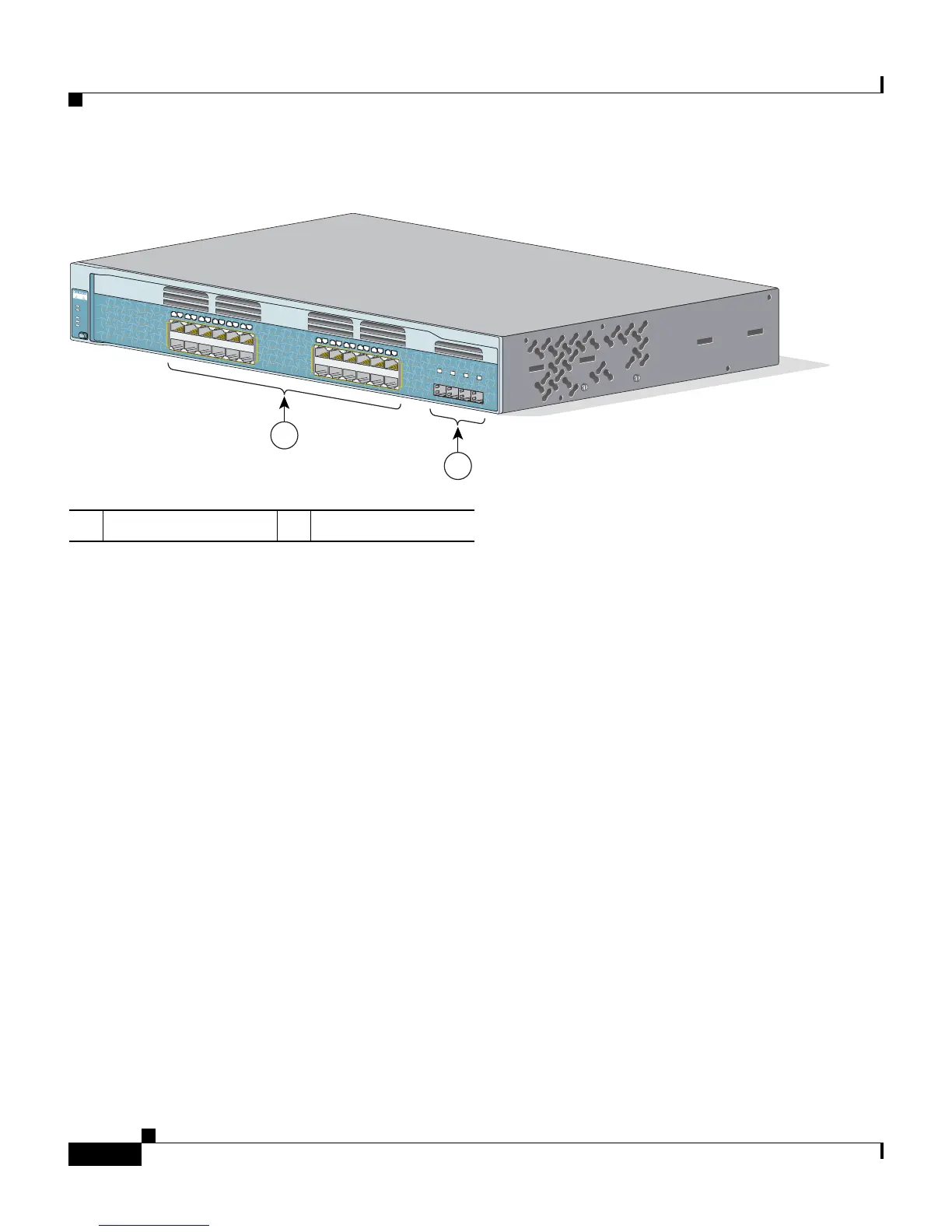
Figure 1-2 Catalyst 2970G-24TS Switch Front Panel
10/100/1000 Ports
You can set the 10/100/1000 ports to operate at 10 Mbps, 100 Mbps, or
1000 Mbps in full-duplex mode. You can also set these ports for speed and duplex
autonegotiation in compliance with IEEE 802.3AB. (The default setting is
autonegotiate.) When set for autonegotiation, the port senses the speed and duplex
settings of the attached device and advertises its own capabilities. If the connected
device also supports autonegotiation, the switch port negotiates the best
connection (that is, the fastest line speed that both devices support and full-duplex
transmission if the attached device supports it) and configures itself accordingly.
In all cases, the attached device must be within 328 feet (100 meters).
1 10/100/1000 ports 2 SFP module slots
13X
14X
23X
24X
1X
11X
12X
1
2
97400
C
atalyst 2970
SERIES
SYST
RPS
STAT
DUPLX
SPEED
M
O
D
E
1
2
3
4
5
6
7
8
9
1
0
1
1
1
2
1
4
1
5
16
1
7
1
8
1
9
2
0
2
1
2
2
2
3
24
1
3
25
26
27
28














 To Next Page