Chapter 2 Switch Installation
Installing the Switch
2-18
Catalyst 2970 Switch Hardware Installation Guide
OL-6422-01
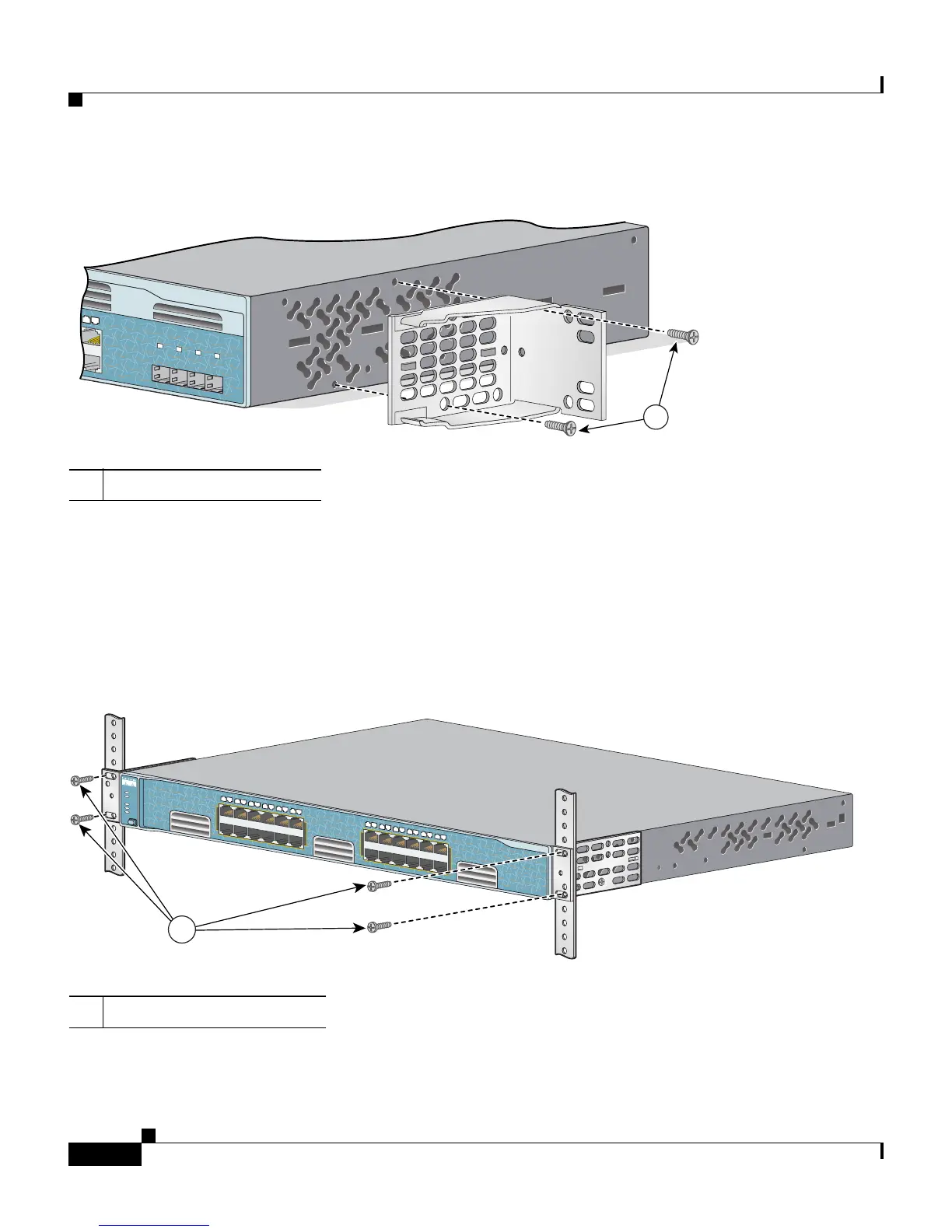
Figure 2-14 Attaching Brackets for 24-Inch Telco Racks to a Catalyst 2970G-24TS Switch
Mounting the Switch in a Rack
After the brackets are attached to the switch, use the four supplied number-12
Phillips machine screws to securely attach the brackets to the rack, as shown in
Figure 2-15.
Figure 2-15 Mounting the Catalyst 2970 Switch in a Rack
1 Phillips flat-head screws
24
97408
Catalyst 2970
SER
IE
S
23
24
2
5
26
2
7
2
8
1
1 Phillips machine screws
Catalyst 2970
S
E
R
IE
S
3
1X
2X
11X
12X
1
2
4
5
6
7
8
9
1
0
1
1
1
2
13X
14X
23X
24X
1
3
1
4
1
5
1
6
1
7
1
8
1
9
2
0
2
1
2
2
2
3
2
4
SYST
RPS
STAT
DUPLX
SPEED
M
O
D
E
87631
1














 To Next Page