© 1999-2017 Citrix Systems, Inc. All rights reserved. p.172https://docs.citrix.com
Setting up a Cluster of NetScaler Instances
Sep 29, 2014
After provisioning NetScaler instances on one or more NetScaler SDX appliances, you can create a cluster of NetScaler
instances. The nodes of the cluster can be NetScaler instances on the same SDX appliance or on other SDX appliances
that are available on the same subnet.
Note:
To set up a cluster, you must understand NetScaler clustering. For more information, see Clustering.
For clusters that have NetScaler instances across SDX appliances, Citrix recommends that you use NetScaler instances
from three SDX appliances. This ensures that the cluster criteria of a minimum of (n/2 +1) nodes is always satisfied.
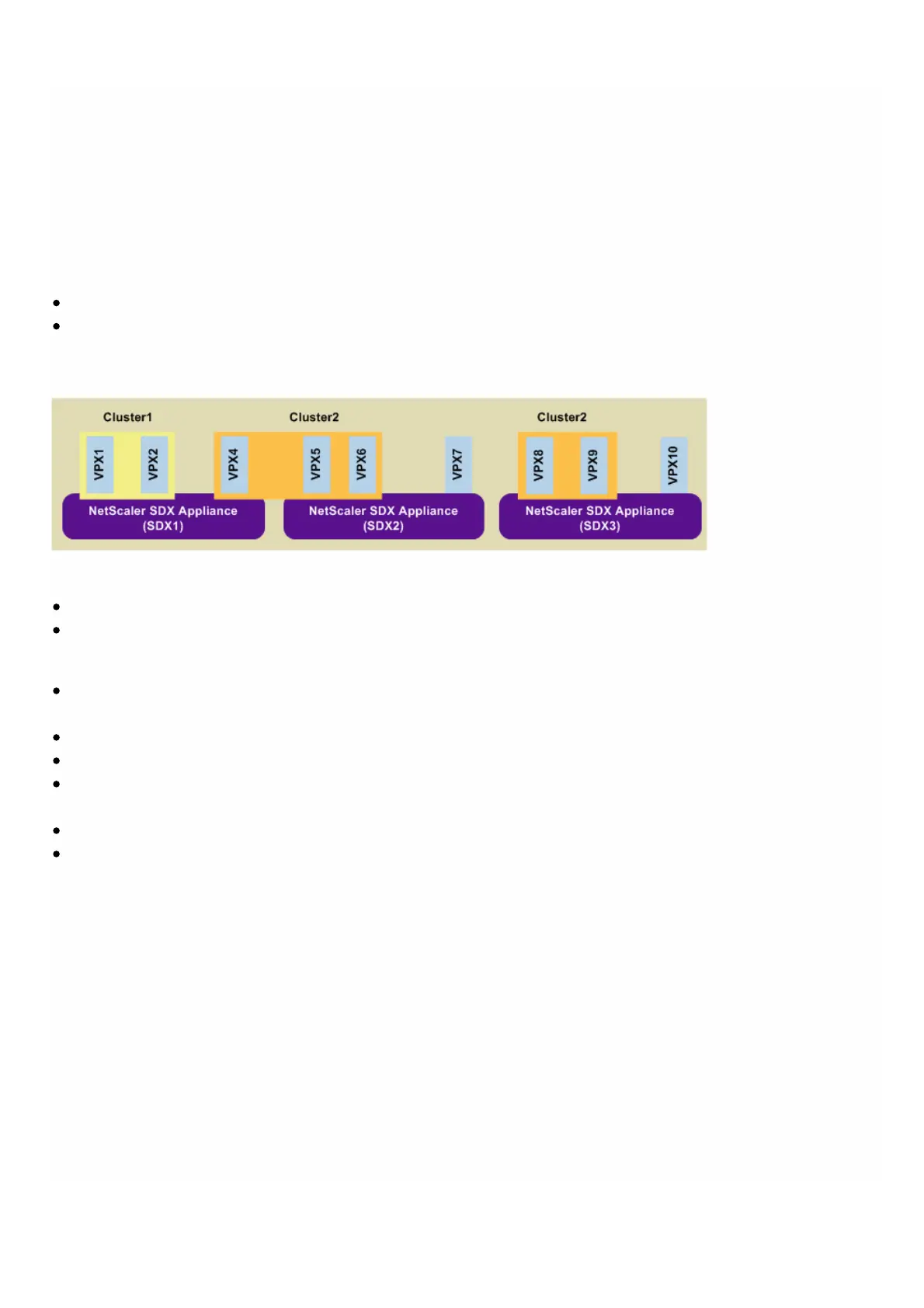
Figure 1. Cluster of SDX NetScaler instances
The above figure shows three SDX appliances, SDX1, SDX2, and SDX3, on the same subnet. The NetScaler instances on
these appliances are used to form two clusters: Cluster1 and Cluster2.
Cluster1 includes two instances on SDX1.
Cluster2 includes one instance on SDX1, two instances on SDX2, and another two instances on SDX3.
Points to remember
All nodes of a cluster must be of the same type. You cannot form a cluster of hardware and virtual appliances, nor a
cluster of VPX NetScaler instances and SDX NetScaler instances.
The NetScaler instances must be of the same version, which must be version 10.1 or later.
The NetScaler instances must all have the same feature license.
No configurations can be updated on individual NetScaler instances after they are added to the cluster. All changes
must be performed through the cluster IP address.
The NetScaler instances must all have the same resources (memory, CPU, interfaces, and so on).
Cluster link aggregation is not supported on a cluster of SDX appliances.
To set up a NetScaler cluster on an SDX appliance
1. Log on to the SDX appliance.
2. On the Configuration tab, navigate to NetScaler, and then click Clusters.
3. Create the cluster:
1. Click Create Cluster.
2. In the Create Cluster dialog box, set the parameters required for the cluster. For a description of a parameter, hover
the mouse cursor over the corresponding field.
3. Click Next to view the configuration summary.
4. Click Finish to create the cluster.
Note: When a NetScaler instance that is provisioned on the NetScaler SDX appliance has L2 VLAN configured, and if
that node is added to the cluster, then the add vlan command is saved with the sdxvlan parameter set to Yes. T his
parameter is an internal argument and is used to avoid loss of connectivity during SDX cluster formation.



 To Next Page