28
Polygon Vertex Number: Select the number of vertices the polygon will have
(3 or 4). If 3 is selected, Latitude4 and Longitude4 will dim to prevent selection.
Latitude 1-4: Enter the location latitude of 1-4 vertices of the operational area
(-90 to 90).
Longitude 1-4: Enter the location longitude of 1-4 vertices of the operational
area (-180 to 180).
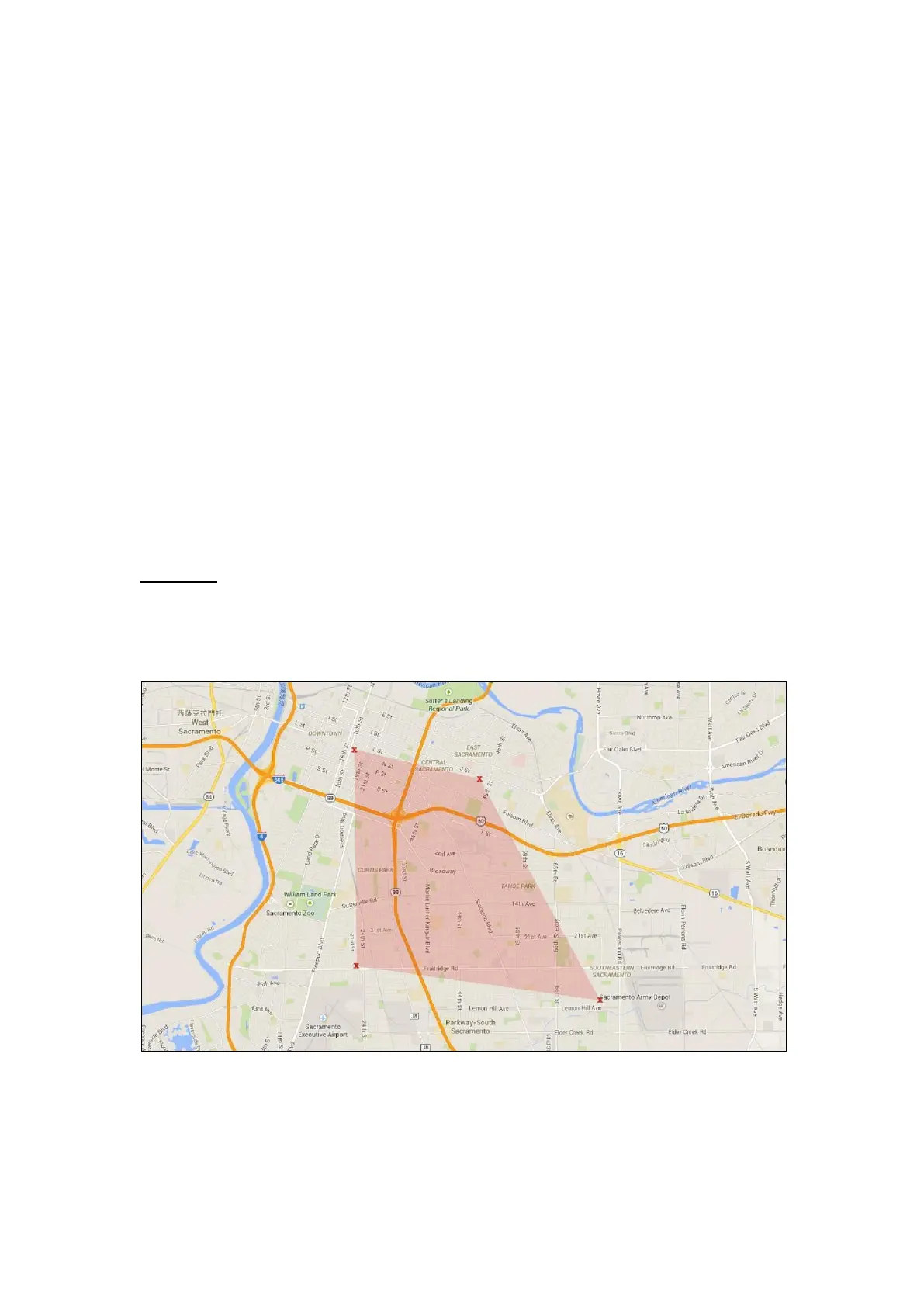
Mobile Lite will connect the coordinates consecutively (from 1 > 2 > 3 > 4) and
draw up a GeoFence area (see Example below). Do not cross any coordinate
connections (to prevent GeoFence area error).
Both Latitude and Longitude accept coordinates of up to 6 decimal points. Due
to the mechanics of GPS positioning, the 6
th
decimal point may deviate slightly
from the entered value. However, the actual position is affected very slightly.
Click on “Write” to submit the settings.
Example:
For a polygon of 4 vertices. Enter the coordinates from coordinate 1 to
coordinate 4 to create a GeoFence area as shown (pink-colored area):



 To Next Page